
Package Exports
- git-commit-msg-linter
This package does not declare an exports field, so the exports above have been automatically detected and optimized by JSPM instead. If any package subpath is missing, it is recommended to post an issue to the original package (git-commit-msg-linter) to support the "exports" field. If that is not possible, create a JSPM override to customize the exports field for this package.
Readme
Welcome to git-commit-msg-linter 👋



👀Watching your every git commit message INSTANTLY 🚀.

A git "commit-msg" hook for linting your git commit message against the Angular Commit Message Guidelines. As a hook it will run at every commiting to make sure that the message to commit is valid against the conventions. If not the commit will be aborted.
This linter is deeply influenced by pre-commit. Thanks.
Install
npm install git-commit-msg-linter --save-devTo uninstall run the uninstall script instead of removing it manually because only in this way, the old commit-msg hook can be restored, so that your next commit messages will be ignored by the linter.
npm uninstall git-commit-msg-linter --save-devWhy yet a new linter
Firstly it's very important to follow certain git commit message conventions and we recommend Angular's.
Secondly no simple git commit message hook ever exists right now. To Add, to overwrite or to remove types is not so friendly supported. Why not conventional-changelog/commitlint or husky, read the FAQs.
Recommended commit message pattern
<type>(<scope>): <subject>
// scope optional
Bad:
Fix syntax error
Good:
docs: fix syntax error
Excellent:
docs(README): fix syntax error
The default types includes feat, fix, docs, style, refactor, test, chore, perf, ci and temp. And They can be extended or modified by commitlinterrc.json.
How it works
The
commit-msghook takes one parameter, which again is the path to a temporary file that contains the commit message written by the developer. If this script exits non-zero, Git aborts the commit process, so you can use it to validate your project state or commit message before allowing a commit to go through.
After installed, it will copy the hook {PROJECT_ROOT}/.git/hooks/commit-msg if it exists to {PROJECT_ROOT}/.git/hooks/commit-msg.old then the commit-msg will be overwritten by our linting rules.
Before uninstalling, the commit-msg file will be restored and the commit-msg.old will be removed.
Zero Configuration
Configuration Not Required! If it has to be customized we have the guide below.
The default types includes feat, fix, docs, style, refactor, test, chore, perf, ci and temp.
The default max-len is 100 which means the commit message cannot be longer than 100 characters.
commitlinterrc.json
Except for default types, you can add, overwrite or forbid certain types and so does the max-len.
For example if you have this commitlinterrc.json file below in the root directory of your project:
{
  "types": {
    "feat": "ユーザーが知覚できる新機能",
    "build": "ビルドシステムまたは外部の依存関係に影響する変更(スコープの例:gulp、broccoli、npm)",
    "deps": "依存関係を追加、アップグレード、削除",
    "temp": false,
    "chore": false
  },
  "max-len": 80,
  "debug": true
}
Which means:
- Modify existing type
feat's description to "ユーザーが知覚できる新機能". - Add two new types:
buildanddeps. tempis not allowed.choreis forbidden asbuildcovers the same scope.- Maximum length of a commit message is adjusted to 80.
- Display verbose information about the commit message.
A more detailed commitlinterrc.json:
{
  "types": {
    "feat": "ユーザーが知覚できる新機能",
    "build": "ビルドシステムまたは外部の依存関係に影響する変更(スコープの例:gulp、broccoli、npm)",
    "deps": "依存関係を追加、アップグレード、削除",
    "docs": "ドキュメントのみ変更",
    "fix": false,
    "style": false,
    "refactor": false,
    "test": false,
    "perf": false,
    "ci": false,
    "temp": false,
    "chore": false
  },
  "min-len": 10,
  "max-len": 80,
  "example": "feat: 新機能",
  "scopeDescriptions": [
    "オプションで、コミット変更の場所を指定するものであれば何でもかまいません。",
    "たとえば、$ location、$ browser、$ compile、$ rootScope、ngHref、ngClick、ngViewなど。",
    "アプリ開発では、スコープはページ、モジュール、またはコンポーネントです。"
  ],
  "invalidScopeDescriptions": [
    "`scope`はオプションですが、括弧が存在する場合は空にすることはできません。"
  ],
  "subjectDescriptions": [
    "1行での変更の非常に短い説明。"
  ],
  "invalidSubjectDescriptions": [
    "最初の文字を大文字にしないでください",
    "最後にドット「。」なし"
  ],
  "showInvalidHeader": false,
  "debug": false
}
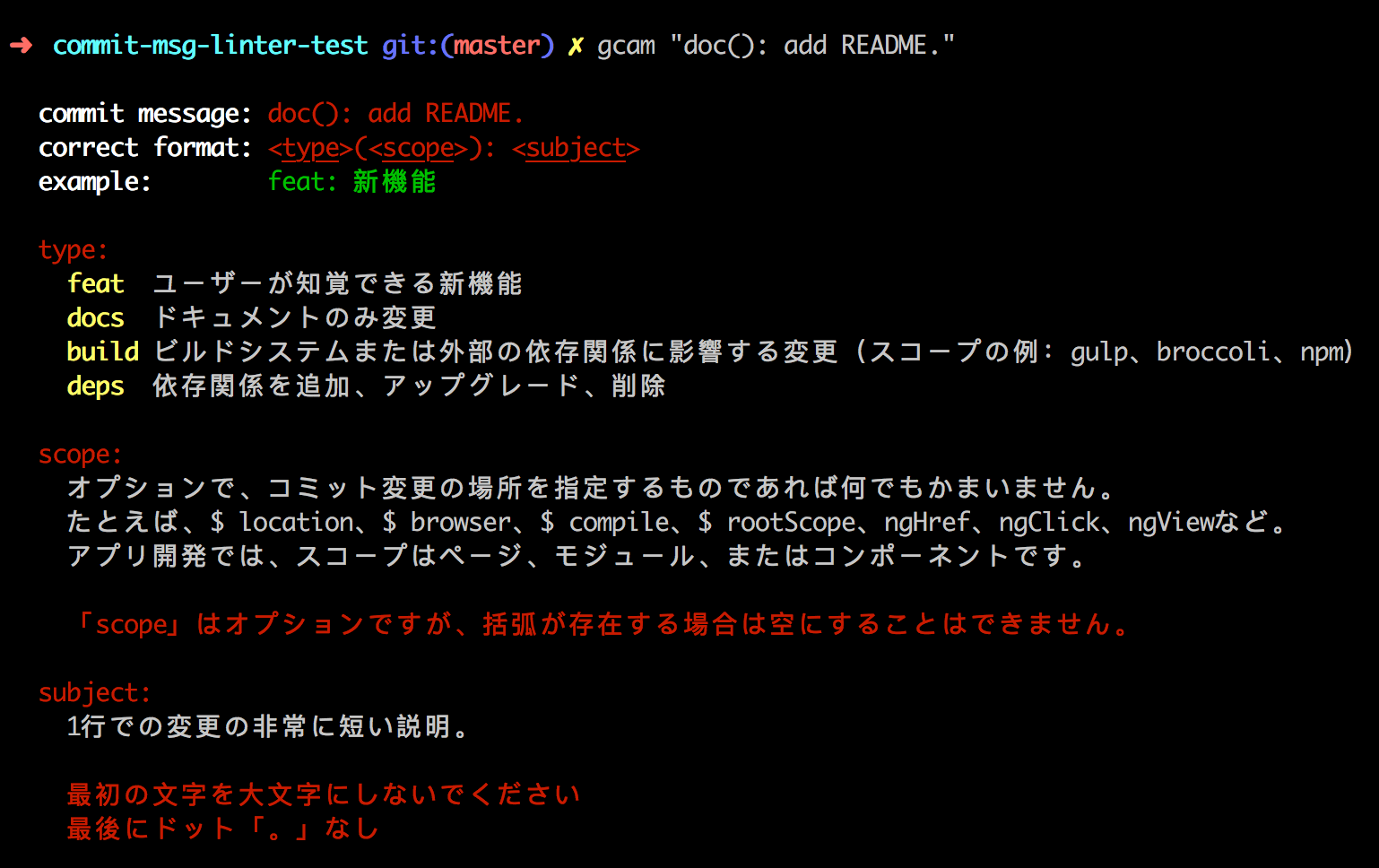
In this config, the one-line example and scope, subject's description section are modified as what your write in the commitlinterrc.json. And the the invalid header is hidden by set "showInvalidHeader": false。
FAQs
Why not conventional-changelog/commitlint?
Configuration is relatively complex.
No description for type, unfriendly to commit newbies. Because every time your are wondering which type should I use, you must jump out of you commit context to seek documentation in the wild web.
To modify type description is also not supported. Unfriendly to non-english speakers. For example, all my team members are Japanese, isn't it more productive to change all the descriptions to Japanese?
To add more types is also impossible. This is unacceptable for project with different types already existed.
TODO
- Existing rule can be overwritten and new ones can be added through
commitlinterrc.json. -
is-english-onlyshould be configurable throughcommitlinterrc.json, defaultfalse. -
max-lenshould be configurable throughcommitlinterrc.json, default100. - First letter of
subjectmust be a lowercase one. -
subjectmust not end with dot. - Empty
scopeparenthesis not allowed. -
scopeparenthesis must be of English which means full-width ones are not allowed. - Keep a space between Chinese and English character.
- Fix git merge commit not valid.
- Enable showing verbose information for debugging.
- Interactive correcting and suggestion.
- No backup when
commit-msg.oldexisted. - Display commit message on invalid error.
References
- Angular Commit Message Guidelines
- Angular.js Git Commit Guidelines
- Google AngularJS Git Commit Message Conventions
🤝 Contributing
Contributions, issues and feature requests are welcome!
Feel free to check issues page.
Show your support
Give a ⭐️ if this project helped you!
📝 License
Copyright © 2019 legend80s.
This project is MIT licensed.
This README was generated with ❤️ by readme-md-generator