
Package Exports
- git-jandi
- git-jandi/dist/index.js
This package does not declare an exports field, so the exports above have been automatically detected and optimized by JSPM instead. If any package subpath is missing, it is recommended to post an issue to the original package (git-jandi) to support the "exports" field. If that is not possible, create a JSPM override to customize the exports field for this package.
Readme

git-jandi 🌱


Display GitHub contribution graphs right in your terminal.
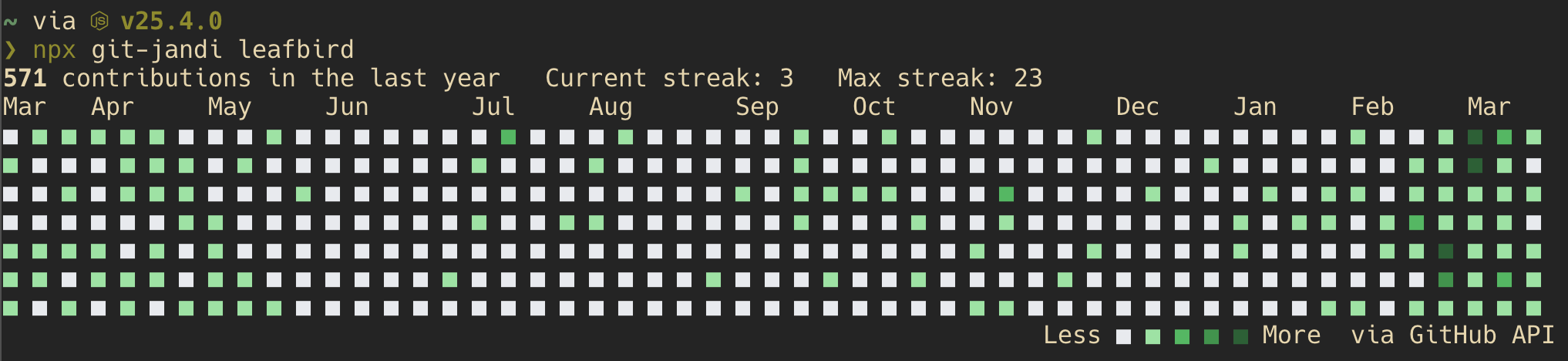
Quick Start
npx git-jandi <username>That's it. No install, no token, no config.
Install
npm install -g git-jandiOptions
| Option | Description |
|---|---|
--no-streak, -s |
Hide streak information |
--help, -h |
Show help |
--version, -v |
Show version |
Features
- Zero dependencies — uses only Node.js built-ins
- Zero configuration — works out of the box, no token needed
- Cross-platform — works anywhere Node.js 18+ runs
- Streak tracking — shows current and max contribution streaks
How It Works
By default, git-jandi scrapes the public GitHub contributions page. This works without any authentication, but the data may be delayed by up to a few hours due to GitHub's CDN cache.
If a GitHub token is available, git-jandi automatically switches to the GitHub GraphQL API for real-time data. The output footer shows which method was used (via GitHub API or via HTML scraping).
Data Source Priority
git-jandi tries the following methods in order, falling back to the next on failure:
| Priority | Method | Condition | Real-time |
|---|---|---|---|
| 1 | GitHub GraphQL API | GITHUB_TOKEN env var is set |
✅ Yes |
| 2 | GitHub GraphQL API | GitHub CLI is installed and authenticated | ✅ Yes |
| 3 | HTML scraping | All above failed | ⚠️ Cached (up to a few hours delay) |
Setting Up a Token
A token is entirely optional. If you want real-time data, choose one of the following:
Option 1: GitHub CLI (recommended)
If you already have GitHub CLI installed and authenticated, git-jandi detects it automatically. Nothing else to configure.
# Install GitHub CLI (macOS)
brew install gh

# Authenticate once
gh auth login

# git-jandi picks up the token automatically
git-jandi <username>
Option 2: Personal Access Token
Generate a Personal Access Token and set it as an environment variable. Contribution data is public, so no extra scopes are required.
# One-time use
GITHUB_TOKEN=ghp_xxxxxxxxxxxx git-jandi <username>

# Or add to your shell profile (~/.zshrc, ~/.bashrc, etc.)
export GITHUB_TOKEN=ghp_xxxxxxxxxxxx
Requirements
- Node.js 18 or later
Inspired by
- Kusa — Rust-based GitHub contribution graph CLI
License
MIT