
Package Exports
- gitbook-plugin-intopic-toc
This package does not declare an exports field, so the exports above have been automatically detected and optimized by JSPM instead. If any package subpath is missing, it is recommended to post an issue to the original package (gitbook-plugin-intopic-toc) to support the "exports" field. If that is not possible, create a JSPM override to customize the exports field for this package.
Readme
GitBook Plugin: InTopic TOC
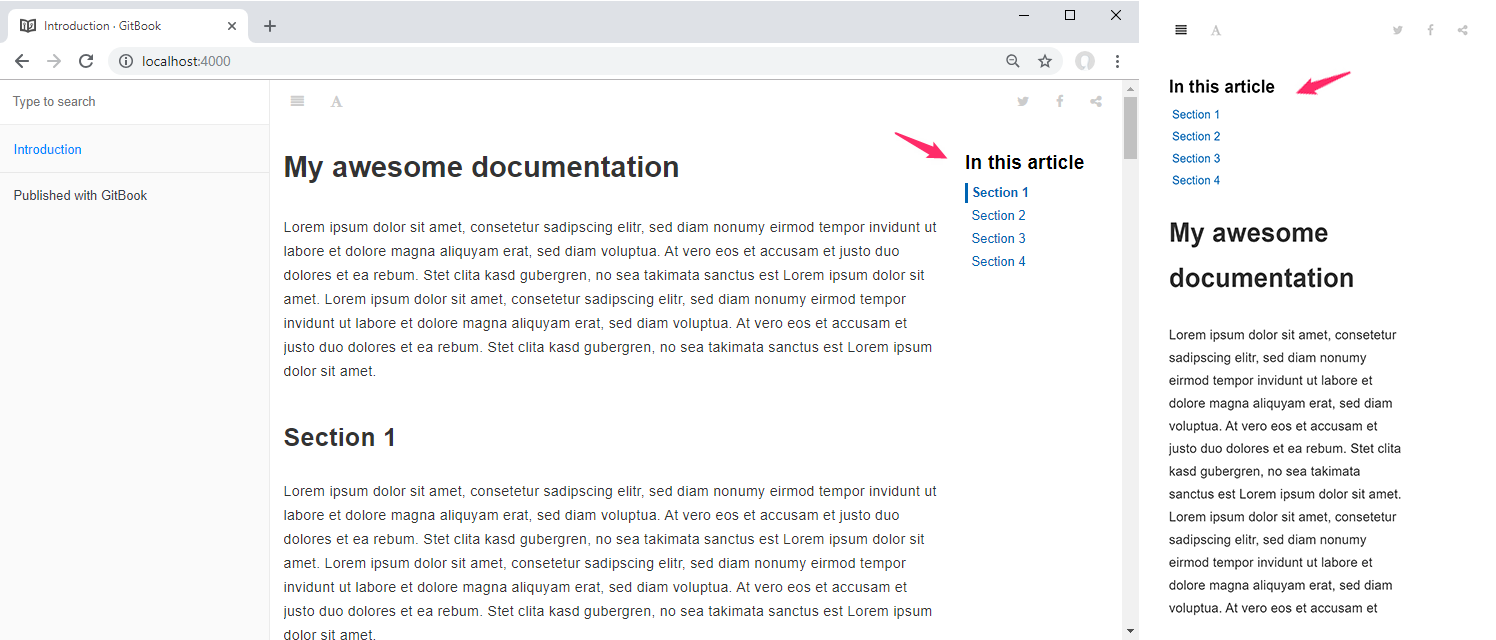
This GitBook Plugin adds an inline table of contents (TOC) to each page based on configurable selectors. Inline TOC can be enabled or disabled by default or on individual pages. TOC is placed on the right side and moves to top for smaller devices automatically.
Inline TOC stays at the top of the page when scrolling using a sticky effect. Current position is highlighted by a scrollspy effect.
Installation
Step #1 - Update book.json file
- In you gitbook's book.json file, add
intopic-tocto plugins list. - In pluginsConfig, configure the plugin so it does fit your needs. A custom setup is not mandatory.
Sample book.json file for gitbook version 2.0.0+
{
  "plugins": [
    "intopic-toc"
  ]
}
Sample book.json file for gitbook version 2.0.0+ and custom heading
{
  "plugins": [
    "intopic-toc"
  ],
  "pluginsConfig": {
    "intopic-toc": {
      "label": "Navigation"
    }
  }
}
Sample book.json file for gitbook version 2.0.0+ and multilingual headings
{
  "plugins": [
    "intopic-toc"
  ],
  "pluginsConfig": {
    "intopic-toc": {
      "label": {
        "de": "In diesem Artikel",
        "en": "In this article"
      }
    }
  }
}
Note: Above snippets can be used as complete book.json file, if one of these matches your requirements and your book doesn't have one yet.
Step #2 - gitbook commands
- Run
gitbook install. It will automatically installintopic-tocgitbook plugin for your book. This is needed only once. - Build your book (
gitbook build) or serve (gitbook serve) as usual.
Usage
For basic usage, the only thing you have to do is install the plugin. For advanced scenarios see following configuration sample.
{
  "plugins": [
    "intopic-toc"
  ],
  "pluginsConfig": {
    "intopic-toc": {
      "selector": ".markdown-section h2",
      "visible": true,
      "label": {
        "de": "In diesem Artikel",
        "en": "In this article"
      },
    }
  }
}- selector : Selector used to find elements to put anchors on.
- Default: .markdown-section h2
- visible: Defines whether to show the navigation on every page.
- Default: true.
- label: Label which is used as heading for the navigation. Could be a single string or an object for multilingual setups.
- Default: In this article
If visible parameter set to true and you want to hide the TOC on a single page, add the front matter item isTocVisible: false to the top of the Markdown file like this:
---
isTocVisible: false
---
# My awesome documentation

Lorem ipsum dolor sit amet, consetetur sadipscing elitr, ...
The specific front matter isTocVisible overrides the visible parameter from global configuration.
Troubleshooting
If inline TOC does not look as expected, check if your book.json is valid according to this documentation.
Changelog
01/05/2019 - Initial Release