
Package Exports
- hyper-pokemon
This package does not declare an exports field, so the exports above have been automatically detected and optimized by JSPM instead. If any package subpath is missing, it is recommended to post an issue to the original package (hyper-pokemon) to support the "exports" field. If that is not possible, create a JSPM override to customize the exports field for this package.
Readme

Hyper Pokemon
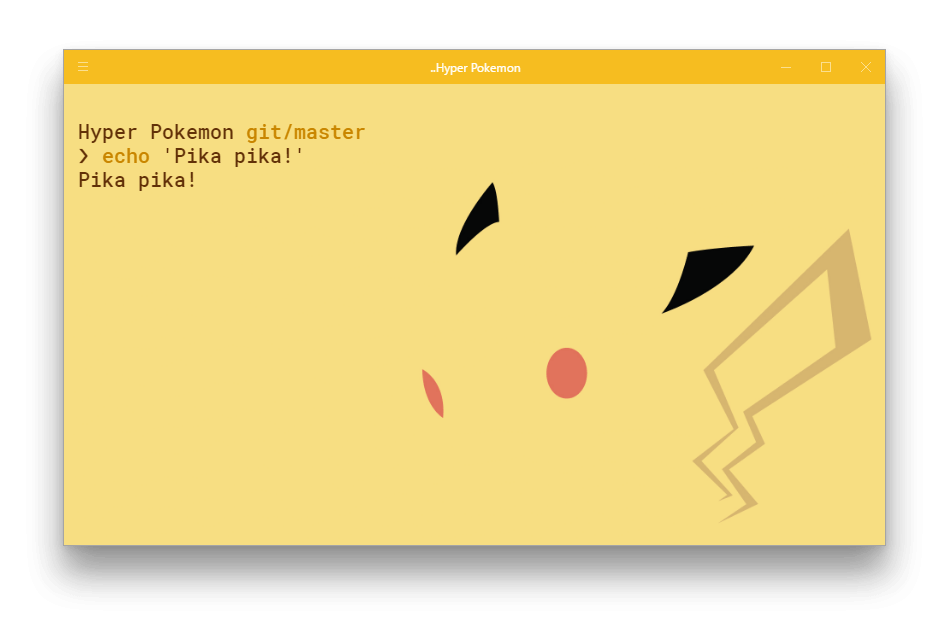
🌈 Tailor-made Pokémon themes for your Hyper terminal




Contents
Description
Made for Pokémon enthusiasts by Pokémon enthusiasts ❤
All of the wonderful Pokémon backgrounds were created by the amazing Teej/TopHat & MapleRose.
Do you enjoy this project? Maybe you love Star Wars, Yoda or Darth Vader?
Then, you will also love our Hyper Star Wars theme project. Go have a peek.
Come over to our Gitter channel to share your thoughts on the project or to just say hi.
Vote the next Region
Vote for the Pokémon Region you want to see themes from next.
In essence, this poll will determine the creation order of all Pokémon Regions.
The poll will be kept alive until the project's completion, when all 600+ themes will be available.


Poll powered by tj/gh-polls
Install
Using the plugin manager - hpm-cli
Firstly, ensure you have Hyper and Node.js installed in your system.
Then simply do the npm dance to get hpm-cli
# fire up a terminal and type
$ npm install -g hpm-cli
Once done with that, it's time to install the hyper-pokemon theme.
# run the hyper plugin manager
$ hpm install hyper-pokemon
Manually through .hyper.js
Add hyper-pokemon to the plugins list in your ~/.hyper.js config file and restart Hyper.
plugins: ['hyper-pokemon']Usage
Once you have installed hyper-pokemon, it's time to set your favorite theme.
Go to your ~/.hyper.js and add the pokemon and pokemonSyntax options below the colors object, and define your theme of choice.
Here is a quick example, where we choose the gengar  theme, with a
 unibody color for the window header & dark terminal tabs.
config: {
    //...
    colors: {
    //...
    },
    pokemon: 'gengar', // Define your favorite pokemon theme
    pokecursor: 'true', // Activate your theme's pokecursor
    pokemonSyntax: 'dark', // Define the color of the terminal tabs
    unibody: 'true', // Define the color of the Hyper window header
    poketab: 'false', // Deactivate your theme's poketab
    //...
}
To get the exact same look, install Google's Roboto Mono font as well as oh-my-zsh and choose pure as your zsh prompt.
Options
pokemon
Using this option you can choose your pokémon background along with it's tailor-made syntax color.
The assignable values are:
pokemon name- choose any of the available Pokémon themes by defining the Pokémon name.
i.e.pokemon: 'charizard',pokemon: 'pikachu',pokemon: 'blastoise'etcrandom- randomly selects a Pokémon theme from the whole list of available Pokémons, each time you fire up a new Hyper terminal session.
i.e.pokemon: 'random'pokemon type- randomly selects a Pokémon theme from only a specific Pokémon type, each time you fire up a new Hyper terminal session. You can view all available Pokémon types here.
i.e.pokemon: 'fire',pokemon: 'water',pokemon: 'grass'etcpokemon trainer- randomly selects a Pokémon theme from only a specific Pokémon Trainer's party, each time you fire up a new Hyper terminal session. You can view all available Pokémon Trainer here.
i.e.pokemon: 'ash',pokemon: 'jessie',pokemon: 'gary',pokemon: 'erika'etcpokemon party- randomly selects a Pokémon theme/theme option from a defined array holding custom multiple themes/theme options, each time you fire up a new Hyper terminal session. Any from the available Pokémon themes, types & trainers can be chosen.
i.e.pokemon: ['articuno', 'zapdos', 'moltres', 'mewtwo', 'mew']pokemon: ['random', 'fire', 'water', 'grass', 'ash', 'pikachu']pokemon: ['lance', 'brock', 'bruno', 'gary', 'legendary', 'dragonite']etc
pokecursor
Replace the regular terminal cursor with an animated .gif that matches the current pokemon theme.
The assignable values are:
pokecursor: 'true'- enable your theme's pokecursorpokecursor: 'false'- revert to the cursor's original appearance
Also, completely omitting the pokecursor option from your .hyper.js will have the same effect as defining it and setting it to false. (default state)

pokemonSyntax
Here you can define the color of the terminal tabs.
The assignable values are:
pokemonSyntax: 'light'- choose it if your pokémon theme is of a more light colorpokemonSyntax: 'dark'- go for it if you are using a darker pokémon theme

unibody
Choose whether or not you want the Hyper windows header color to be the same as the background pokémon theme.
The assignable values are:
unibody: 'true'- choose it for a unibody color themeunibody: 'false'- go for it if you like your terminal more colorful
In addition, completely omitting the unibody option from your .hyper.js will have the same effect as defining it and setting it to true. (default state)

poketab
Choose whether or not you want an animated .gif that matches your current pokemon theme, to accompany your active Hyper terminal tab.
The assignable values are:
poketab: 'true'- enable your theme's poketabpoketab: 'false'- disable your theme's poketab
Also, completely omitting the poketab option from your .hyper.js will have the same effect as defining it and setting it to false. (default state)

Available Themes
You can view all the available themes here.
Pokémon Types
List of all available Pokémon types
Pokémon Types
LegendaryStarterFireWaterGrassPoisonFlyingBugElectricGroundFairyNormalPsychicGhostRockIceDragonFightingSteel
Pokémon Trainers
List of all available Pokémon trainers
Pokémon Trainers
AshAgathaBlaineBrockBrunoErikaGaryGiovanniJamesJessieKogaLanceLoreleiSurgeMistySabrina
Related
More awesome Hyper plugins.
- Hyper Star Wars - 🚀 Super awesome, your Hyper terminal shall look.
Team
Meet the team and all the contributors.
 |
 |
 |
 |
 |
 |
|---|---|---|---|---|---|
| Klaus Sinani | Mario Sinani | George Baxopoulos | Thanasis Gkanos | Konstantinos Mitropoulos | Gabriel Tibúrcio |