
Package Exports
- join-monster
This package does not declare an exports field, so the exports above have been automatically detected and optimized by JSPM instead. If any package subpath is missing, it is recommended to post an issue to the original package (join-monster) to support the "exports" field. If that is not possible, create a JSPM override to customize the exports field for this package.
Readme


Read the Documentation
Try Demo
Example Repo
What is Join Monster?
A JavaScript execution layer from GraphQL to SQL for batch data fetching between the API and the database by dynamically translating GraphQL to SQL for efficient data retrieval, all in a single batch before resolution. Simply delcare the data requirements of each field in you schema. Then, for each query, Join Monster will look at what was requested, find the data requirements, fetch, and shape your data.
Think of it as an alternative to Facebook's DataLoader if you're fetching from a SQL database. It's a little opionionated, but not an ORM.
It is NOT a tool for automatically creating a schema for you GraphQL from your database or vice versa. You retain the freedom and power to define your schemas how you want. Join Monster simply "compiles" a GraphQL query to a SQL query based on the existing schemas. It fits into existing applications and can be seamlessly removed later or used to varying degree. And it works with Relay!
The problem with GraphQL & SQL that we solve
GraphQL is an elegant solution the round-trip problem often encountered with REST APIs. Many are using it in conjunction with the power of SQL databases. But how do we mitigate the number of roundtrips to our database? Consider the following schema: Users that have many Posts that have many Comments.

Here is a sensible query to retrieve some info from these tables.
{
  users {
    name
    posts {
      body
      comments { body, author_id }
    }
  }
}
How might we go about resolving this?
const User = new GraphQLObjectType({
  name: 'User',
  fields: () => ({
    name: { /*...*/ },
    posts: {
      type: new GraphQLList(Post),
      resolve: user => {
        return db.query(`SELECT * FROM posts WHERE author_id = '?'`, user.id)
      }
    }
  })
})

const Post = new GraphQLObjectType({
  name: 'Post',
  fields: () => ({
    body: { /*...*/ },
    comments: {
      type: new GraphQLList(Comment),
      resolve: post => {
        return db.query(`SELECT * FROM comments WHERE post_id = '?'`, post.id)
      }
    }
  })
})
Elegant as this is, consider what happens if the user has 20 posts. That's one SQL query for the posts, and 20 more for each post's set of comments. This is a total of at least 21 round-trips to the database (we haven't considered how we got the User data)! This could easily become a performance bottleneck. We've encountered the round-trip problem again (on the back-end instead of the client). We need to optimize the data-fetching against our back-end!
Of course, it doesn't have to be done this way. Perhaps we can reduce the round-trips by doing the joins all at once in the User resolver.
const Query = new GraphQLObjectType({
  name: 'Query',
  fields: () => ({
    users: {
      type: new GraphQLList(User),
      resolve: async () => {
        const sql = `
          SELECT * from accounts
          JOIN posts ON posts.author_id = accounts.id
          JOIN comments ON comments.post_id = posts.id
        `
        const rows = await db.query(sql)
        // convert the flat rows to the object tree structure
        const tree = nestObjectShape(rows)
        return tree
      }
    }
  })
})
So we got all the data at the top level, this will simplify the Posts and Comments resolvers since those properties are already there.
const User = new GraphQLObjectType({
  name: 'User',
  fields: () => ({
    name: { /*...*/ },
    posts: {
      type: new GraphQLList(Post)
    }
  })
})

const Post = new GraphQLObjectType({
  name: 'Post',
  fields: () => ({
    body: { /*...*/ },
    comments: {
      type: new GraphQLList(Comment)
    }
  })
})
Although we made the round-trip problem go away, what if another query doesn't even ask for the comments?
{
  users {
    name
    posts { body }
  }
}
During the execution of this request, it will wastefully join on the comments! The resolving phase essentially becomes a bunch of property lookups for a conglomerate result we prepared in the top-level. It's not too bad now, but this approach will not scale to more complex schema. Consider a schema like this:

Imagine doing all those joins up front. This is especially wasteful when client only wants a couple of those resources. We now have the inverse problem: getting too much data. Furthermore, we've reduced the maintainability of our code. Changes to the schema will require changes to the SQL query that fetches all the data. Often times there is the extra burden of converting the database result into the Object shape, since many database drivers simply return a flat, tabular structure.
How It Works
Join Monster fetches only the data you need - nothing more, nothing less, just like to original philosophy of GraphQL. It reads the parsed GraphQL query, looks at your schema definition, and generates the SQL automatically that will fetch no more than what is required to fulfill the request. All data fetching for all resources becomes a single batch request.
Instead of writing the SQL yourself, you configure the schema definition with a bit of additional metadata about the SQL schema. Your queries can be as simple as this:
{                         SELECT                             {
  user(id: 1) {             "user"."id",                       user: {
    idEncoded               "user"."first_name",                 idEncoded: 'MQ==',
    fullName     ==>       "user"."last_name",      ==>         fullName: 'andrew carlson',
    email                   "user"."email_address"               email: 'andrew@stem.is'
  }                       FROM "accounts" AS "user"            }
}                         WHERE "user".id = 1                }
To something as complex as this:
{
  users {
    id, idEncoded, fullName, email
    following { id, fullName }
    comments {
      body
      author { id, fullName }
      post {
        id, body
        author { id, fullName }
      }
    }
  }
}
which becomes...
SELECT
  "users"."id" AS "id",
  "users"."first_name" AS "first_name",
  "users"."last_name" AS "last_name",
  "users"."email_address" AS "email_address",
  "following"."id" AS "following__id",
  "following"."first_name" AS "following__first_name",
  "following"."last_name" AS "following__last_name",
  "comments"."id" AS "comments__id",
  "comments"."body" AS "comments__body",
  "author"."id" AS "comments__author__id",
  "author"."first_name" AS "comments__author__first_name",
  "author"."last_name" AS "comments__author__last_name",
  "post"."id" AS "comments__post__id",
  "post"."body" AS "comments__post__body",
  "author$"."id" AS "comments__post__author$__id",
  "author$"."first_name" AS "comments__post__author$__first_name",
  "author$"."last_name" AS "comments__post__author$__last_name"
FROM "accounts" AS "users"
LEFT JOIN "relationships" AS "relationships" ON "users".id = "relationships".follower_id
LEFT JOIN "accounts" AS "following" ON "relationships".followee_id = "following".id
LEFT JOIN "comments" AS "comments" ON "users".id = "comments".author_id
LEFT JOIN "accounts" AS "author" ON "comments".author_id = "author".id
LEFT JOIN "posts" AS "post" ON "comments".post_id = "post".id
LEFT JOIN "accounts" AS "author$" ON "post".author_id = "author$".id
and responds with...
{
  "data": {
    "users": [
      {
        "id": 1,
        "idEncoded": "MQ==",
        "fullName": "andrew carlson",
        "email": "andrew@stem.is",
        "following": [
          {
            "id": 2,
            "fullName": "matt elder"
          }
        ],
        "comments": [
          {
            "body": "Wow this is a great post, Matt.",
            "author": {
              "id": 1,
              "fullName": "andrew carlson"
            },
            "post": {
              "id": 1,
              "body": "If I could marry a programming language, it would be Haskell.",
              "author": {
                "id": 2,
                "fullName": "matt elder"
              }
            }
          }
        ]
      },
      {
        "id": 2,
        "idEncoded": "Mg==",
        "fullName": "matt elder",
        "email": "matt@stem.is",
        "following": [],
        "comments": []
      }
    ]
  }
}
Join Monster generates the SQL dynamically. The SQL queries will adapt not only with the varying complexities of queries, but also changes in the schema. No back-and-forth from web server to database. No need to get convert the raw result to the nested structure. Lots of benefits for a little bit of configuration.
- Fetch all the data in a single database query.
- Automatically generate adapting SQL queries.
- Automatically build the nested object structure.
- Easier maintainability.
- Coexists with your custom resolve functions.
Join Monster is a means of batch-fetching data from your SQL database. It will not prevent you from writing custom resolvers or hinder your ability to define either of your schemas.
Running the Demo
$ git clone https://github.com/stems/join-monster.git
$ cd join-monster
$ npm install
$ npm start
# go to http://localhost:3000/graphql
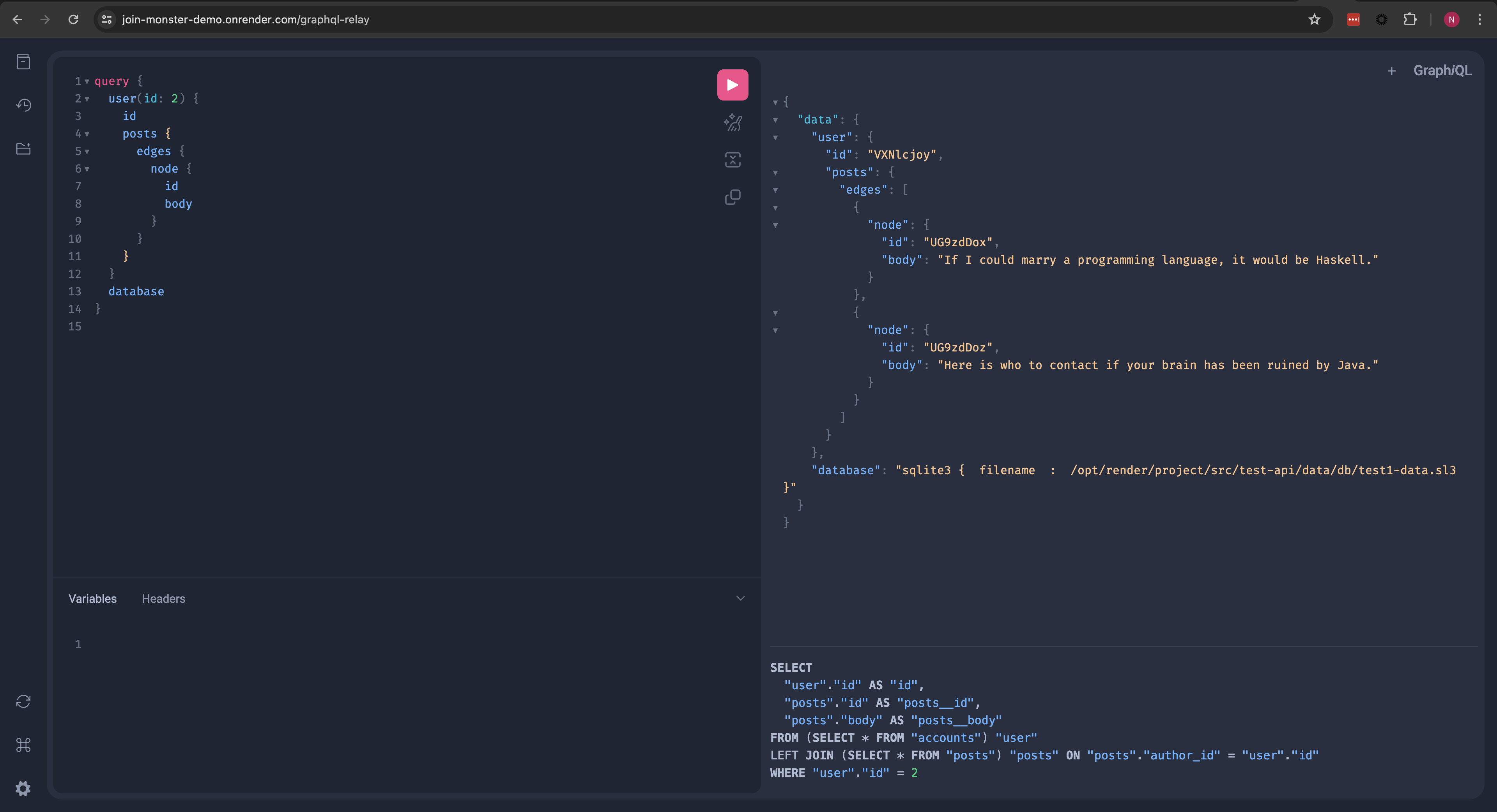
Explore the schema, try out some queries, and see what the resulting SQL queries and responses look like in our custom version of GraphiQL!
Usage
See the example repo for a reference. I'll demonstrate the steps to set up this example. We'll set up a little API for a simple blog site for Users that can make Posts as well as Comments on people's posts. We will also let them follow other users. Here is a picture of the schema.
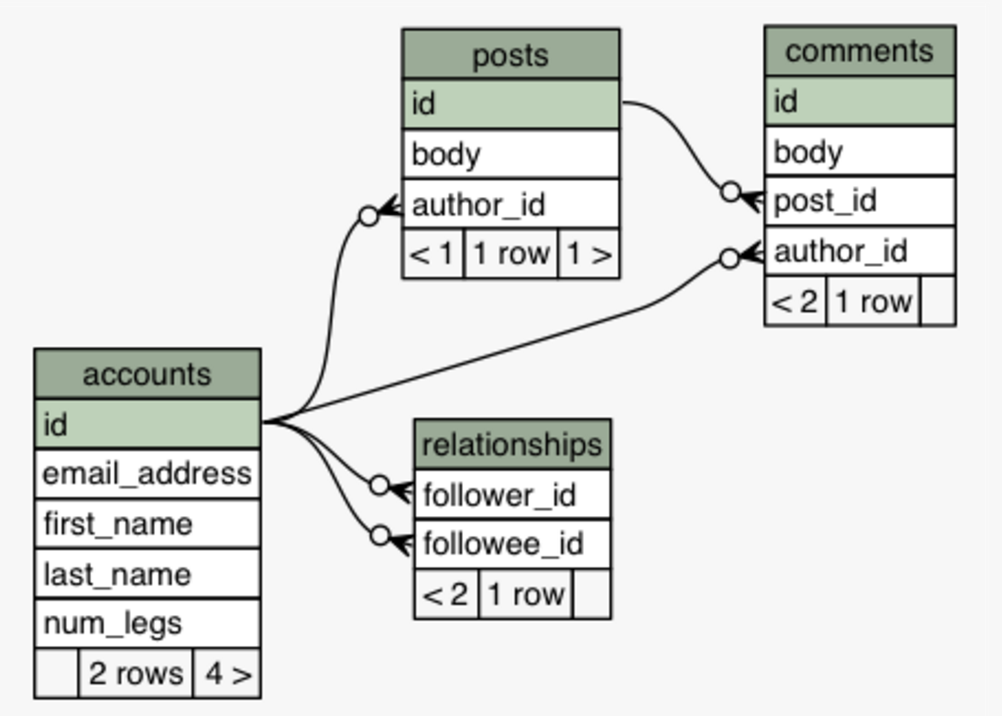
I'll omit the code to set up the SQL. A small set of SQLite3 sample data is provided in the example at example/data/data.sl3.
1. Declare GraphQL and SQL schemas like you normally would
Here is how the graphql-js schema would look.
import { GraphQLSchema } from 'graphql'
import { GraphQLObjectType, GraphQLList, GraphQLString, GraphQLInt } from 'graphql'

const User = new GraphQLObjectType({
  name: 'User',
  fields: () => ({
    id: {
      type: GraphQLInt
    },
    email: {
      type: GraphQLString
    },
    idEncoded: {
      description: 'The ID base-64 encoded',
      type: GraphQLString,
      resolve: user => toBase64(user.idEncoded)
    },
    fullName: {
      description: 'A user\'s first and last name',
      type: GraphQLString
    }
  })
})

const QueryRoot = new GraphQLObjectType({
  name: 'Query',
  fields: () => ({
    users: {
      type: new GraphQLList(User),
      resolve: () => {} // TODO
    }
  })
})

export default new GraphQLSchema({
  description: 'a test schema',
  query: QueryRoot
})
2. Map Object Types to SQL Tables
Your SQL Tables must map to a GraphQLObjectType. Add the sqlTable and uniqueKey properties to the type definition.
const User = new GraphQLObjectType({
  name: 'User',
  sqlTable: 'accounts', // the SQL table for this object type is called "accounts"
  uniqueKey: 'id', // the id in each row is unique for this table
  fields: () => ({ /*...*/ })
})
Wrap the name in an additional pair of double quotes if the name contains capital letters. You can also prefix this string with the schema name if it is different than the default, separated by a period.
3. Add Metadata to the User Fields
You'll need to provide a bit of information about each column, like sqlColumn and sqlDeps. These will be added to the fields in the type definition.
const User = new GraphQLObjectType({
  //...
  fields: () => ({
    id: {
      // the column name is assumed to be the same as the field name
      type: GraphQLInt
    },
    email: {
      type: GraphQLString,
      // if the column name is different, it must be specified specified
      sqlColumn: 'email_address'
    },
    idEncoded: {
      description: 'The ID base-64 encoded',
      type: GraphQLString,
      sqlColumn: 'id',
      // this field uses a sqlColumn and applies a resolver function on the value
      // if a resolver is present, the `sqlColumn` MUST be specified even if it is the same name as the field
      resolve: user => toBase64(user.idEncoded)
    },
    fullName: {
      description: 'A user\'s first and last name',
      type: GraphQLString,
      // perhaps there is no 1-to-1 mapping of field to column
      // this field depends on multiple columns
      sqlDeps: [ 'first_name', 'last_name' ],
      resolve: user => `${user.first_name} ${user.last_name}`
    }
  })
})

function toBase64(clear) {
  return Buffer.from(String(clear)).toString('base64')
}
4. Let Join Monster Grab Your Data
Import joinMonster. Have the top-most field that maps to a SQL table implement a resolver function that calls joinMonster. Simply pass it the AST info, a "context" object (which can be empty for now), and a callback that takes the SQL as a parameter, calls the database, and returns the data (or a Promise of the data). The data must be an array of objects where each object represents a row in the result set.
import joinMonster from 'join-monster'

const QueryRoot = new GraphQLObjectType({
  name: 'Query',
  fields: () => ({
    users: {
      type: new GraphQLList(User),
      resolve: (parent, args, context, ast) => {
        return joinMonster(ast, {}, sql => {
          // knex is a SQL query library for NodeJS. This method returns a `Promise` of the data
          return knex.raw(sql)
        })
      }
    }
  })
})
You'll need to set up the connection to the database. For the example there is a small SQLite3 file provided. You can import knex and load the data like this.
const dataFilePath = 'path/to/the/data.sl3' // make this the path to the database file
const knex = require('knex')({
  client: 'sqlite3',
  connection: {
    filename: dataFilePath
  }
})
You're ready to handle queries on the Users!
{
  users { id, idEncoded, email, fullName }
}
Note: joinMonster does NOT have to be at the root field of the query. You can call joinMonster at and field at any depth and it will handle fetching the data for its children.
5. Adding Joins
Let's add a field to our User which is a GraphQLObjectType: their Comments which also map to a SQL table as a one-to-many relationship. Let's define that type and add the additional SQL metadata.
const Comment = new GraphQLObjectType({
  name: 'Comment',
  sqlTable: 'comments',
  uniqueKey: 'id',
  fields: () => ({
    // id and body column names are the same
    id: {
      type: GraphQLInt
    },
    body: {
      type: GraphQLString
    }
  })
})
We need to add a field to our User, and tell joinMonster how to grab these comments via a JOIN. This can be done with a sqlJoin property with a function. It will take the parent table and child table names (actually the aliases that joinMonster will generate) as parameters respectively and return the join condition.
const User = new GraphQLObjectType({
  //...
  fields: () => ({
    //...
    comments: {
      type: new GraphQLList(Comment),
      // a function to generate the join condition from the table aliases
      // NOTE: you must double-quote any case-sensitive column names the table aliases are already quoted
      sqlJoin: (userTable, commentTable) => `${userTable}.id = ${commentTable}.author_id`
    }
  })
})
Now you can query for the comments for each user!
{
  users {
    id, idEncoded, email, fullName
    comments { id, body }
  }
}
6. Arbitrary Depth
Let's go deeper and join the post on the comment, a one-to-one relationship. We'll define the Post, give it the SQL metadata, and add it as a field on the Comment. Each of these also has an author, which maps to the User type, let's tell joinMonster how to fetch those too.
const Post = new GraphQLObjectType({
  name: 'Post',
  sqlTable: 'posts',
  uniqueKey: 'id',
  fields: () => ({
    id: {
      type: GraphQLInt
    },
    body: {
      description: 'The content of the post',
      type: GraphQLString
    },
    // we'll give the `Post` a field which is a reference to its author, back to the `User` type too
    author: {
      description: 'The user that created the post',
      type: User,
      sqlJoin: (postTable, userTable) => `${postTable}.author_id = ${userTable}.id`
    }
  })
})

const Comment = new GraphQLObjectType({
  //...
  fields: () => ({
    //...
    post: {
      description: 'The post that the comment belongs to',
      type: Post,
      sqlJoin: (commentTable, postTable) => `${commentTable}.post_id = ${postTable}.id`
    },
    author: {
      description: 'The user who wrote the comment',
      type: User,
      sqlJoin: (commentTable, userTable) => `${commentTable}.author_id = ${userTable}.id`
    }
  })
})
Now you have some depth and back references. It would be possible to cycle.
{
  users {
    id, idEncoded, email, fullName
    comments {
      id, body
      author { fullName }
      post {
        id, body
        author { fullName }
      }
    }
  }
}
7. Many-to-Many, Self-Referential Relationship
Let us allow Users to follow one another. We'll need a join table for the many-to-many and hence two joins to fetch this field. For this we can specify joinTable and sqlJoins on the field, which should be intuitive based on previous examples.
const User = new GraphQLObjectType({
  //...
  fields: () => ({
    //...
    following: {
      description: 'Users that this user is following',
      type: new GraphQLList(User),
      joinTable: 'relationships', // this is the name of our join table
      sqlJoins: [
        // first the parent table to the join table
        (followerTable, relationTable) => `${followerTable}.id = ${relationTable}.follower_id`,
        // then the join table to the child
        (relationTable, followeeTable) => `${relationTable}.followee_id = ${followeeTable}.id`
      ]
    },
  })
})
{
users {
id, idEncoded, email, fullName
following { fullName }
}
}8. Where Conditions
We of course don't always want every row from every table. In a similar manner to the sqlJoin function, you can define a where function on a field. Its parameters are the table alias (generated automatically by joinMonster), the GraphQL arguments on that field, and the "context" mentioned earlier. The string returned is the WHERE condition. If a falsy value is returned, there will be no WHERE condition. We'll add another top-level field that just returns one user.
const QueryRoot = new GraphQLObjectType({
  name: 'Query',
  fields: () => ({
    users: { /*...*/ },
    user: {
      type: User,
      args: {
        id: { type: GraphQLInt }
      },
      where: (usersTable, args, context) => {
        if (args.id) return `${usersTable}.id = ${args.id}`
      },
      resolve: (parent, args, context, ast) => {
        return joinMonster(ast, {}, sql => {
          return knex.raw(sql)
        })
      }
    }
  })
})
{
user(id: 1) {
id, idEncoded, email, fullName
following { fullName }
comments { id, body }
}
}9. Join Monster Context
The joinMonster function has a second parameter which is basically an arbitrary object with useful contextual information that your where functions might depend on. For example, if you want to get the logged in user, the ID of the loggen in user could be passed in the second argument.
{
  //...
  // there is a GraphQL context and a Join Monster context. these are separate!
  resolve: (parent, args, context, ast) => {
    // get some info off the HTTP request, like the cookie.
    const loggedInUserId = getHeaderAndParseCookie(context)
    return joinMonster(ast, { id: loggedInUserId }, sql => {
      return knex.raw(sql)
    })
  }
}
10. Relay Compatibility
It works well with graphql-relay-js! Check out the docs for more details.
There's still a lot of work to do. Please feel free to fork and submit a Pull Request!
TODO
- Much better error messages in cases of mistakes (like missing sql properties)
- Figure out a way to handle Interface and Union types
- Figure out a way to support the schema language
- Implement
LIMITOFFSETpagination for relay connections - Aggregate functions
- Caching layer?