

Package Exports
- json-colorizer
- json-colorizer/dist/index.js
This package does not declare an exports field, so the exports above have been automatically detected and optimized by JSPM instead. If any package subpath is missing, it is recommended to post an issue to the original package (json-colorizer) to support the "exports" field. If that is not possible, create a JSPM override to customize the exports field for this package.
Readme
json-colorizer
A library for colorizing JSON strings
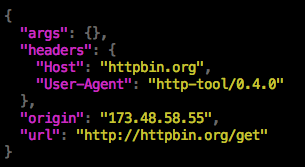
This package is a simple console syntax highlighter for JSON.
Installation
npm install --save json-colorizer
Usage
const { colorize } = require('json-colorizer');
console.log(colorize({ "foo": "bar" }));
You can also pass a JavaScript object to the colorize function:
const { colorize } = require('json-colorizer');
console.log(colorize({
  foo: 'bar',
  baz: 42
}));
Pretty-printing output
By default, the output JSON will be pretty-printed with an indentation of 2 spaces. You can adjust this by passing the indent option.
const { colorize } = require('json-colorizer');
console.log(colorize({
  foo: 'bar',
  baz: 42
}, { indent: 4 }));
Customizing the colors
You can override any of the colors used for token types by providing a colors option. This should map token types to the names of color functions. These color functions are contained in the color object exported by the library.
const { colorize, color } = require('json-colorizer');

console.log(colorize({ foo: 'bar' }, {
  colors: {
    StringLiteral: color.red
  }
}));
The list of valid token types and color functions are listed below.
Token types
Brace: curly braces ({,})Bracket: square brackets ([,])Colon: colon character (:)Comma: comma character (,)StringKey: the key in a key/value pairNumberLiteral: a number valueStringLiteral: a string valueBooleanLiteral: a boolean literal (true,false)NullLiteral: the literalnullvalue
Color functions in the color object
blackredgreenyellowbluemagentacyanwhitegray