
Package Exports
- json2csv
This package does not declare an exports field, so the exports above have been automatically detected and optimized by JSPM instead. If any package subpath is missing, it is recommended to post an issue to the original package (json2csv) to support the "exports" field. If that is not possible, create a JSPM override to customize the exports field for this package.
Readme
json2csv
Converts json into csv with column titles and proper line endings. Can be used as a module and from the command line.


How to use
Install
$ npm install json2csv --saveInclude the module and run
var json2csv = require('json2csv');
var fields = ['field1', 'field2', 'field3'];

json2csv({ data: myData, fields: fields }, function(err, csv) {
  if (err) console.log(err);
  console.log(csv);
});Features
- Uses proper line endings on various operating systems
- Handles double quotes
- Allows custom column selection
- Allows specifying nested properties
- Reads column selection from file
- Pretty writing to stdout
- Supports optional custom delimiters
- Supports optional custom eol value
- Supports optional custom quotation marks
- Not create CSV column title by passing hasCSVColumnTitle: false, into params.
- If field is not exist in object then the field value in CSV will be empty.
Use as a module
Available Options
options- Required; Options hash.data- Required; Array of JSON objects.fields- Array of Strings, JSON attribute names to use as columns. Defaults to toplevel JSON attributes.fieldNamesArray of Strings, names for the fields at the same indexes. Must be the same length asfieldsarray.del- String, delimiter of columns. Defaults to,if not specified.defaultValue- String, default value to use when missing data. Defaults to `` if not specified.quotes- String, quotes around cell values and column names. Defaults to"if not specified.nested- Boolean, enables nested fields for getting JSON data. Defaults tofalseif not specified.eol- String, it gets added to each row of data. Defaults to `` if not specified.newLine- String, overrides the default OS line ending (i.e.\non Unix and\r\non Windows).
callback- Required;function (error, csvString) {}.
Example 1
var json2csv = require('json2csv');
var fields = ['car', 'price', 'color'];
var myCars = [
  {
    "car": "Audi",
    "price": 40000,
    "color": "blue"
  }, {
    "car": "BMW",
    "price": 35000,
    "color": "black"
  }, {
    "car": "Porsche",
    "price": 60000,
    "color": "green"
  }
];

json2csv({ data: myCars, fields: fields }, function(err, csv) {
  if (err) console.log(err);
  fs.writeFile('file.csv', csv, function(err) {
    if (err) throw err;
    console.log('file saved');
  });
});
The content of the "file.csv" should be
car, price, color
"Audi", 40000, "blue"
"BMW", 35000, "black"
"Porsche", 60000, "green"
Example 2
Similarly to mongoexport you can choose which fields to export
var json2csv = require('json2csv');
var fields = ['car', 'color'];

json2csv({ data: myCars, fields: fields }, function(err, csv) {
  if (err) console.log(err);
  console.log(csv);
});
Results in
car, color
"Audi", "blue"
"BMW", "black"
"Porsche", "green"
Example 3
Use a custom delimiter to create tsv files. Add it as the value of the del property on the parameters:
var json2csv = require('json2csv');
var fields = ['car', 'price', 'color'];

json2csv({ data: myCars, fields: fields, del: '\t' }, function(err, tsv) {
  if (err) console.log(err);
  console.log(tsv);
});
Will output:
car price color
"Audi"  10000 "blue"
"BMW" 15000 "red"
"Mercedes"  20000 "yellow"
"Porsche" 30000 "green"
If no delimiter is specified, the default , is used
Example 4
You can choose custom column names for the exported file.
var json2csv = require('json2csv');
var fields = ['car', 'price'];
var fieldNames = ['Car Name', 'Price USD'];

json2csv({ data: myCars, fields: fields, fieldNames: fieldNames }, function(err, csv) {
  if (err) console.log(err);
  console.log(csv);
});
Example 5
You can choose custom quotation marks.
var json2csv = require('json2csv');
var fields = ['car', 'price'];
var fieldNames = ['Car Name', 'Price USD'];
var opts = {
  data: myCars,
  fields: fields,
  fieldNames: fieldNames,
  quotes: ''
};

json2csv(opts, function(err, csv) {
  if (err) console.log(err);
  console.log(csv);
});
Results in
Car Name, Price USD
Audi, 10000
BMW, 15000
Porsche, 30000
Example 6
You can also specify nested properties using dot notation.
var json2csv = require('json2csv');
var fields = ['car.make', 'car.model', 'price', 'color'];
var myCars = [
  {
    "car": {"make": "Audi", "model": "A3"},
    "price": 40000,
    "color": "blue"
  }, {
    "car": {"make": "BMW", "model": "F20"},
    "price": 35000,
    "color": "black"
  }, {
    "car": {"make": "Porsche", "model": "9PA AF1"},
    "price": 60000,
    "color": "green"
  }
];

json2csv({ data: myCars, fields: fields, nested: true }, function(err, csv) {
  if (err) console.log(err);
  fs.writeFile('file.csv', csv, function(err) {
    if (err) throw err;
    console.log('file saved');
  });
});
The content of the "file.csv" should be
car.make, car.model, price, color
"Audi", "A3", 40000, "blue"
"BMW", "F20", 35000, "black"
"Porsche", "9PA AF1", 60000, "green"
Command Line Interface
json2csv can also be called from the command line if installed with -g.
Usage: json2csv [options]

  Options:

    -h, --help                   output usage information
    -V, --version                output the version number
    -i, --input <input>          Path and name of the incoming json file.
    -o, --output [output]        Path and name of the resulting csv file. Defaults to console.
    -f, --fields <fields>        Specify the fields to convert.
    -l, --fieldList [list]       Specify a file with a list of fields to include. One field per line.
    -d, --delimiter [delimiter]  Specify a delimiter other than the default comma to use.
    -e, --eol [value]            Specify an EOL value after each row.
    -z, --newLine [value]        Specify an new line value for separating rows.
    -q, --quote [value]          Specify an alternate quote value.
    -x, --nested                 Allow fields to be nested via dot notation, e.g. 'car.make'.
    -n, --no-header              Disable the column name header
    -p, --pretty                 Use only when printing to console. Logs output in pretty tables.
An input file -i and fields -f are required. If no output -o is specified the result is logged to the console.
Use -p to show the result in a beautiful table inside the console.
CLI examples
Input file and specify fields
$ json2csv -i input.json -f carModel,price,colorcarModel,price,color
"Audi",10000,"blue"
"BMW",15000,"red"
"Mercedes",20000,"yellow"
"Porsche",30000,"green"Input file, specify fields and use pretty logging
$ json2csv -i input.json -f carModel,price,color -p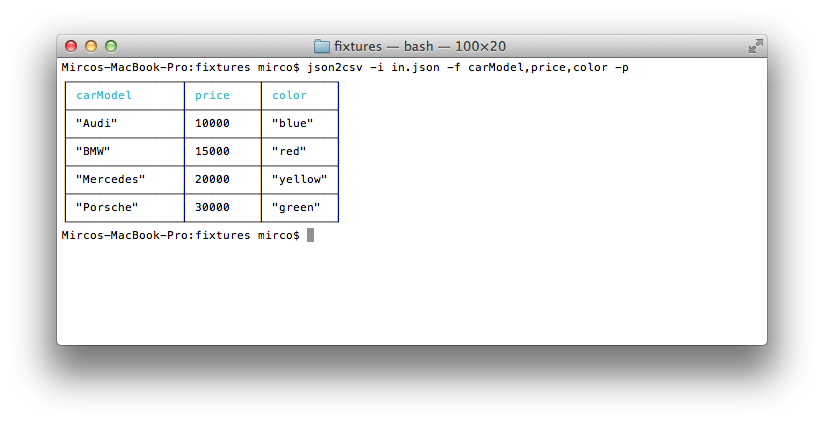
Input file, specify fields and write to file
$ json2csv -i input.json -f carModel,price,color -o out.csvContent of out.csv is
carModel,price,color
"Audi",10000,"blue"
"BMW",15000,"red"
"Mercedes",20000,"yellow"
"Porsche",30000,"green"
Input file, use field list and write to file
The file fieldList contains
carModel
price
colorUse the following command with the -l flag
$ json2csv -i input.json -l fieldList -o out.csvContent of out.csv is
carModel,price,color
"Audi",10000,"blue"
"BMW",15000,"red"
"Mercedes",20000,"yellow"
"Porsche",30000,"green"Read from stdin
$ json2csv -f price
[{"price":1000},{"price":2000}]
Hit Enter and afterwards CTRL + D to end reading from stdin. The terminal should show
price
1000
2000
Appending to existing CSV
Sometimes you want to add some additional rows with the same columns. This is how you can do that.
# Initial creation of csv with headings
$ json2csv -i test.json -f name,version > test.csv
# Append additional rows
$ json2csv -i test.json -f name,version --no-header >> test.csv
Testing
Requires mocha, should and async.
Run
$ npm testFormatting json2csv
Requires js-beautify.
Run
$ npm run formatContributors
Install require packages for development run following command under json2csv dir.
Run
$ npm installCould you please make sure code is formatted and test passed before submit Pull Requests?
See Testing and Formatting json2csv above.
But I want streams!
Check out my other module json2csv-stream. It transforms an incoming
stream containing json data into an outgoing csv stream.
Similar Projects
License
See LICENSE.md.