
Package Exports
- kynjal-cli
- kynjal-cli/dist/index.js
This package does not declare an exports field, so the exports above have been automatically detected and optimized by JSPM instead. If any package subpath is missing, it is recommended to post an issue to the original package (kynjal-cli) to support the "exports" field. If that is not possible, create a JSPM override to customize the exports field for this package.
Readme
BNA UI 🚀
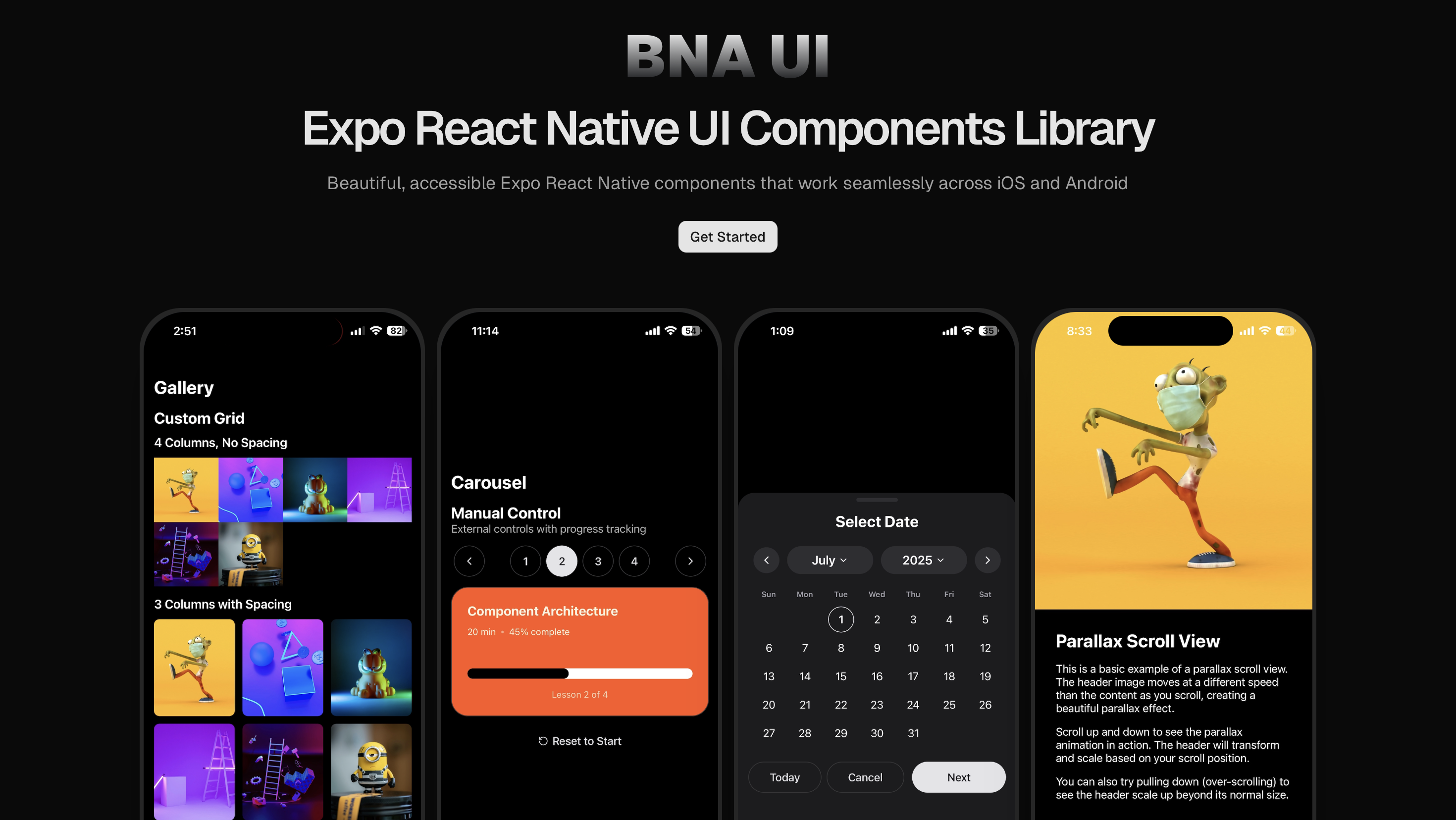
Build Native Apps - A powerful CLI for creating Expo React Native applications with a beautiful UI component library.
✨ Features
- 🎨 Beautiful UI Components - Pre-built, customizable components with modern design
- 🌙 Theme Support - Built-in light/dark mode with seamless transitions
- 📱 Expo Router Ready - Complete navigation setup with tab and stack navigation
- 🎯 TypeScript First - Full TypeScript support with excellent IntelliSense
- 📦 Flexible Package Manager - Works with npm, yarn, or pnpm
- 🚀 Zero Configuration - Get started in seconds with sensible defaults
- 🔧 Highly Customizable - Easily customize colors, spacing, and components
- 📲 Cross-Platform - Perfect compatibility across iOS and Android
- ⚡ Performance Optimized - Lightweight and fast components
- 🎭 Animation Ready - Smooth animations with React Native Reanimated
📦 Installation
# The fastest way to set up BNA UI in your Expo project:
npx bna-ui init

# Navigate to your Expo project
cd bna-app

# Start adding components
npx bna-ui add button
npx bna-ui add card
npx bna-ui add input
🎯 Usage Example
import React from 'react';
import { Button } from '@/components/ui/button';
import { Card } from '@/components/ui/card';
import { Input } from '@/components/ui/input';
import { View } from '@/components/ui/view';

export default function HomeScreen() {
  return (
    <View style={{ flex: 1, padding: 20 }}>
      <Card>
        <Input placeholder='Enter your email' keyboardType='email-address' />
        <Button
          variant='success'
          onPress={() => console.log('Button pressed!')}
        >
          Get Started
        </Button>
      </Card>
    </View>
  );
}
🌙 Theme Configuration
BNA UI comes with a flexible theming system:
// theme/colors.ts
export const lightTheme = {
  colors: {
    background: '#FFFFFF',
    foreground: '#000000',
    card: '#F2F2F7',
    cardForeground: '#000000',
    // ... more colors
  },
};

export const darkTheme = {
  colors: {
    background: '#000000',
    foreground: '#FFFFFF',
    card: '#1C1C1E',
    // ... more colors
  },
};
📱 Platform Support
- ✅ iOS - Full native iOS support
- ✅ Android - Full native Android support
- ✅ Web - Responsive web support
- ✅ Expo Go - Development with Expo Go
- ✅ EAS Build - Production builds with EAS
🛠️ Development
# Clone the repository
git clone https://github.com/ahmedbna/bna-ui.git
cd bna-ui

# Install dependencies
npm install

# Build for production
npm run build
🤝 Contributing
We welcome contributions! Please see our Contributing Guide for details.
- Fork the repository
- Create your feature branch (
git checkout -b feature/amazing-feature) - Commit your changes (
git commit -m 'Add some amazing feature') - Push to the branch (
git push origin feature/amazing-feature) - Open a Pull Request
📄 License
This project is licensed under the MIT License - see the LICENSE file for details.
🔗 Links
- 📚 Documentation: https://ui.ahmedbna.com
- 🐛 Bug Reports: GitHub Issues
- 💬 Linkedin: @ahmedbna
- 𝕏 : @ahmedbnaa
⭐ Support
If you find BNA UI helpful, please consider giving it a star on GitHub! It helps us a lot.

📈 Stats




Made with ❤️ by Ahmed BNA