
Package Exports
This package does not declare an exports field, so the exports above have been automatically detected and optimized by JSPM instead. If any package subpath is missing, it is recommended to post an issue to the original package (llm-supercli) to support the "exports" field. If that is not possible, create a JSPM override to customize the exports field for this package.
Readme
LLM SuperCLI
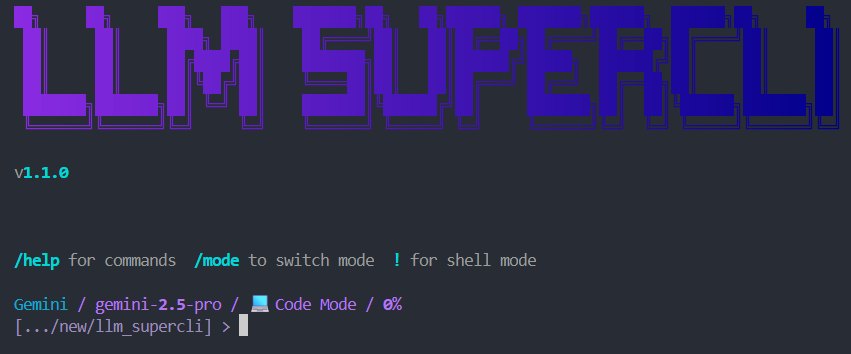
A powerful multi-provider LLM command line interface


Features • Installation • Quick Start • Providers • Commands
Features
- Multi-Provider Support - Groq, OpenRouter, Together AI, HuggingFace, Ollama, Gemini, Qwen
- Free Tiers Available - Gemini, Qwen, and Ollama work without API keys
- Interactive UI - Rich terminal with autocomplete, syntax highlighting, and live streaming
- Streaming Responses - Real-time token streaming with reasoning display
- Session Management - Save, load, and manage conversation sessions
- Tool Support - Built-in file operations, shell commands, and directory navigation
- MCP Integration - Model Context Protocol server connections
- Multiple Modes - Code, chat, and other operational modes
Installation
Via npm (Recommended)
npm install -g llm-supercliVia pip
pip install llm-supercliFrom Source
git clone https://github.com/alisaalisaalisaalisas/LLM_SuperCLI.git
cd LLM_SuperCLI
pip install -e .
Quick Start
# Start the CLI
llm

# Or use the full command
llm-supercli
Providers
| Provider | Models | Auth | Cost |
|---|---|---|---|
| Qwen | coder-model, vision-model | OAuth | Free (2K req/day) |
| Gemini | gemini-2.5-pro, gemini-2.5-flash, gemini-2.5-flash-lite | OAuth | Free |
| Groq | llama-3.3-70b, llama-3.1-8b, mixtral-8x7b, gemma2-9b | API Key | Free tier |
| Ollama | llama3.2, mistral, codellama, phi3 | Local | Free |
| OpenRouter | claude-3.5-sonnet, gpt-4o, gemini-pro-1.5, llama-3.1-405b | API Key | Paid |
| Together | llama-3.1-405b, llama-3.1-70b, mixtral-8x22b | API Key | Paid |
| HuggingFace | llama-3-70b, mixtral-8x7b, gemma-7b | API Key | Paid |
Authentication
Qwen (Free - OAuth)
Uses Qwen Code CLI credentials:
npm install -g @anthropic-ai/qwen-code
qwen  # Follow OAuth flow
Credentials stored in ~/.qwen/oauth_creds.json
Free tier: 2,000 requests/day, 60 requests/minute
Gemini (Free - OAuth)
Uses Gemini CLI credentials:
npm install -g @anthropic-ai/gemini-cli
gemini  # Follow OAuth flow
Credentials stored in ~/.gemini/oauth_creds.json
Ollama (Free - Local)
Run models locally with Ollama:
# Install Ollama from https://ollama.ai
ollama pull llama3.2
API Keys
Set environment variables for API key providers:
export GROQ_API_KEY=your_key
export OPENROUTER_API_KEY=your_key
export TOGETHER_API_KEY=your_key
export HF_API_KEY=your_key
Or set via CLI:
/key groq your_api_keyCommands
| Command | Description |
|---|---|
/help |
Show help message |
/model |
Switch LLM model or provider |
/settings |
View/edit settings |
/login [provider] |
Login with OAuth |
/logout [provider] |
Logout from provider |
/sessions |
Manage chat sessions |
/new |
Start new chat session |
/clear |
Clear the screen |
/status |
Show current status |
/cost |
Show token usage |
/key [provider] [key] |
Set API key |
/mcp |
Manage MCP servers |
/account |
View account information |
/favorite |
Save session as favorite |
/compress |
Compress conversation context |
/rewind |
Rewind to previous message |
/quit |
Exit the CLI |
/update |
Check for updates and install |
Updating
From within the CLI
/updateThis will check for new versions and prompt you to update if available.
Manual update
# npm installation
npm update -g llm-supercli

# pip installation
pip install --upgrade llm-supercli
After updating, restart the CLI to use the new version.
Special Syntax
# Execute shell command
!ls -la
!git status

# Include file contents in prompt
@path/to/file.py
Tell me about @src/main.py

# Multiple files
Explain the difference between @file1.py and @file2.py
Built-in Tools
The LLM can use these tools during conversations:
| Tool | Description |
|---|---|
list_directory(path) |
List files and folders |
read_file(path) |
Read file contents |
write_file(path, content) |
Create or write a file |
create_directory(path) |
Create a folder |
run_command(command) |
Run shell command |
get_current_directory() |
Get current working directory |
Configuration
Settings stored in ~/.llm_supercli/config.json
Access interactive settings menu:
/settingsAvailable settings:
- LLM: Provider, model, temperature, max_tokens
- UI: Theme, streaming, syntax highlighting
- MCP: Enable/disable MCP features
Requirements
- Python 3.10+
- Node.js 14+ (for npm installation)
Dependencies:
- rich >= 13.0.0
- httpx >= 0.25.0
- click >= 8.0.0
- prompt_toolkit >= 3.0.0
- packaging >= 21.0
License
MIT License - see LICENSE for details.
Links
- GitHub: https://github.com/alisaalisaalisaalisas/LLM_SuperCLI
- npm: https://www.npmjs.com/package/llm-supercli
- PyPI: https://pypi.org/project/llm-supercli/
Made with love for the CLI community