

Package Exports
- opencode-subagent-statusline
- opencode-subagent-statusline/runtime
- opencode-subagent-statusline/tui
Readme
opencode-subagent-statusline
Subagent Monitor for OpenCode.
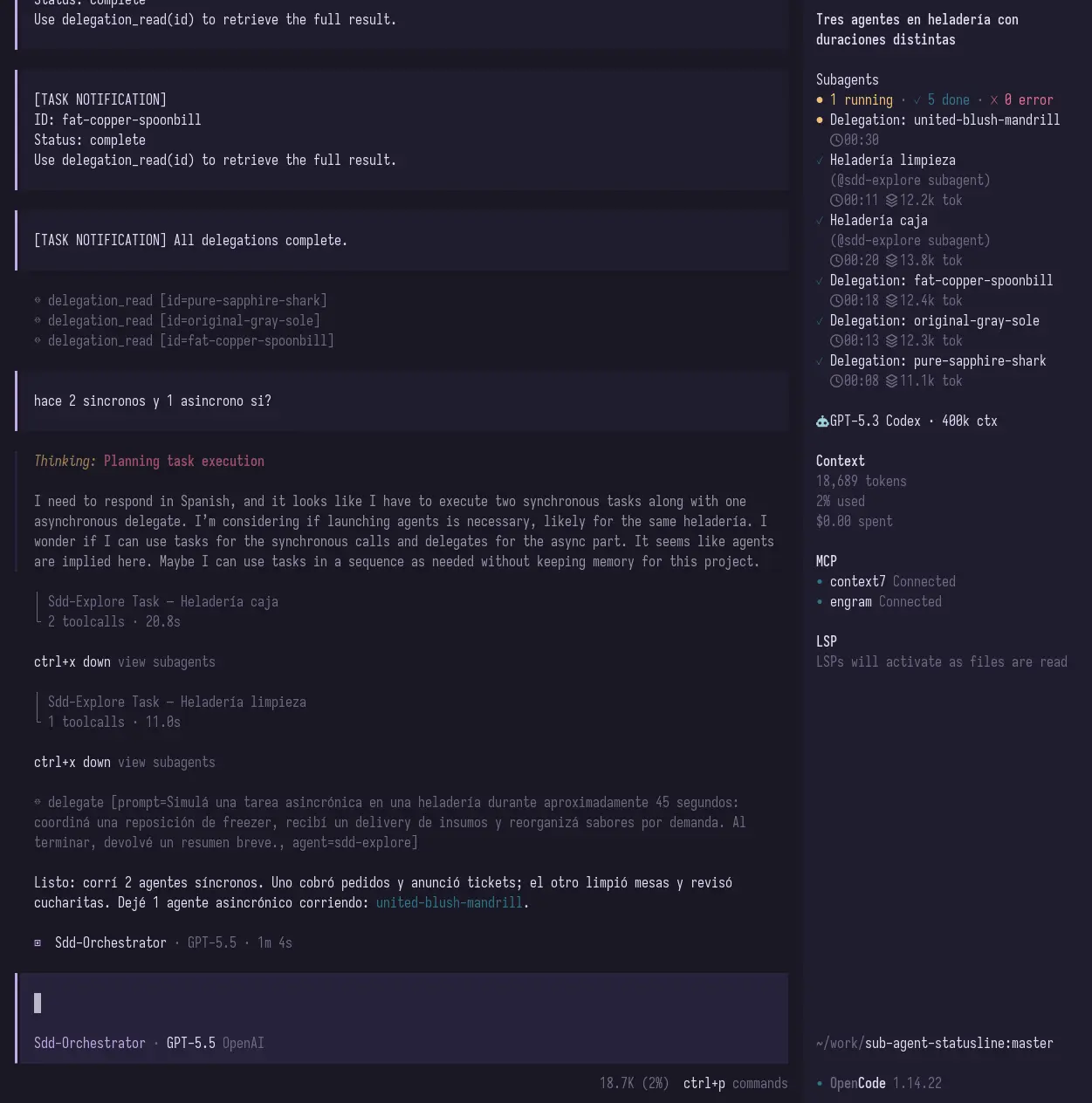
See what your subagents are doing without losing track of them: running, done, failed, elapsed time, and token/context usage when OpenCode exposes it.
This package works as both:
- a TUI sidebar plugin for OpenCode
- a runtime/statusline plugin that writes state files for custom integrations
Why?
When you delegate work to subagents, they can disappear into the background. That is powerful, but it also makes it easy to lose visibility:
- Is the review agent still running?
- Did the test agent finish?
- Which child session failed?
- How much context did a subagent use?
opencode-subagent-statusline adds a compact Subagent Monitor inside OpenCode so you can keep that information visible while you work.
Screenshot
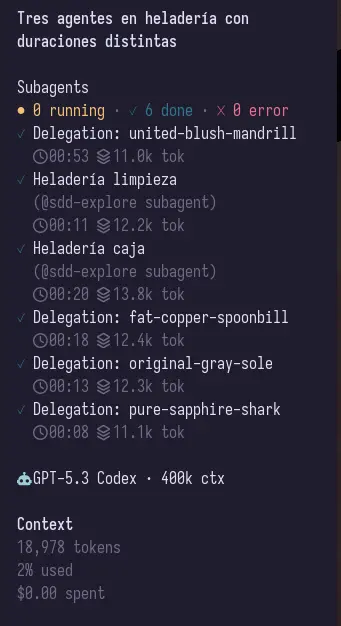
Focused sidebar view:
Install
Add the plugin to your OpenCode TUI config:
{
  "$schema": "https://opencode.ai/tui.json",
  "plugin": ["opencode-subagent-statusline"]
}
Your TUI config usually lives at:
~/.config/opencode/tui.jsonRestart OpenCode after editing the file.
What you get
The TUI plugin adds a sidebar section that shows:
- running subagents
- completed subagents
- failed subagents
- elapsed time
- token/context usage when available
It also adds a small home/footer summary when there is active subagent activity.
Runtime/statusline mode
If you also want file output for a custom statusline or external integration, add the runtime plugin to your OpenCode config:
{
  "plugin": ["opencode-subagent-statusline/runtime"]
}
This writes:
state.json— machine-readable subagent statestatus.txt— compact text output
Example statusline text:
↳ 2 running · 1 done · 0 error · tests 01:23 ctx 12.4k tok · reviewer 00:41By default, files are written under:
${XDG_RUNTIME_DIR ?? os.tmpdir()}/opencode-subagent-statusline/pid-${process.pid}/Local development
Install dependencies:
pnpm installBuild the plugin:
pnpm buildTest the local TUI build by pointing OpenCode directly at dist/tui.js:
{
  "$schema": "https://opencode.ai/tui.json",
  "plugin": [
    "/absolute/path/to/sub-agent-statusline/dist/tui.js"
  ]
}
For local runtime/statusline testing:
{
  "plugin": [
    "/absolute/path/to/sub-agent-statusline/dist/index.js"
  ]
}
Development notes
This project ships two plugin surfaces:
src/tui.tsx→ OpenCode TUI sidebar pluginsrc/index.ts→ runtime/statusline file-output plugin
The TUI bundle is built with tsup and esbuild-plugin-solid in Solid universal mode for OpenTUI compatibility.
Package entrypoints:
opencode-subagent-statusline          -> TUI plugin
opencode-subagent-statusline/tui      -> TUI plugin
opencode-subagent-statusline/runtime  -> runtime/statusline plugin
Useful commands:
pnpm build
pnpm typecheck
pnpm pack --dry-run
Troubleshooting
The plugin does not show up
Check OpenCode logs:
grep -n "subagent-statusline\|failed to load tui plugin" ~/.local/share/opencode/log/*.logThen restart OpenCode after changing tui.json.
I installed a new version but OpenCode still behaves like the old one
OpenCode may be using a cached package. Try clearing the cached package directory under:
~/.cache/opencode/packages/Then restart OpenCode.
Token/context usage is missing
OpenCode event payloads can vary by version and by event type. The plugin shows token/context usage when it is available and safely omits it when it is not.
License
MIT