
Package Exports
- rambda
- rambda/modules/prop
This package does not declare an exports field, so the exports above have been automatically detected and optimized by JSPM instead. If any package subpath is missing, it is recommended to post an issue to the original package (rambda) to support the "exports" field. If that is not possible, create a JSPM override to customize the exports field for this package.
Readme


Rambda
Faster alternative to Ramda in just 10kB - Documentation
Argumentation
I admire Ramda, as it is great library in what it does. My main problem was its size. Even custom builds didn't deliver satisfactory results. Also I already had Ramda habits and I didn't want to switch to Lodash.
Then I realized that my best solution was to publish a library that recreates the functionality of some Ramda methods with less code.
Example use
const R = require("rambda")
const result = R.compose(
  R.join("-"),
  R.filter(a => a > 2),
  R.flatten,
)([ [1], [2], [3], 4])
console.log(result) // => "3-4"
Install
Use npm i rambda for
WebpackandNode.jsusageFor browser usage include in your HTML
https://cdnjs.cloudflare.com/ajax/libs/rambda/0.8.3/webVersion.jsDifferences between Rambda and Ramda
Rambda shadows only small part of the Ramda's API.
A few things to note:
Rambda's methods should be compatible with most of the basic Ramda's methods. For more complex and Ramda specific methods(such as R.__), you should expect a mismatch.
Rambda's type detect async functions. The returned value is
"Async"Rambda's type detect unresolved
Promises. The returned value is"Promise"Rambda's map/filter work only for arrays, while Ramda's map/filter accept also objects.
Rambda's equals doesn't protect against circular structures as Ramda.equals does.
Rambda's path, pick and omit accepts both string and array as condition argument.
Rambda's defaultTo approve incoming argument only if it has the same type as the default argument.
Rambda's reverse modifies the array, instead of returning reversed copy of it.
Rambda's partialCurry is not part of Ramda API.
Rambda is tested for compatability with Ramda.flip, as this method could be useful in some cases.
If you need more Ramda methods in Rambda, you may either submit a
PRor check the extended version of Rambda - Rambdax
API
add
add(a: Number, b: Number): Number
R.add(2, 3) // => 5addIndex
addIndex(fn: Function): Function
const mapWithIndex = R.addIndex(R.map)
mapWithIndex(
  (val, index) => `${val} - ${index}`,
  ["A", "B", "C"]
) // => ["A - 0", "B - 1", "C - 2"]
adjust
adjust(replaceFn: Function, i:Number, arr:Array): Array
It replaces i index in arr with the result of replaceFn(arr[i]).
R.adjust(a => a + 1, 0, [0, 100]) // => [1, 100]always
const fn = R.always('foo')
fn() // => 'foo'
any
any(condition: Function, arr: Array): Boolean
It returns true if at least one member of arr returns true,
when passed to the condition function.
R.any(a => a * a > 8)([1, 2, 3]) // => true
R.any(a => a * a > 10)([1, 2, 3]) // => false
append
append(valueToAppend: any, arr: Array): Array
R.append('foo', ['bar', 'baz']) // => ['foo', 'bar', 'baz']compose
compose(fn1: Function, ... , fnN: Function): any
It performs right-to-left function composition.
const result = R.compose(
  R.map(a => a*2)
  R.filter(val => val>2),
)([1, 2, 3, 4])
console.log(result) // => [6, 8]
concat
concat(x: Array|String, y: Array|String): Array|String
It returns new string or array, which is result merging x and y.
R.concat([1, 2])([3, 4]) // => [1, 2, 3, 4]
R.concat('foo', 'bar') // => 'foobar'
contains
contains(valueToFind: any, arr: Array): Boolean
It returns true if valueToFind is part of arr.
R.contains(2, [1, 2]) // => true
R.contains(3, [1, 2]) // => false
curry
curry(fn: Function): Function
It returns curried version of fn.
const addFourNumbers = (a, b, c, d) => a + b + c + d
const curriedAddFourNumbers = R.curry(addFourNumbers)
const f = curriedAddFourNumbers(1, 2)
const g = f(3)
g(4) // => 10
defaultTo
defaultTo(defaultArgument: T, inputArgument: any): T
It returns defaultArgument if inputArgument is undefined or the type of inputArgument is different of the type of defaultArgument.
It returns inputArgument in any other case.
R.defaultTo('foo', undefined) // => 'foo'
R.defaultTo('foo')('bar') // => 'bar'
R.defaultTo('foo')(1) // => 'foo'
divide
R.divide(71, 100) // => 0.71drop
drop(howManyToDrop: Number, arrOrStr: Array|String): Array|String
It returns arrOrStr with howManyToDrop items dropped from the left.
R.drop(1, ['foo', 'bar', 'baz']) // => ['bar', 'baz']
R.drop(1, 'foo')  // => 'oo'
dropLast
dropLast(howManyToDrop: Number, arrOrStr: Array|String): Array|String
It returns arrOrStr with howManyToDrop items dropped from the right.
R.dropLast(1, ['foo', 'bar', 'baz']) // => ['foo', 'bar']
R.dropLast(1, 'foo')  // => 'fo'
endsWith
endsWith(x: any, arrOrStr: Array|String): Boolean
R.endsWith(
  'bar',
  "foo-bar"
) // => true

R.endsWith(
  'baz',
  "foo-bar"
) // => false
equals
equals(a: any, b: any): Boolean
It returns equality match between a and b.
It doesn't handle cyclical data structures.
R.equals(1, 1) // => true
R.equals({}, {}) // => false
R.equals([1, 2, 3], [1, 2, 3]) // => true
F
R.F() // => false
filter
filter(filterFn: Function, arr: Array): Array
Filters arr throw boolean returning filterFn
const filterFn = a => a % 2 === 0

R.filter(filterFn, [1, 2, 3, 4]) // => [2, 4]
find
find(findFn: Function, arr: Array
): T|undefined
It returns undefined or the first element of arr satisfying findFn.
const findFn = a => R.type(a.foo) === "Number"
const arr = [{foo: "bar"}, {foo: 1}]
R.find(findFn, arr) // => {foo: 1}
findIndex
findIndex(findFn: Function, arr: Array): Number
It returns -1 or the index of the first element of arr satisfying findFn.
const findFn = a => R.type(a.foo) === "Number"
const arr = [{foo: "bar"}, {foo: 1}]
R.find(findFn, arr) // => 1
flatten
flatten(arr: Array): Array
R.flatten([ 1, [ 2, [ 3 ] ] ]
// => [ 1, 2, 3 ]
has
has(prop: String, obj: Object): Boolean
- It returns
trueifobjhas propertyprop.
R.has("a", {a: 1}) // => true
R.has("b", {a: 1}) // => false
head
head(arrOrStr: Array|String): any
It returns the first element of arrOrStr.
R.head([1, 2, 3]) // => 1
R.head('foo') // => 'f'
ifElse
ifElse(condition: Function, ifFn: Function, elseFn: Function): Function
It returns function, which expect input as argument and returns finalResult.
When the function is called, a value answer is generated as a result of condition(input).
If answer is true, then finalResult is equal to ifFn(input).
If answer is false, then finalResult is equal to elseFn(input).
const fn = R.ifElse(
 x => x > 10,
 x => x*2,
 x => x*10
)
fn(8) // => 80
fn(11) // => 22
indexOf
indexOf(valueToFind: any, arr: Array): Number
It returns -1 or the index of the first element of arr equal of valueToFind.
R.indexOf(1, [1, 2]) // => 0init
init(arrOrStr: Array|String): Array|String
- It returns all but the last element of
arrOrStr.
R.init([1, 2, 3])  // => [1, 2]
R.init('foo')  // => 'fo'
join
join(separator: String, arr: Array): String
R.join('-', [1, 2, 3]) // => '1-2-3'last
last(arrOrStr: Array|String): any
- It returns the last element of
arrOrStr.
R.last(['foo', 'bar', 'baz']) // => 'baz'
R.last('foo') // => 'o'
lastIndexOf
lastIndexOf(x: any, arr: Array): Number
R.lastIndexOf(1, [1, 2, 3, 1, 2]) // => 3
R.lastIndexOf(10, [1, 2, 3, 1, 2]) // => -1
length
length(arrOrStr: Array|String): Number
R.length([1, 2, 3]) // => 3map
map(mapFn: Function, arr: Array): Array
It returns the result of looping through arr with mapFn.
const mapFn = x => x * 2;
R.map(mapFn, [1, 2, 3]) // => [2, 4, 6]
match
match(regExpression: Regex, str: String): Array
R.match(/([a-z]a)/g, 'bananas') // => ['ba', 'na', 'na']merge
merge(a: Object, b: Object)
It returns result of Object.assign({}, a, b).
R.merge({ 'foo': 0, 'bar': 1 }, { 'foo': 7 })
// => { 'foo': 7, 'bar': 1 }
modulo
modulo(a: Number, b: Number): Number
It returns the remainder of operation a/b.
R.module(14,3) // => 2multiply
multiply(a: Number, b: Number): Number
It returns the result of operation a*b.
R.module(14,3) // => 2not
not(x: any): Boolean
It returns inverted boolean version of input x.
R.not(true); //=> false
R.not(false); //=> true
R.not(0); //=> true
R.not(1); //=> false
omit
omit(propsToOmit: Array
, obj: Object): Object
It returns a partial copy of an obj with omitting propsToOmit
R.omit(['a', 'd'], {a: 1, b: 2, c: 3}) // => {b: 2, c: 3}path
path(pathToSearch: Array
|String, obj: Object): any
Retrieve the value at pathToSearch in object obj
R.path('a.b', {a: {b: 2}}) // => 2
R.path(['a', 'b'], {a: {b: 2}}) // => 2
R.path(['a', 'c'], {a: {b: 2}}) // => undefined
partialCurry
partialCurry(fn: Function|Async, a: Object, b: Object): Function|Promise
When called with function fn and first set of input a, it will return a function.
This function will wait to be called with second set of input b and it will invoke fn with the merged object of a over b.
fn can be asynchronous function. In that case a Promise holding the result of fn is returned.
See the example below:
const fn = ({a, b, c}) => {
  return (a * b) + c
}
const curried = R.partialCurry(fn, {a: 2})
curried({b: 3, c: 10}) // => 16
Note that
partialCurryis method specific for Rambda and the method is not part of Ramda's APIYou can read my argumentation for creating partialCurry here
pick
pick(propsToPick: Array
, obj: Object): Object
It returns a partial copy of an obj containing only propsToPick properties.
R.pick(['a', 'c'], {a: 1, b: 2}) // => {a: 1}pluck
pluck(property: String, arr: Array): Array
It returns list of the values of property taken from the objects in array of objects arr.
R.pluck('a')([{a: 1}, {a: 2}, {b: 3}]) // => [1, 2]prepend
prepend(x: any, arr: Array): Array
It adds x to the start of the array arr.
R.prepend('foo', ['bar', 'baz']) // => ['foo', 'bar', 'baz']prop
prop(propToFind: String, obj: Object): any
It returns undefined or the value of property propToFind in obj
R.prop('x', {x: 100}) // => 100
R.prop('x', {a: 1}) // => undefined
propEq
propEq(propToFind: String, valueToMatch: any, obj: Object): Boolean
It returns true if obj has property propToFind and its value is equal to valueToMatch
const propToFind = "foo"
const valueToMatch = 0
R.propEq(propToFind, valueToMatch)({foo: 0}) // => true
R.propEq(propToFind, valueToMatch)({foo: 1}) // => false
range
range(start: Number, end: Number): Array
It returns a array of numbers from start(inclusive) to end(exclusive).
R.range(0, 2) // => [0, 1]reduce
reduce(iteratorFn: Function, accumulator: any, array: Array): any
It returns a single item by iterating through the list, successively calling the iterator function iteratorFn and passing it an accumulator value and the current value from the array, and then passing the result to the next call.
The iterator function behaves like the native callback of the Array.prototype.reduce method.
const iteratorFn = (acc, val) => acc + val
R.reduce(iteratorFn, 1, [1, 2, 3])   // => 7
repeat
repeat(valueToRepeat: T, num: Number): Array
R.repeat('foo', 2) // => ['foo', 'foo']replace
replace(strOrRegex: String|Regex, replacer: String, str: String): String
Replace strOrRegex found in str with replacer
R.replace('foo', 'bar', 'foo foo') // => 'bar foo'
R.replace(/foo/, 'bar', 'foo foo') // => 'bar foo'
R.replace(/foo/g, 'bar', 'foo foo') // => 'bar bar'
reverse
!!! It modifies the array instead of returning new copy, as original Ramda method does.
const arr = [1, 2]
R.reverse(arr)
console.log(arr) // => [2, 1]
sort
sort(sortFn: Function, arr: Array): Array
It returns copy of arr sorted by sortFn.
sortFn must return Number
const sortFn = (a, b) => a - b
R.sort(sortFn, [3, 1, 2]) // => [1, 2, 3]
sortBy
sortBy(sortFn: Function, arr: Array): Array
It returns copy of arr sorted by sortFn.
sortFn must return value for comparison
const sortFn = obj => obj.foo
R.sortBy(sortFn, [
  {foo: 1},
  {foo: 0}
])
// => [{foo: 0}, {foo: 1}]
split
split(separator: String, str: String): Array
R.split('-', 'a-b-c') // => ['a', 'b', 'c']splitEvery
splitEvery(sliceLength: Number, arrOrString: Array|String): Array
- Splits
arrOrStrinto slices ofsliceLength
R.splitEvery(2, [1, 2, 3]) // => [[1, 2], [3]]
R.splitEvery(3, 'foobar') // => ['foo', 'bar']
startsWith
startsWith(x: any, arrOrStr: Array|String): Boolean
R.endsWith(
  'bar',
  "foo-bar"
) // => true

R.endsWith(
  'baz',
  "foo-bar"
) // => false
subtract
subtract(a: Number, b: Number): Number
R.subtract(3, 1) // => 2tail
tail(arrOrStr: Array|String): Array|String
- It returns all but the first element of
arrOrStr
R.tail([1, 2, 3])  // => [2, 3]
R.tail('foo')  // => 'oo'
take
take(num: Number, arrOrStr: Array|String): Array|String
- It returns the first
numelements ofarrOrStr.
R.take(1, ['foo', 'bar']) // => ['foo']
R.take(2, ['foo']) // => 'fo'
takeLast
takeLast(num: Number, arrOrStr: Array|String): Array|String
- It returns the last
numelements ofarrOrStr.
R.takeLast(1, ['foo', 'bar']) // => ['bar']
R.takeLast(2, ['foo']) // => 'oo'
test
test(regExpression: Regex, str: String): Boolean
- Determines whether
strmatchesregExpression
R.test(/^f/, 'foo') // => true
R.test(/^f/, 'bar') // => false
toLower
toLower(str: String): String
R.toLower('FOO') // => 'foo'toUpper
toUpper(str: String): String
R.toUpper('foo') // => 'FOO'trim
trim(str: String): String
R.trim(' foo ') // => 'foo'type
type(a: any): String
R.type(() => {}) // => "Function"
R.type(async () => {}) // => "Async"
R.type([]) // => "Array"
R.type({}) // => "Object"
R.type('foo') // => "String"
R.type(1) // => "Number"
R.type(true) // => "Boolean"
R.type(null) // => "Null"
R.type(/[A-z]/) // => "RegExp"

const delay = ms => new Promise(resolve => {
  setTimeout(function () {
    resolve()
  }, ms)
})
R.type(delay) // => "Promise"
uniq
uniq(arr: Array): Array
It returns a new array containing only one copy of each element in arr.
R.uniq([1, 1, 2, 1]) // => [1, 2]
R.uniq([1, '1'])     // => [1, '1']
update
update(i: Number, replaceValue: any, arr: Array): Array
It returns a new copy of the arr with the element at i index
replaced with replaceValue.
R.update(0, "foo", ['bar', 'baz']) // => ['foo', baz]values
values(obj: Object): Array
It returns array with of all values in obj.
R.values({a: 1, b: 2}) // => [1, 2]T
R.T() // => true
Lazy API
The following methods are included as it costs next to nothing to add them.
Note that the following list of methods are not part of Ramda API.
includes
includes(x: any, arrOrStr: Array|String): Boolean
R.includes(1, [1, 2]) // => true
R.includes('oo', 'foo') // => true
R.includes('z', 'foo') // => false
padEnd
padEnd(x: Number, str: String): String
R.padEnd(3, 'foo') // => 'foo '
padStart
padStart(x: Number, str: String): String
R.padStart(3, 'foo') // => ' foo'
toString
R.toString([1, 2]) // => '1,2'
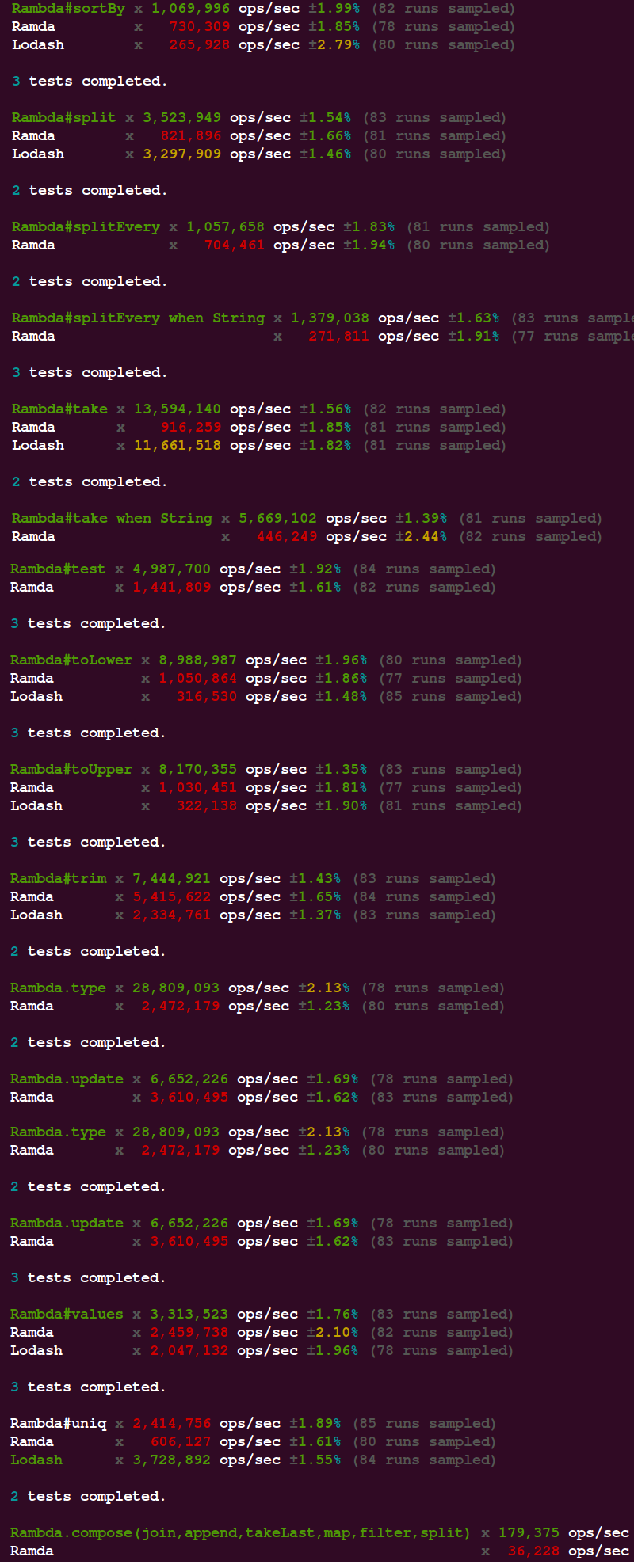
Benchmark

Flowtype
I haven't tested it fully, but the partial test shows that Ramda definitions can be used.
You need to replace declare module ramda with declare module rambda on line 10 and store the file as rambda.js in your flow-typed folder
Changelog
- 0.8.3 Add
R.always,R.TandR.F - 0.8.2 Add
concat,padStart,padEnd,lastIndexOf,toString,reverse,endsWithandstartsWithmethods - 0.8.1 Add
R.ifElse - 0.8.0 Add
R.not,R.includes| Take string as condition forR.pickandR.omit - 0.7.6 Fix incorrect implementation of
R.values - 0.7.5 Fix incorrect implementation of
R.omit - 0.7.4 issue #13 - Fix
R.curry, which used to return incorrectlyfunctionwhen called with more arguments - 0.7.3 Close issue #9 - Compile to
es2015; Approve PR #10 - addR.addIndexto the API - 0.7.2 Add
Promisesupport forR.type - 0.7.1 Close issue #7 - add
R.reduceto the API - 0.7.0 Close issue #5 - change name of
currytopartialCurry; add new methodcurry, which works just like Ramda'scurry - 0.6.2 Add separate documentation site via
docsify
Contribution guidelines
If you want to add another Ramda method to the API, please feel free to submit a PR .
The only requirement is the new method to have exact or very close implementation compared to the corresponding Ramda method.
I give you example steps of the PR process.
Create a method file in
modulesfolder.
If the new method is R.endsWith, then the created file will be ./modules/endsWith.js
Write the function declaration and function's logic.
function endsWith(x, arrOrStr){
  return arrOrStr.endsWith(x)
}
Any method, which takes more than one argument, should be curried.
We can use the standard curring used throughout Rambda.
function endsWith(x, arrOrStr){
  if(arrOrStr === undefined){
    return arrOrStrHolder => endsWith(x, arrOrStrHolder)
  }
  return arrOrStr.endsWith(x)
}
module.exports = endsWith
Or we can also use R.curry, but it is not as performant as the example above.
const curry = require('./curry')
function endsWith(x, arrOrStr){
  if(arrOrStr === undefined){
    return holder => endsWith(x, arrOrStr)
  }
  return arrOrStr.endsWith(x)
}
module.exports = curry(endsWith)
Edit
rambda.jsfile
Exported methods are sorted alphabetically
exports.dropLast = require("./modules/dropLast")
exports.endsWith = require("./modules/endsWith")
exports.equals = require("./modules/equals")
Write your test cases
Create file endsWith.js in folder __tests__
const R = require('../rambda')

test('endsWith', () => {
  expect(R.endsWith('oo')('foo')).toBeTruthy()
})
Run
npm testto validate your tests
Edit
./README.mdto add documentation
Note that your documentation should match the pattern visible across ./README.md
Lint your files
npm run lint modules/endsWith.js
npm run lint __tests__/endsWith.js
Submit PR
Expect response within 2 days.
Additional info
Projects using Rambda
Articles about Rambda