
Package Exports
- react-canvas-captcha
- react-canvas-captcha/dist/index.js
This package does not declare an exports field, so the exports above have been automatically detected and optimized by JSPM instead. If any package subpath is missing, it is recommended to post an issue to the original package (react-canvas-captcha) to support the "exports" field. If that is not possible, create a JSPM override to customize the exports field for this package.
Readme
React Canvas Captcha
Add captcha to your react projects
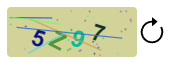
Installation
npm install react-canvas-captchaOR
yarn add react-canvas-captchaUsage
import Captcha from "react-canvas-captcha";

const App = () => {
  const [generatedCaptcha, setGeneratedCaptcha] = useState('');

  return (
    <Captcha
      boxHeight={50}
      boxWidth={130}
      refreshButton
      captchaConfig={{
        numberOfChars: 4,
        font: "bold 23px Arial",
        textStartingX: 15,
        textStartingY: 5,
      }}
      setCode={(captchaCode) => setGeneratedCaptcha(captchaCode)}
    />
  );
};

export default App;
Parameters
| Parameter Name | Default Value | Description |
|---|---|---|
| boxHeight | 50 | Height of the canvas box |
| boxWidth | 130 | Width of the canvas box |
| refreshButton | false | Show or hide the refresh button. To show the refresh button make this "true" |
| caseType | mix | Use caseType to make the captcha code case sensitive or use mix. options (mix, uppercase, lowercase) |
| captchaConfig | { numberOfChars: 4, font: 'bold 23px Arial', textStartingX: 15, textStartingY: 5 } | Config for the box. Set the number of characters usinng prop "numberOfChars". Use "font" to set the font styling. Use "textStartingX" to set the horizontal starting point for characters inside the box. Use "textStartingY" to set the vertical starting point for characters inside the box. |
| setCode | Use this function to get the new captcha code |