
Package Exports
- react-sequencer
This package does not declare an exports field, so the exports above have been automatically detected and optimized by JSPM instead. If any package subpath is missing, it is recommended to post an issue to the original package (react-sequencer) to support the "exports" field. If that is not possible, create a JSPM override to customize the exports field for this package.
Readme
React Sequencer
A better way to do animations in React.
Docs
Overview
React Sequencer gives you a step-based sequencer that transitions through any number of steps with indivdual durations. You can inject your components with the state of the sequencer in order to perform animations, transitions, music, or any complex time-sequenced set of events.
When you create a sequencer you will pass in a configuration array to tell it what the steps are:
[
  ['initial', 100],
  ['middle', 100],
  ['final', 200]
]
To explain how the sequencer behaves, consider the example above.
- A sequencer is always in one of your provided states at any time, so when the sequencer is initialized it starts in the first step
initial - The sequencer needs to be started (through the API) to begin sequencing through the steps. When this happens the sequencer remains in
initialfor another 100ms. - The sequencer then transitions to
middleand stays there for 100ms. - It then transitions to
finaland stays there for 200ms. - After the 200ms is up the sequencer remains in
finaluntil you reset it.
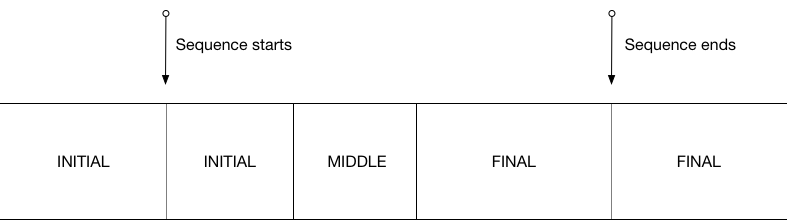
The idea here is that you get a simple, easily configurable, non-ambiguous state machine and api to control your animations. The state is passed to your component and it's totally up to you how you render it - whether it's through css animation, className animation or a graphics library.
Getting started
Install from NPM:
npm install react-sequencerThe most basic usage of react sequencer is to wrap your component with the withSequencer HOC.
import { withSequencer } from 'react-sequencer';

class MyComponent extends React.Component {
  render() {
    const { current, play } = this.props.sequencer;
    return (
      <div className={current}>
        <div>
          The sequencer state: {current}
        </div>
        <button onClick={ play }>Start</button>
      </div>
    );
  }
}

export default withSequencer({
  steps: [
    ['initial', 100],
    ['middle', 100],
    ['final', 0]
  ]
})(MyComponent);
Your component then receives a sequencer object as a prop that contains the sequencer state and some methods to control the sequencer.
Configuration
Pass an options object to withSequencer to configure your sequencer.
steps: Array [required]
Pass an array of tuples that defines the steps of the sequence and their transition times.
withSequencer({
  steps: [
    ['initial', 100],
    ['middle', 100],
    ['final', 0]
  ]
})(MyComponent);
If you specify a duration of 0ms for a step, it means that the following step will fire on the next animation frame. This guarantees that every state must be visited and rendered before transitioning to the next state.
This is a useful animation tool, since let's say you'd like a different initial state for an animation before it starts, but you don't want to effect the rest of the sequence. You can simply do this:
[
  ['pre', 0],
  ['initial', 100],
  ['middle', 100],
  ['final', 0]
]
And then pre becomes the default state when your component mounts, until the sequencer is started. By defining all the states explicitly in this fashion, it makes your animation easier to understand and manipulate.
loop: Boolean
Put the sequencer in loop mode. In loop mode, the sequencer jumps to the first step when it finishes the final step. Default is false.
Props
The sequencer prop passed to your wrapped component has the following properties:
State Props
sequencer.current: String
The current step of the sequencer, as specified by the step names provided to the sequencer.
sequencer.index: Number
The index of the current step.
sequencer.isPlaying: Boolean
true if the sequencer is playing.
sequencer.isComplete: Boolean
true if the sequencer has finished sequencing through the steps and is idle. If the sequencer is in loop mode this will never be true.
API Props
sequencer.play(): Function
Starts the sequencer, or continues playing if the sequencer was paused.
sequencer.pause(): Function
Pauses the sequencer. The sequencer remembers how far through the current step you are so that playback continues from that point rather than replaying the current step from the beggining.
sequencer.stop(): Function
Stops playback and resets the sequencer back to the first step.
<Transition>
Transition is a wrapper component to help make in/out transitions easy to manage. The concept is losely based off the React Transition Group <Transition>, but uses Sequencers as the machinery and remains unopionated about render.
Usage
import {Transition} from 'react-sequencer';

/* Define the sequence for when the component enters */
const inSteps = [
  ['enter-start', 0]
  ['enter-active', 500],
  ['entered', 100]
]

/* Define the sequence for when the component leaves */
const outSteps = [
  ['entered', 0],
  ['leave-start', 0],
  ['leave-active', 500],
  ['gone', 100]
]

<Transition
  inSteps={inSteps}
  outSteps={outSteps}
  in={true}
>
  {
    current => (
        <MyComponent/>
    )
  }
</Transition>
In the example above, MyComponent gets injected with a current prop to indicate the current step. You can also pass a function to get access to the state from your top level component. You could then do what you please with the state:
const getStyle = current => {
  switch(current) {
    case 'enter-start':
      return {
        opacity: 0
      };
    case 'enter-active':
    case 'enter-entered':
      return {
        opacity: 1
      };
    ...
  }
}

const MyComponent = props => (
  <div style={getStyle(props.current)}>
    ...
  </div>
);
Props
Props that you pass to <Transition> to configure the behavior.
in: Boolean
Toggles the component in and out.
inSteps: Array [required]
Sequence to perform when in becomes true.
outSteps: Array [required]
Sequence to perform when in becomes false.
runOnMount: Boolean
Whether or not to run the 'in' sequence when the component mounts.
unmountOnExit: Boolean
If set to true, the child element is removed from the dom when the out sequence gets to a completed state. Note that your component will remain mounted for the duration of the last step before unmounting.
Injected Props
current: String
Your wrapped component gets passed the step name of the current step of either the In Sequence or the Out Sequence.