
Package Exports
- react-style-editor
- react-style-editor/lib/index.js
This package does not declare an exports field, so the exports above have been automatically detected and optimized by JSPM instead. If any package subpath is missing, it is recommended to post an issue to the original package (react-style-editor) to support the "exports" field. If that is not possible, create a JSPM override to customize the exports field for this package.
Readme
React Style Editor


A React component that displays and edits CSS, similar to the browser's DevTools.
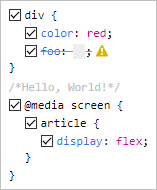
Live demo
Features
- Parses any CSS string and formats it in a familiar fashion
- Validates each rule and each declaration using the browsers's own engine
- Facilitates commenting the CSS code through checkbox toggling
- Allows easy additions by clicking next to the desired location
- Has no dependencies (other than React)
- Is tiny (< 10 KB minified)
- Is customizable through classes
- Offers 3 output formats:
- the code with preserved formatting
- a machine-friendly model of the code (recursive array of objects)
- the prettified code
Installation
npm i react-style-editorUsage
import React from 'react';
import StyleEditor from 'react-style-editor';

class Component extends React.Component {
    render() {
        return (
            <StyleEditor
                defaultValue={`
                    div {color:red;}
                    /* Hello, World! */
                    @media screen {
                        article {
                            display: flex;
                        }
                    }
                `}
            />
        );
    }
}
Props
| prop | type | default | description |
|---|---|---|---|
defaultValue |
string | '' |
The initial CSS code |
value |
string | undefined |
The controlled CSS code |
onChange |
function | null |
A closure that receives a single argument, string or array, depending on the value of outputFormats |
outputFormats |
string | 'pretty' |
Comma-separated values of: 'preserved', 'machine', 'pretty' |
readOnly |
boolean | false |
All interactions with the component are blocked |
All parameters are optional, but some are inter-related. For example, due to the nature of React, you should use StyleEditor either fully controlled or fully uncontrolled (see this article).
A short summary:
defaultValue=> uncontrolled, the component is on its ownvalue=> controlled => you must also use theonChangeorreadOnlyproperties.
The above behavior is identical to that of normal React form elements, e.g. <textarea/>.
Any other props are spread to the internal root.
Exports
Besides the default export (StyleEditor), there are also a few utility functions exported:
analyze(): ouputs themachineformatparse(): a lighter version ofanalyze()stringify(): outputs thepreservedformatprettify(): outputs theprettyformat
They all expect a CSS string as parameter and are useful if you don't want to use the React component and wait for its onChange.
Wishlist
- Color swatches (similar to the browser)
- Dropdown suggestions for properties/values (similar to the browser)
- Keyboard support for
TAB,:andUP/DOWNincrements of numeric values - Theme support (similar to the browser)
- Toggle view mode: tree/original
- Undo/redo
- Better code quality through
propTypes - Filters (similar to the browser)
- Error messages displayed in the warning-sign's tooltip