Package Exports
- rest-contracts-lambda
This package does not declare an exports field, so the exports above have been automatically detected and optimized by JSPM instead. If any package subpath is missing, it is recommended to post an issue to the original package (rest-contracts-lambda) to support the "exports" field. If that is not possible, create a JSPM override to customize the exports field for this package.
Readme
REST-Contracts
Minimalist TypeScript Libraries for Defining & Implementing REST APIs
The REST-Contracts set of packages were designed for web services that run TypeScript on both their back-end (API server/provider) and front-end (API client/consumer), and want a light-weight way to:
- specify the inputs and outputs of each API call
- automatically generate typed API client functions
- with types for each function's parameters so that TypeScript can enforce the contract
- with each function returning a Promise for the result type specified in the contract
- use TypeScript to simplify implementing the API service while reducing errors
- parameters arrive to your code with the types specified in the contract
- the type checker verifies that your implementation returns the type specified in the contract
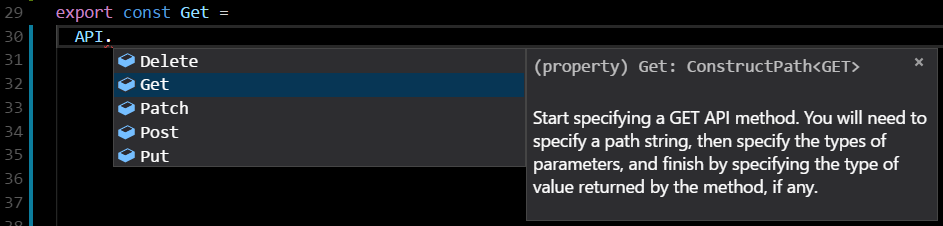
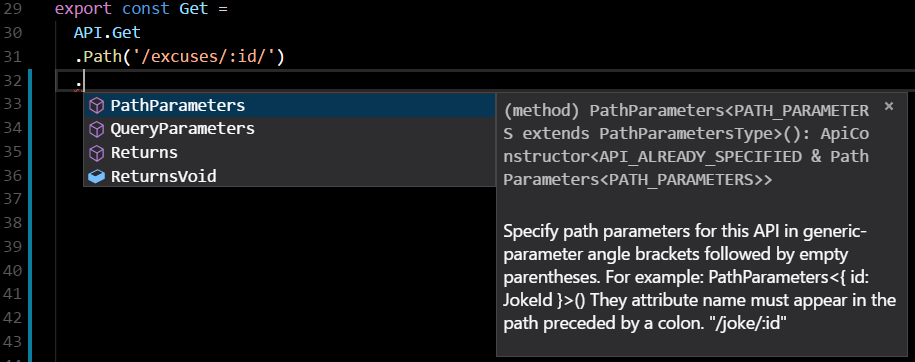
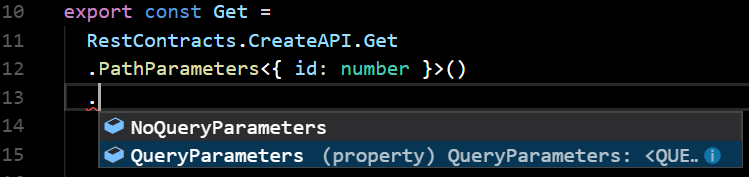
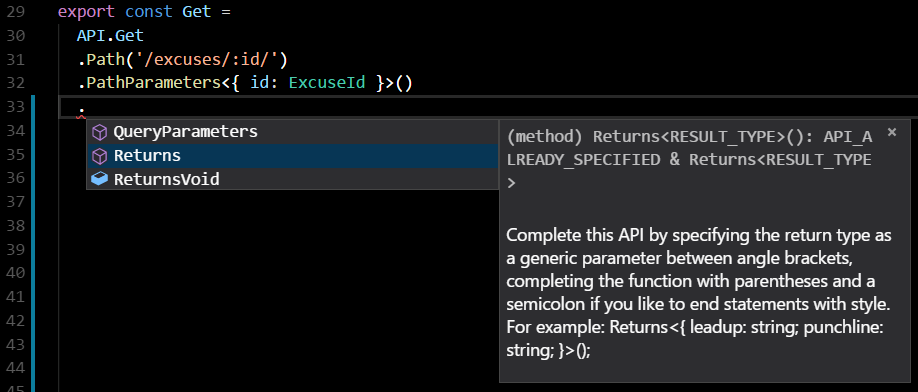
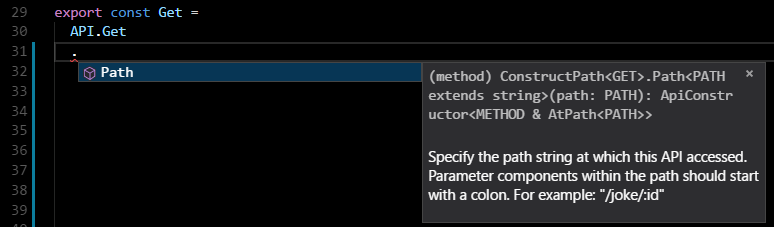
REST-contracts uses auto-complete to help make writing APIs easy.
First, you can use auto-complete to pick an HTTP REST method.
Then, you choose whether your method will have path paramters.
Next, you specify query parameters (get & delete method) or body parameters (put, post, & patch).
You then specify a result, or choose to return no result.
Finally, you choose the specify the path. Any path parameters should appear between slashes and be preceded by a colon (":").
The result is a complete contract.
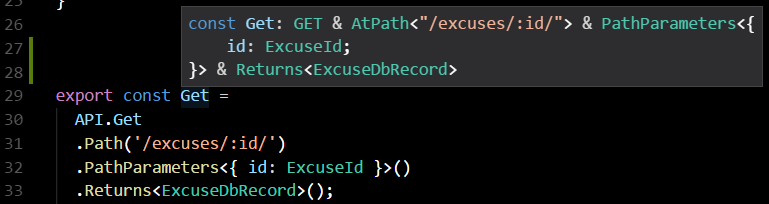
A full contract for a data type (e.g. an Excuse object) might look something like this, with a GET request for individaul objects, a GET request for multiple objects, and a PUT request to add items.
// excuse-contract.ts
import * as RestContracts from "rest-contracts";

export enum ExcuseQuality {
  Good = "solid",
  Mediocre = "iffy",
  Poor = "lame"
}

export interface Excuse {
  id: string;
  quality: ExcuseQuality;
  description: string;
}

export const Get =
  RestContracts.CreateAPI.Get
  .PathParameters<{ id: string }>()
  .NoQueryParameters
  .Returns<Excuse>()
  .Path('/excuses/:id/');

export const Query =
  RestContracts.CreateAPI.Get
  .NoPathParameters
  .QueryParameters<{quality?: Excuse["quality"]}>()
  .Returns<Excuse[]>()
  .Path('/excuses/');

export const Put =
  RestContracts.CreateAPI.Put
  .NoPathParameters
  .BodyParameters<Excuse>()
  .Returns<Excuse>()
  .Path("/excuses/");
The Get, Query, and Put objects generated in this example contain a path and method. More importantly, the compiler attaches to these objects additional type information that defines parameters and return type of each API call. These attached types are consumed by packages that help you to implement the APIs on the server side that implement client functions to allow client code to call these APIs--providing compile-time checking of compliance with the interface contract on both sides.
REST-contracts server packages simplify correct API implementation.
To create servers implement the API in these contracts, you can currently used rest-contracts-express-server, rest-contracts-lambda, or implement your own.
// server.ts
import * as bodyParser from "body-parser";
import * as express from "express";
import * as RestContracts from "rest-contracts";
import * as RestContractsExpressServer from "rest-contracts-express-server";
import * as ExcuseContract from "./excuse-contract";

// If you're using express, you'll still have to configure it,
// making sure to use bodyParser.json()
const router = express.Router()
const app = express();
// This line causes express to parse JSON responses for you.
app.use(bodyParser.json());
app.use(router);
const PORT = 5000;
app.listen(PORT);

export function run(): void {
  console.log("Starting API server");

  // You'll implement your APIs by calling the implement method of this class.
  // (Want to add authentication or other steps?  Just create a subclass!)
  const ourApi = new RestContractsExpressServer.RestContractsExpressServer(router);

  // Best to create a new file here, import the ourApi class,
  // and separate implementations into different files.
  const excuseMemoryTable =
    new Map<ExcuseContract.Excuse["id"], ExcuseContract.Excuse>();

  // We've merged all params into params, but req, res, & next are still available
  // to you. (We've also added typings to the parameter fields of the req object!)

  // Implement the Excuse Put method
  ourApi.implement(ExcuseContract.Put, (params, req, res, next) => {
    excuseMemoryTable.set( params.id, params );
    return params;
  });

  // Implement the Excuse Get method
  // (leaving out req, res, next since we're not using them)
  ourApi.implement(ExcuseContract.Get, (params) =>
    excuseMemoryTable.get(params.id)
  );

  // Impelmenting the Excuse directory-level Get, which can query on excuse quality
  ourApi.implement(ExcuseContract.Query, (params) =>
    [...excuseMemoryTable.values()].
      filter( values => (!params.quality) || values.quality === params.quality )
  );
}
REST-contracts client packages build typed client functions for you.
To automatically build client functions to call the API in the contract, we have a minimal rest-contracts-browser-client, which has no dependencies so that it can run compactly in the browser, and rest-contracts-axios-client, which builds on top of axios so that it can run within node or in the browser. Since our example runs on node, it uses the latter.
// client.ts
import * as RestContracts from "rest-contracts";
import {getClientCreationFunction} from "rest-contracts-axios-client";
import * as ExcuseContract from "./excuse-contract";

// To create client calls, the factory needs the URL and any default configuration settings
// we might want to specify.
const createRequestFunction = getClientCreationFunction  ("http://localhost:5000/", {timeout: 5000});

// Call the factory to create a request functio nfor Get, Query, and Put
const excuseClient = {
  get: createRequestFunction(ExcuseContract.Get),
  query: createRequestFunction(ExcuseContract.Query),
  put: createRequestFunction(ExcuseContract.Put),
};

// This function runs our example queries.  Try modifying the requests
// in VSCode to see Intellisense autocomplete parameters, dislpay type
// information, and report type errors.
export async function run(): Promise<void> {
  console.log("Starting API client");

  try {
    // Add two excuses.  Excuses for what?  Not using TypeScript.
    await excuseClient.put({
      id: "df458df",
      quality: ExcuseContract.ExcuseQuality.Poor,
      description: "I don't use TypeScript because I enjoy debugging type errors in production software.",
    });

    console.log("Put the first excuse");

    await excuseClient.put({
      id: "asdflewi",
      quality: ExcuseContract.ExcuseQuality.Poor,
      description: "My nervous systems has a built-in type checker that catches errors before they become keystrokes.",
    });

    console.log("Put the second excuse");

    // Retrieve the second excuse using get with a path parameter.
    const secondExcuse = await excuseClient.get({id: "asdflewi"});

    // Retrieve excuses using Query (get with a query parameter)
    const lameExcuses = await excuseClient.query({quality: ExcuseContract.ExcuseQuality.Poor});
    console.log("Retrieved excuses:", lameExcuses);

    // Retrieve excuses using Query (get with a query parameter)
    const goodExcuses = await excuseClient.query({quality: ExcuseContract.ExcuseQuality.Good});
    console.log("Here are all the valid excuses for not using TypeScript:", goodExcuses);
    console.log("Yup, that's all of them.");

  } catch (error) {
    console.log("Error:", error);
  }
}
You can download the working example from the package/rest-contracts-example directory of the repository on GitHub, or download it as an npm package.
Contributing
Make sure you're using yarn version >= 1 and have the shx package installed globally.
npm install -g yarn@latest
npm install -g shx
git clone https://github.com/UppaJung/rest-contracts.git
yarn
The only thing we love more than carefully-crafted pull requests are the people who contribute them.
