
Package Exports
- service-mock-middleware
This package does not declare an exports field, so the exports above have been automatically detected and optimized by JSPM instead. If any package subpath is missing, it is recommended to post an issue to the original package (service-mock-middleware) to support the "exports" field. If that is not possible, create a JSPM override to customize the exports field for this package.
Readme


service-mock-middleware
使用这个中间件的好处如下:
- 在服务端没有提供接口的情况下进行一个真实的http请求数据的mock,进行正常的业务开发,提高开发效率。
- mock配置文件可以接收到前端ajax请求过来的参数,并且可以根据不同的请求参数,返回不同的mock数据。
- 在开发过程中我们经常会遇到服务端的某个接口出现错误问题,例如:服务端的一个状态改变的接口,出现错误。这时候就会阻塞我们的业务流程,以前我们可能就需要等待服务的修复后才能继续往下开发。使用这个mock中间件我们在开发阶段可以按照正常的业务流程返回正确的mock数据,等服务端接口修复了我们把mock数据开关一关马上就可以验证效果。
- 这个mock中间件只用于开发阶段,而且mock数据不会造成代码污染,就是当你对你的项目进行生产环境的代码构建时完全不需要关心mock数据,不需要做任何的配置,mock的数据也不会被打包。传统前端的mock数据拦截,如果不使用webpack全局变量的区分,mock数据会被打包到生产环境的代码中,而且它并没有发出一个真实的http请求。
- 使用、配置简单、灵活、支持请求参数接收,可以返回灵活丰富的mock数据,满足各种业务场景。
安装
``` npm install service-mock-middleware --save-dev ```使用
1、webpack-dev-server配置中使用中间件
``` const path = require('path'); const HtmlWebpackPlugin = require('html-webpack-plugin'); const bodyParser = require('body-parser'); const serviceMockMiddleware = require('service-mock-middleware');module.exports = { mode: 'development', entry: { app: path.resolve(__dirname, 'src', 'demo1', 'index.js'), // 必须使用绝对路径 main: path.resolve(__dirname, 'src/demo2/main.js') // 必须使用相对路径 }, output: { filename: '[name].[hash].js', path: path.resolve(__dirname, 'dist') }, devtool: 'inline-source-map', devServer: { /** * 提供在服务器内部所有其他中间件之前执行自定义中间件的能力。 * @param app * @param server */ before(app, server) { // POST 创建 application/x-www-form-urlencoded 编码解析,用于POST请求参数解析 app.use(bodyParser.urlencoded({ extended: false })); // 使用service-mock-middleware中间件 app.use(serviceMockMiddleware({ webpackConfig: module.exports, // webpack配置 server // webpack-dev-server对象,用于控制浏览器刷新 })); } }, plugins: [ new HtmlWebpackPlugin({ template: path.resolve(__dirname,'src/common/index.html'), // html模版 filename: path.resolve(__dirname, 'dist', 'index.html'), // html输出位置 title: 'index', // html默认标题 chunks: ['app' ] // entry对象的key,一个key就是一个chunk }), new HtmlWebpackPlugin({ template: path.resolve(__dirname, 'src', 'common', 'index.html'), filename: path.resolve(__dirname, 'dist', 'main.html'), title: 'main', chunks: [ 'main' ] }) ] }
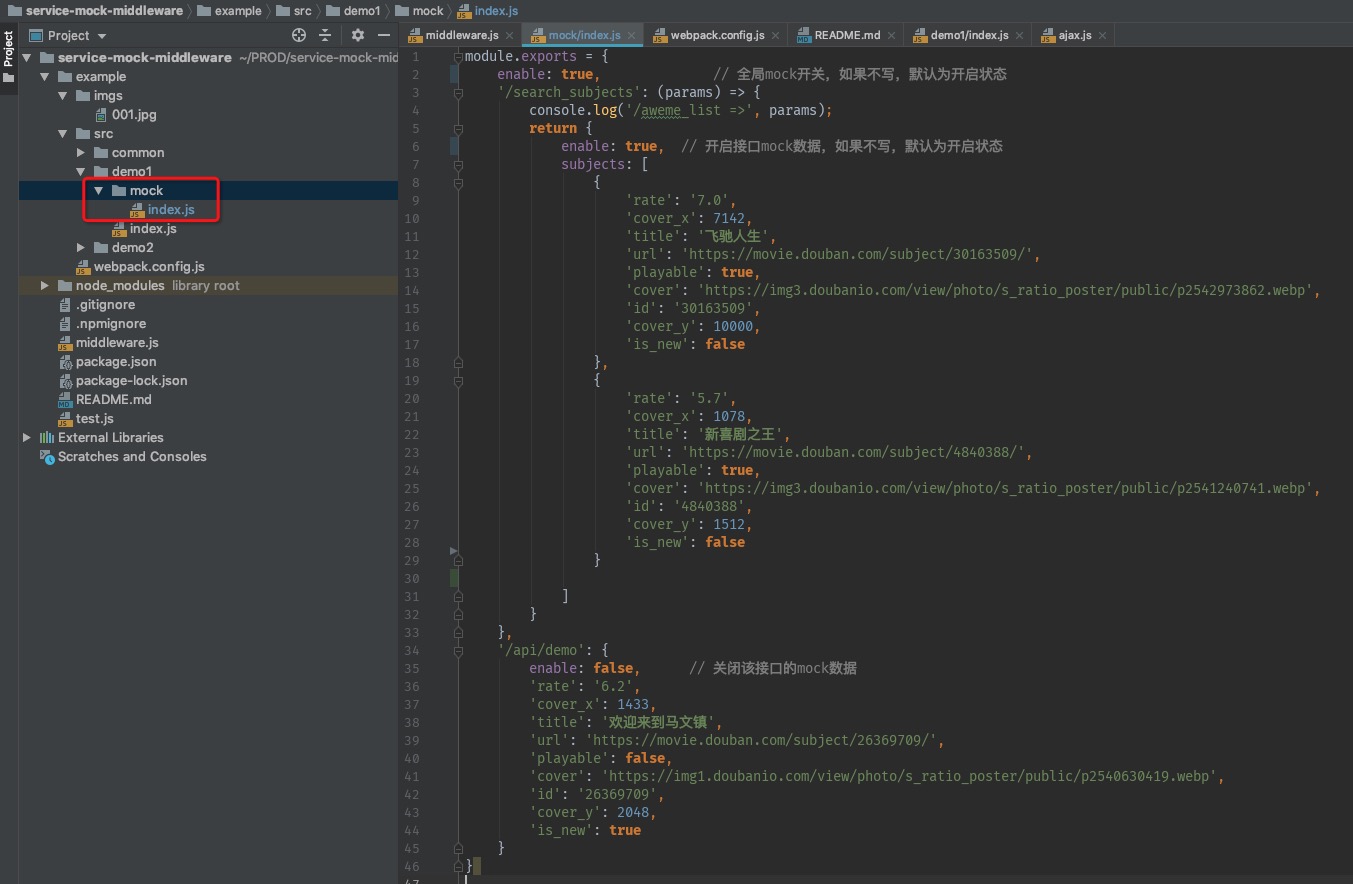
<h4 align="left">2、webpack入口文件的同级目录下创建mock配置文件</h4>
<h4 align="left">3、发送ajax请求,获取mock数据</h4>
<h2 align="center">运行例子</h2>