
Package Exports
- typescript-yaml-plugin
- typescript-yaml-plugin/dist/index.js
This package does not declare an exports field, so the exports above have been automatically detected and optimized by JSPM instead. If any package subpath is missing, it is recommended to post an issue to the original package (typescript-yaml-plugin) to support the "exports" field. If that is not possible, create a JSPM override to customize the exports field for this package.
Readme
typescript-yaml-plugin



Import .yaml files in TypeScript 5+ with autocomplete and type checking.
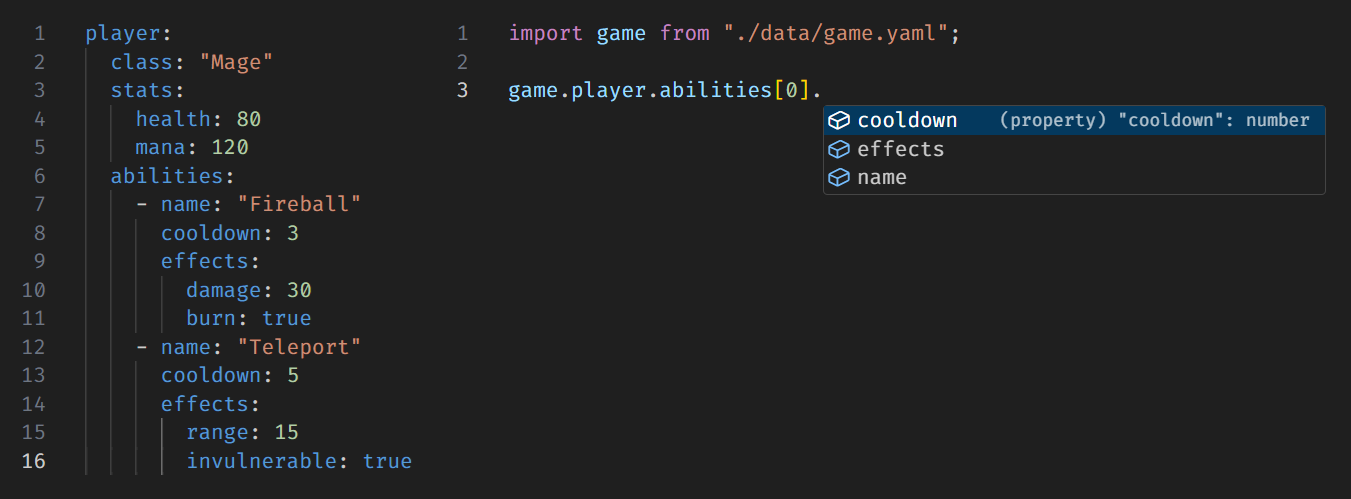
Usage
Install the plugin:
npm install --save-dev typescript-yaml-pluginUpdate your tsconfig.json:
{
  "compilerOptions": {
    "plugins": [{ "name": "typescript-yaml-plugin" }]
  }
}
Start importing YAML files! 🎉
import schema from './schema.yaml';VSCode Users
Make sure your editor is using the workspace version of TypeScript (the one where the plugin is installed). To do this:
- Open the Command Palette (
Ctrl+Shift+PorCmd+Shift+P) - Run
TypeScript: Select TypeScript Version - Choose
Use Workspace Version
Notes
- This plugin uses the
yamlpackage under the hood. Supported features and limitations are fully inherited from that library. - This plugin is only for editor support (autocomplete and type-checking). It does not make
.yamlfiles work at runtime. To actually be able to import YAML files in your running code, you’ll need to pair this with a runtime plugin that handles.yamlfiles likebun-plugin-yamlor@modyfi/vite-plugin-yaml, depending on your runtime. - This plugin was inspired by
typescript-plugin-yaml, which is no longer maintained and does not support TypeScript 5+.
Contributing
Issues and PRs are welcome!