
Package Exports
- canvacord
This package does not declare an exports field, so the exports above have been automatically detected and optimized by JSPM instead. If any package subpath is missing, it is recommended to post an issue to the original package (canvacord) to support the "exports" field. If that is not possible, create a JSPM override to customize the exports field for this package.
Readme
Canvacord
Powerful image manipulation tool to manipulate images easily.
Installation
$ npm i canvacord
Features
- Super simple and easy to use 😎
- Faster than canvacord v4 🚀
- More than 50 methods...? Yay! 🎉
- Built on node-canvas and no bullsh*t involved 🔥
- Object oriented 💻
- Beginner friendly 🤓
- Supports emojis 😀
Documentation
Join our Discord server
Examples
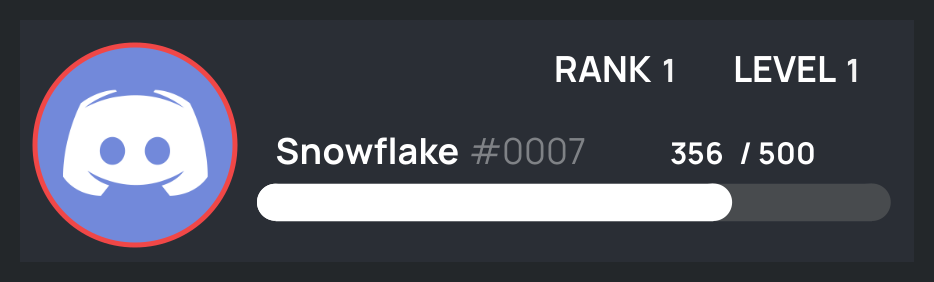
Rank Card
const canvacord = require("canvacord");
const img = "https://cdn.discordapp.com/embed/avatars/0.png";

const userData = getDataSomehow();

const rank = new canvacord.Rank()
    .setAvatar(img)
    .setCurrentXP(userData.xp)
    .setRequiredXP(userData.requiredXP)
    .setStatus("dnd")
    .setProgressBar("#FFFFFF", "COLOR")
    .setUsername("Snowflake")
    .setDiscriminator("0007");

rank.build()
    .then(data => {
        const attachment = new Discord.MessageAttachment(data, "RankCard.png");
        message.channel.send(attachment);
    });
Preview
Other Examples
const Discord = require("discord.js");
const client = new Discord.Client();
const canvacord = require("canvacord");

client.on("ready", () => {
    console.log("I'm online!");
});

client.on("message", async (message) => {
    if (message.author.bot) return;
    if (message.content === "!triggered") {
        let avatar = message.author.displayAvatarURL({ dynamic: false, format: 'png' });
        let image = await canvacord.Canvas.trigger(avatar);
        let attachment = new Discord.MessageAttachment(image, "triggered.gif");
        return message.channel.send(attachment);
    }
});

client.login("Your_Bot_Token_here");
Support me

Note
⚠ | In order to use
Canvacord#Welcomer/Canvacord#Leaver/Canvacord#CaptchaGen, you may need to install packages like discord-canvas & captcha-canvas.