
Package Exports
- check-outdated
This package does not declare an exports field, so the exports above have been automatically detected and optimized by JSPM instead. If any package subpath is missing, it is recommended to post an issue to the original package (check-outdated) to support the "exports" field. If that is not possible, create a JSPM override to customize the exports field for this package.
Readme





check-outdated
Ensures that your dependencies are up-to-date, otherwise the process is terminated with status code 1.
This is an improved version of npm outdated, which can be used in build-pipelines, pre-publish scripts (npm) or pre-commit hook (Git) to make sure all the used dependencies are up-to-date.
- Zero dependencies
- Optionally ignore pre-releases (e.g. "2.1.0-alpha", "2.1.0-beta", "2.1.0-rc.1")
- Optionally ignore dev dependencies
- Optionally ignore specific packages
- Optionally check globally installed packages
- Optionally set depth for checking dependency tree
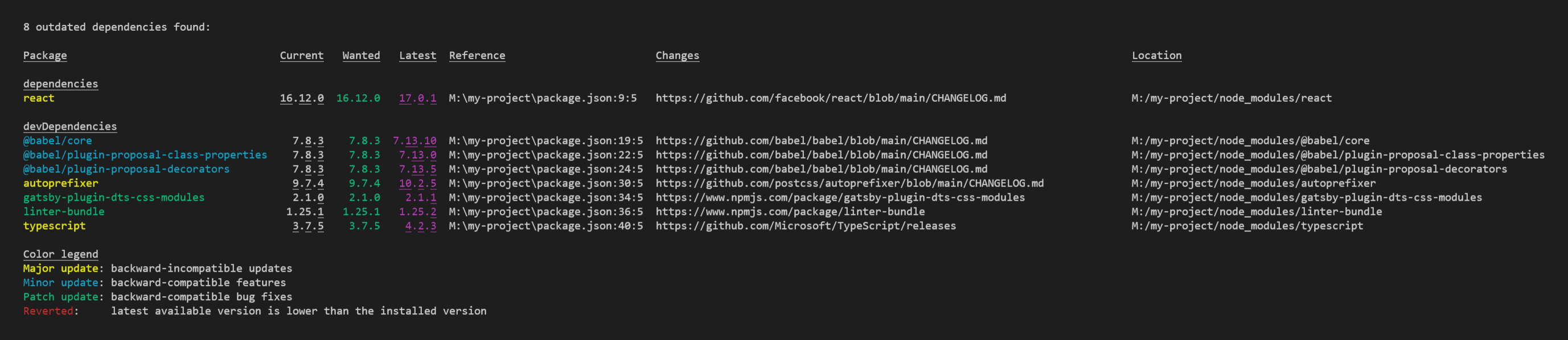
Example Screenshot
Install
npm install check-outdated --save-devUsage
On command-line you can run the command like this:
node_modules/.bin/check-outdated --ignore-pre-releases --ignore-dev-dependencies --ignore-packages package1,package2Or put it into your package.json:
{
  "scripts": {
    "check-outdated": "check-outdated --ignore-pre-releases --ignore-dev-dependencies --ignore-packages package1,package2",
    "preversion": "npm run lint && npm run test && npm run check-outdated"
  }
}| Argument | Description |
|---|---|
| --help, -h | Show the help |
| --ignore-pre-releases | Don't recommend to update to the latest version, if it contains a hyphen (e.g. "2.1.0-alpha", "2.1.0-beta", "2.1.0-rc.1") |
| --ignore-dev-dependencies | Do not warn if devDependencies are outdated. |
| --ignore-packages <comma-separated-list-of-package-names> | Ignore the listed packages, even if they are outdated |
| --global | Check packages in the global install prefix instead of in the current project (equal to the npm outdated-option) |
| --depth <number> | Max depth for checking dependency tree (equal to the npm outdated-option) |