
Package Exports
- detectrtc
- detectrtc/DetectRTC
- detectrtc/DetectRTC.min
This package does not declare an exports field, so the exports above have been automatically detected and optimized by JSPM instead. If any package subpath is missing, it is recommended to post an issue to the original package (detectrtc) to support the "exports" field. If that is not possible, create a JSPM override to customize the exports field for this package.
Readme
DetectRTC | Is WebRTC Supported In Your Browser?




Live Demo: https://www.webrtc-experiment.com/DetectRTC/
if (DetectRTC.isWebRTCSupported === false) {
    alert('Please use Chrome or Firefox.');
}

if (DetectRTC.hasWebcam === false) {
    alert('Please install an external webcam device.');
}

if (DetectRTC.hasMicrophone === false) {
    alert('Please install an external microphone device.');
}

if (DetectRTC.hasSpeakers === false && (DetectRTC.broser.name === 'Chrome' || DetectRTC.broser.name === 'Edge')) {
    alert('Oops, your system can not play audios.');
}
What is this?
A tiny JavaScript library that can be used to detect WebRTC features e.g. system having speakers, microphone or webcam, screen capturing is supported, number of audio/video devices etc.
Free?
It is MIT Licenced, which means that you can use it in any commercial/non-commercial product, free of cost.
Tests?
Releases?
How to install?
npm install detectrtc --production

# or via "bower"
bower install detectrtc
Proposed NEW API
DetectRTC.isSetSinkIdSupported                  // (implemented)
DetectRTC.isRTPSenderReplaceTracksSupported     // (implemented)
DetectRTC.isORTCSupported                       // (implemented)
DetectRTC.isRemoteStreamProcessingSupported     // (implemented)

DetectRTC.isWebsiteHasWebcamPermissions        // (implemented)
DetectRTC.isWebsiteHasMicrophonePermissions    // (implemented)

DetectRTC.audioInputDevices    // (implemented)
DetectRTC.audioOutputDevices   // (implemented)
DetectRTC.videoInputDevices    // (implemented)

// Below API are NOT implemented yet
DetectRTC.browser.googSupportedFlags.googDAEEchoCancellation
DetecRTC.browser.googSupportedFlags.echoCancellation
DetectRTC.isMediaHintsSupportsNewSyntax
LocalHost
node server.js

# or
npm start

# and open:
http://127.0.0.1:9001

# or
http://localhost:9001
NPM
var DetectRTC = require('detectrtc');

console.log(DetectRTC.browser);

DetectRTC.load(function() {
    console.log(DetectRTC);
});- Live NPM test: https://tonicdev.com/npm/detectrtc
Or try npm-test.js:
cd node_modules
cd detectrtc

# npm test
# or
node npm-test.js
How to link the script?
<script src="./node_modules/detectrtc/DetectRTC.js"></script>

<!-- or bower -->
<script src="./bower_components/detectrtc/DetectRTC.js"></script>

<!-- or CDN link (suggested) -->
<script src="https://cdn.webrtc-experiment.com/DetectRTC.js"></script>

<!-- or RawGit (if CDN fails) -->
<script src="https://cdn.rawgit.com/muaz-khan/DetectRTC/master/DetectRTC.js"></script>
You can even link specific versions:
<script src="https://github.com/muaz-khan/DetectRTC/releases/download/1.3.5/DetectRTC.js"></script>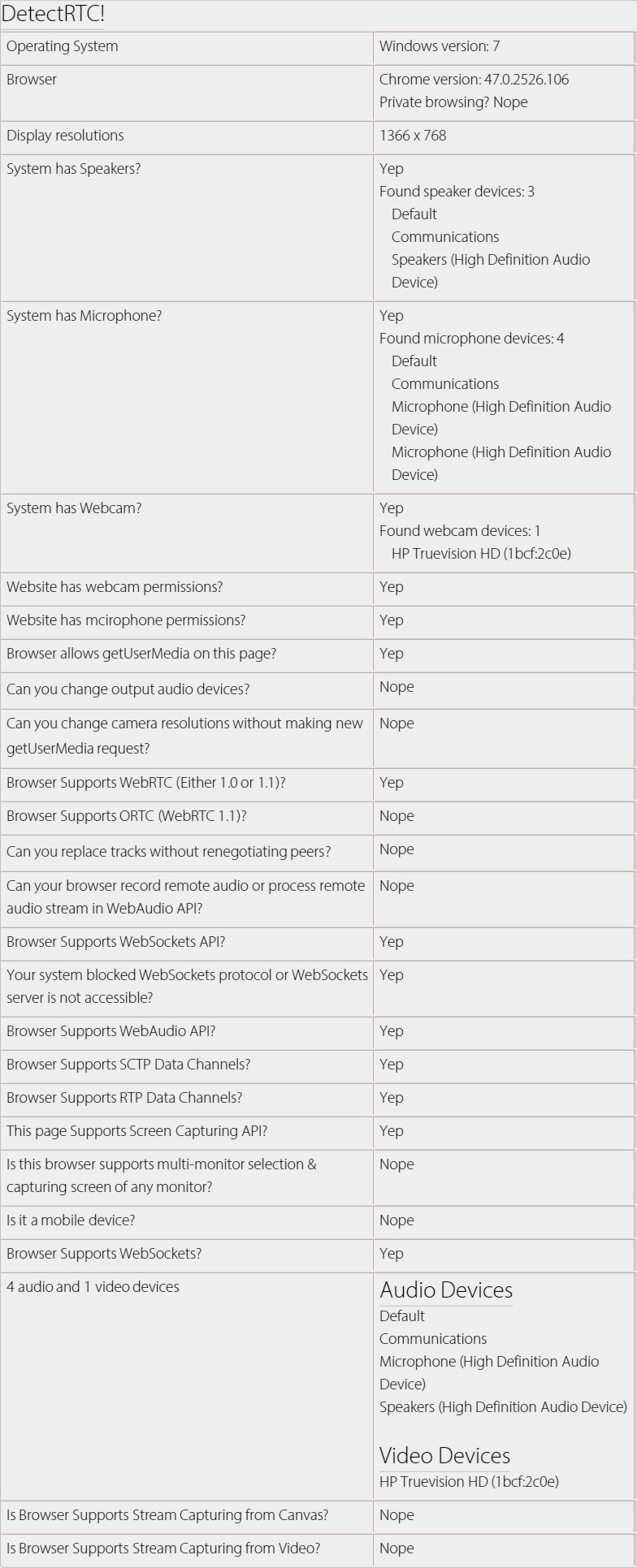
How to use it?
// for node.js users
var DetectRTC = require('detectrtc');

// non-nodejs users can skip above line
// below code will work for all users

DetectRTC.load(function() {
    DetectRTC.hasWebcam; // (has webcam device!)
    DetectRTC.hasMicrophone; // (has microphone device!)
    DetectRTC.hasSpeakers; // (has speakers!)
    DetectRTC.isScreenCapturingSupported;
    DetectRTC.isSctpDataChannelsSupported;
    DetectRTC.isRtpDataChannelsSupported;
    DetectRTC.isAudioContextSupported;
    DetectRTC.isWebRTCSupported;
    DetectRTC.isDesktopCapturingSupported;
    DetectRTC.isMobileDevice;

    DetectRTC.isWebSocketsSupported;
    DetectRTC.isWebSocketsBlocked;
    DetectRTC.checkWebSocketsSupport(callback);

    DetectRTC.isWebsiteHasWebcamPermissions;        // getUserMedia allowed for HTTPs domain in Chrome?
    DetectRTC.isWebsiteHasMicrophonePermissions;    // getUserMedia allowed for HTTPs domain in Chrome?

    DetectRTC.audioInputDevices;    // microphones
    DetectRTC.audioOutputDevices;   // speakers
    DetectRTC.videoInputDevices;    // cameras

    DetectRTC.osName;
    DetectRTC.osVersion;

    DetectRTC.browser.name === 'Edge' || 'Chrome' || 'Firefox';
    DetectRTC.browser.version;
    DetectRTC.browser.isChrome;
    DetectRTC.browser.isFirefox;
    DetectRTC.browser.isOpera;
    DetectRTC.browser.isIE;
    DetectRTC.browser.isSafari;
    DetectRTC.browser.isEdge;

    DetectRTC.browser.isPrivateBrowsing; // incognito or private modes

    DetectRTC.isCanvasSupportsStreamCapturing;
    DetectRTC.isVideoSupportsStreamCapturing;

    DetectRTC.DetectLocalIPAddress(callback);
});
Why load method?
If you're not detecting audio/video input/outupt devices then you can skip this method.
DetectRTC.load simply makes sure that all devices are captured and valid result is set for relevant properties.
How to use specific files?
Demo: https://jsfiddle.net/cf90az9q/
<script src="https://cdn.webrtc-experiment.com/DetectRTC/checkDeviceSupport.js"></script>
<script>
function selectSecondaryCamera() {
    checkDeviceSupport(function() {
        var secondDevice = videoInputDevices[1];
        if(!secondDevice) return alert('Secondary webcam is NOT available.');

        var videoConstraints = {
            deviceId: secondDevice.deviceId
        };

        if(!!navigator.webkitGetUserMedia) {
            videoConstraints = {
                mandatory: {},
                optional: [{
                    sourceId: secondDevice.deviceId
                }]
            }
        }

        navigator.getUserMedia = navigator.mozGetUserMedia || navigator.webkitGetUserMedia;
        navigator.getUserMedia({ video: videoConstraints }, function(stream) {
            //
        }, function(error) {
            alert(JSON.stringify(error));
        });
    });
}
</script>
For further tricks & usages:
Rules to Contribute
mkdir DetectRTC
cd DetectRTC
git clone git://github.com/muaz-khan/DetectRTC.git ./

# install grunt for code style verifications
npm install grunt-cli

# install all dependencies
npm install --save-dev

# verify your changes
# npm test  # or "grunt"
grunt

# Success? Make a pull request!
Github
Tests powered by
- Check tests here: https://travis-ci.org/muaz-khan/DetectRTC
License
DetectRTC.js is released under MIT licence . Copyright (c) Muaz Khan.