

Package Exports
- git-coco
- git-coco/dist/index.esm.mjs
- git-coco/dist/index.js
This package does not declare an exports field, so the exports above have been automatically detected and optimized by JSPM instead. If any package subpath is missing, it is recommended to post an issue to the original package (git-coco) to support the "exports" field. If that is not possible, create a JSPM override to customize the exports field for this package.
Readme
coco







git-coco — write your git commits with AI, then never leave the terminal. The coco command turns your staged diff into a clear, Conventional-Commits-ready message in one step, and grows into a full keyboard-driven git workstation when you want it. Works across seven AI providers — including fully local Ollama (no API costs, nothing leaves your machine) — on GitHub, GitHub Enterprise, and GitLab.
Name note: the package and project are git-coco; the command you run is
coco.
git add .
coco commit          # AI writes the message from your staged changes
That's the core. Everything else — changelogs, code review, PRs, and the coco ui workstation — is the same engine pointed at more of your git workflow.

✨ Key Features:
- 🤖 AI-Powered Commit Messages - Generate contextual commits from your staged changes
- 📋 Conventional Commits - Full support with automatic validation and formatting (extends to
coco commit --splittoo — every group's title respects the spec) - 🔧 Commitlint Integration - Seamless integration with your existing commitlint configuration
- 🏠 Local AI Support - Run completely offline with Ollama (no API costs, full privacy)
- 🖥️ Coco UI Git Workstation - Sixteen top-level views (history, status, diff, compose, branches, tags, stash, worktrees, pull-request, PR triage, issues, conflicts, reflog, bisect, submodules, changelog) reachable via
g-prefixed chords, with an interactive command palette (:), global search (/), and one-keystroke workflows:Ssplit staged changes,Lgenerate a changelog,Ccreate a PR seeded from changelog,Eopen the commit draft in$EDITOR - 🗂️ Multi-Repo Workspace -
coco workspace(aliasws) scans your current directory for git repos and gives you a sortable, filterable overview — branch, dirty count, ahead/behind, open PR count — thenEnterdrills into any one as a fullcoco uisession - 🎨 117 Color Themes - Catppuccin, Gruvbox, Dracula, Tokyo Night, Monokai Pro, Rosé Pine, Selenized, Solarized, and many more (31 light) — browse and live-preview them with the in-app theme picker (
gC), then apply with one keystroke; or set one viacoco ui --theme <name>/ config.NO_COLORhonored - 🎯
--repo <dir>global flag - Drive any coco command against any repository withoutcd-ing first - 📦 Package Manager Friendly - Works with npm, yarn, and pnpm
- 🩺 Config Diagnostics -
coco doctoraudits your configuration for unknown providers, mismatched endpoints, and API key issues — with auto-fix suggestions and a--costmodel-routing breakdown - 👥 Team Ready - Shared configurations and enterprise deployment
Install
# Homebrew (macOS/Linux) — brings Node along, no prerequisites
brew install gfargo/tap/coco

# curl installer
curl -fsSL https://coco.griffen.codes/install.sh | sh

# npm / pnpm / yarn (needs Node 22+)
npm install -g git-coco

# or try it without installing
npx git-coco@latest init
Quick Start
# Setup and configure (pick a provider, set preferences)
coco init

# Generate your first commit
git add .
coco commit -i
Commands
coco commit- Generate commit messages from staged changescoco amend- Regenerate the last commit's message from its diff andgit commit --amendcoco changelog- Create changelogs from commit historycoco pr create- Generate a PR title and body from the branch diff, then open it viagh(GitHub) orglab(GitLab)coco recap- Summarize recent changes and activitycoco review- AI-powered code review of your changes (--severity <n>and--stagedfor CI gating)coco log- Explore commit history with graph, filters, JSON output, and commit detailscoco ui- Open the full-screen Git workstation TUIcoco workspace(aliasws) - Multi-repo overview TUI; drill into any repo as acoco uisessioncoco issues/coco prs- List GitHub or GitLab issues / pull requests (stdout or interactive triage)coco doctor- Diagnose your environment, config, and provider setup (--costshows per-task model routing plus usage by task, model, and repo;--clearwipes the local usage ledger)coco init- Interactive setup wizard
Global flags:
--repo <dir>targets any repository,--jsonrequests machine-readable output where supported, and--quiet(-q) suppresses status chrome while keeping results on stdout.
Smart default (0.57.0+): running
cocowith no subcommand routes by environment —coco uiinside a git repo,coco workspaceoutside one, orcoco initon a fresh install. It no longer defaults tocommit; usecoco commitfor messages (or--commit/COCO_DEFAULT=committo restore the old default).
Local usage stats (0.69.0+): coco keeps a local, per-machine record of AI usage (prompt-token estimate and latency by task, model, and repo) to power
coco doctor --cost. It stays on your machine and records no prompt, diff, or code content. The first interactive run enables it after a one-time notice; non-interactive and CI runs stay off. Opt out anytime withcoco init,telemetry.usage: false, orCOCO_USAGE_LOG=0.
Multi-forge (0.70.0+):
coco prs,coco issues,coco pr create, and the fullcoco uiworkstation (PR/issue triage, inspectors, and every per-row action) work with GitHub, GitHub Enterprise, and GitLab. coco detects the forge from your remote and shells out to the matching CLI:ghfor GitHub / GitHub Enterprise,glabfor GitLab (install it and runglab auth login).
Usage Examples
Basic Workflow
# Make your changes
git add .

# Generate commit message (interactive mode recommended)
coco commit -i

# Or use stdout mode
git commit -m "$(coco commit)"
Conventional Commits
# Enable conventional commits format
coco commit --conventional

# With additional context
coco commit -a "Fixes login timeout" --conventional

# Include ticket from branch name
coco commit --append-ticket --conventional
Team Workflows
# Generate changelog for releases
coco changelog --since-last-tag

# Summarize recent work
coco recap --yesterday

# Code review before committing
coco review

# Explore commit history
coco ui
coco ui --view status
coco log --limit 20
coco log -i
coco log --view full --limit 20
coco log --all --limit 20
coco log --author "Grace Hopper" --path src
coco log --commit HEAD
coco log --format json
Navigating the TUI
coco ui and coco log -i share a chord-driven navigation model. Press g and then a second key to jump anywhere; < (or Esc) pops the navigation stack back.
g h   history          g c   compose         g x   conflicts
g s   status           g b   branches        g r   reflog
g d   diff             g t   tags            g C   theme picker
g w   worktrees        g z   stash           <     back
g p   pull request                           Esc   back / close modal
                                              ?     help overlay
                                              :     command palette
The command palette (:) is an interactive launcher with fuzzy filter and recently-used at the top — every keybinding and workflow action is reachable from there. / searches the active view (history, branches, tags, stash, or reflog). On branches, tags, and history, press m to mark a ref as the compare base — then Enter on a second ref opens a git diff <base>..<head> view. See the Coco UI and TUI Navigation wiki pages for the full keymap.
Configuration
Configure coco for your workflow with the interactive setup wizard:
# Setup wizard
coco init

# Project-specific setup
coco init --scope project
AI Providers: seven first-class providers (API keys read from config or env)
- OpenAI - GPT-4o / GPT-4.1 family (
OPENAI_API_KEY) - Anthropic - Claude 4 / 3.x family (
ANTHROPIC_API_KEY) - Google Gemini - Gemini 2.5 / 2.0 / 1.5 (
GEMINI_API_KEYorGOOGLE_API_KEY) - Mistral - Mistral large/medium/small, Codestral, Ministral (
MISTRAL_API_KEY) - Azure OpenAI - native Azure deployments (
AZURE_OPENAI_API_KEY+ instance/deployment/api-version) - AWS Bedrock - via the AWS credential chain (
AWS_ACCESS_KEY_ID/AWS_SECRET_ACCESS_KEY/AWS_REGION) - Ollama - Local models, no API costs, full privacy
- Plus any OpenAI-compatible endpoint (OpenRouter, custom
baseURL)
Example Configuration:
{
  "mode": "interactive",
  "conventionalCommits": true,
  "logTui": {
    "theme": {
      "preset": "catppuccin"
    }
  },
  "service": {
    "provider": "openai",
    "model": "gpt-4o"
  }
}
Documentation
For comprehensive guides, advanced usage, and detailed configuration options, visit our complete documentation:
📚 Coco Wiki
Essential Guides:
- Getting Started - Complete beginner's guide from installation to first commit
- Command Reference - Detailed command options and examples
- Configuration Overview - All configuration options and setup methods
- Coco UI - GitKraken-style terminal workstation guide
- Interactive Log TUI - History-focused
coco log -iguide - Team Collaboration - Enterprise deployment and team adoption strategies
Advanced Resources:
- Using Ollama - Local AI setup for privacy and cost control
- Advanced Usage - Custom prompts, automation, and power-user features
- Troubleshooting - Solutions for common issues and debugging
🆘 Need Help?
- Troubleshooting Guide - Comprehensive problem-solving resource
- GitHub Issues - Bug reports and feature requests
- Discord Community - Real-time help and discussion
Contribution
We welcome contributions! Check out our CONTRIBUTING.md for more information.
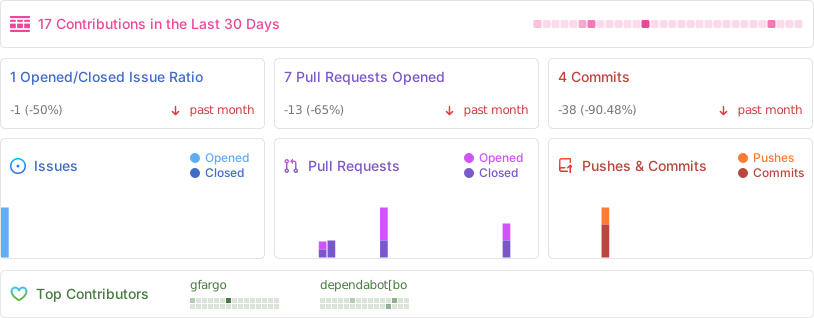
Project Stats
License
MIT © gfargo

Thanks for using coco ✨💜