

Package Exports
- hs-uix
- hs-uix/datatable
- hs-uix/form
Readme
hs-uix


Production-ready UI components for HubSpot UI Extensions. Built entirely on HubSpot's native primitives — no custom HTML, no CSS, no iframes.
Install
npm install hs-uiximport { DataTable } from "hs-uix/datatable";
import { FormBuilder } from "hs-uix/form";
// or import everything from the root
import { DataTable, FormBuilder } from "hs-uix";Requires react >= 18.0.0 and @hubspot/ui-extensions >= 0.12.0 as peer dependencies (already present in any HubSpot UI Extensions project).
DataTable
A drop-in table component for HubSpot UI Extensions. Define your columns, pass your data, and you get search, filtering, sorting, pagination, inline editing, row grouping, and auto-sized columns out of the box.
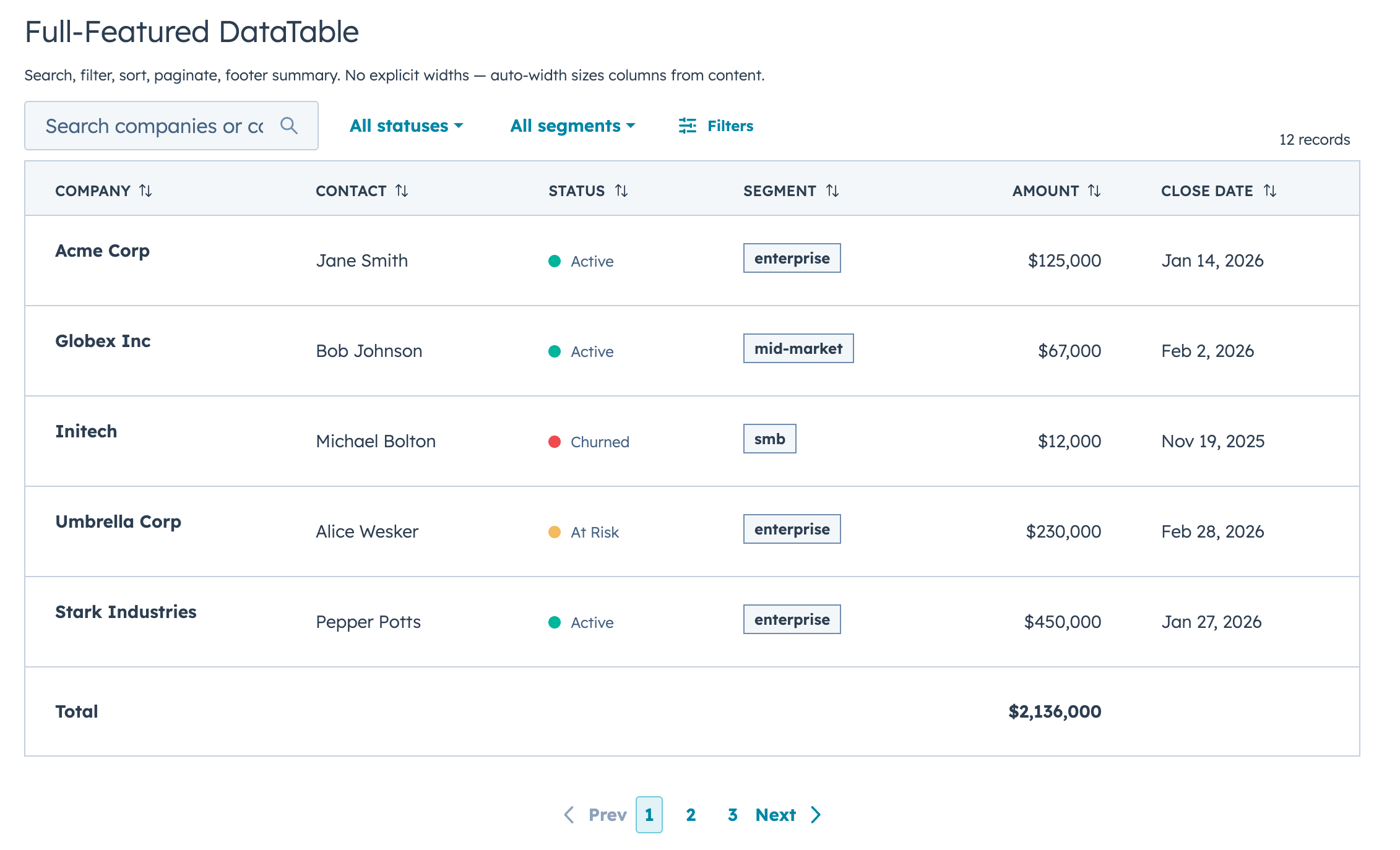
Why DataTable?
If you've built tables with HubSpot's Table, TableRow, and TableCell primitives, you know the drill: wire up search, sorting, pagination, and filtering yourself, then spend an hour tweaking column widths that still look wrong. DataTable does all of that for you.
The column sizing alone is worth it. DataTable looks at your actual data (types, string lengths, unique values, whether a column has edit controls) and picks widths automatically. Booleans and dates get compact columns, text gets room, and editable columns are never too narrow for their inputs. You don't configure any widths unless you want to.
import { DataTable } from "hs-uix/datatable";

const COLUMNS = [
  { field: "name", label: "Company", sortable: true, renderCell: (val) => val },
  { field: "status", label: "Status", renderCell: (val) => <StatusTag>{val}</StatusTag> },
  { field: "amount", label: "Amount", sortable: true, renderCell: (val) => formatCurrency(val) },
];

<DataTable data={deals} columns={COLUMNS} searchFields={["name"]} pageSize={10} />
That's a searchable, sortable, paginated table with auto-sized columns in 5 lines of config.
DataTable Features
- Full-text search across any combination of fields, with optional fuzzy matching via Fuse.js
- Select, multi-select, and date range filters with configurable active badges and clear/reset controls
- Click-to-sort headers with three-state cycling (none, ascending, descending)
- Client-side or server-side pagination with configurable page size, visible page buttons, and First/Last navigation
- Collapsible row groups with per-column aggregation functions
- Row selection via checkboxes with client/server-aware "Select all" behavior
- Selection action bar with selected count, select/deselect all, and custom bulk action buttons
- Per-row actions via
rowActions(static array or dynamic function) - Two edit modes (discrete and inline/full-row) supporting 12 input types with per-column validation
- Auto-width column sizing based on data analysis, with manual overrides
- Text truncation helpers (
truncate: trueortruncate: { maxLength }) - Customizable record label, row count display, and table appearance (
bordered,flush,scrollable) - Column-level footer for totals rows
- Works with
useAssociationsfor live CRM data - Server-side mode with loading/error states, search debounce, controlled state, and unified
onParamsChangecallback
Filters and Footer Totals
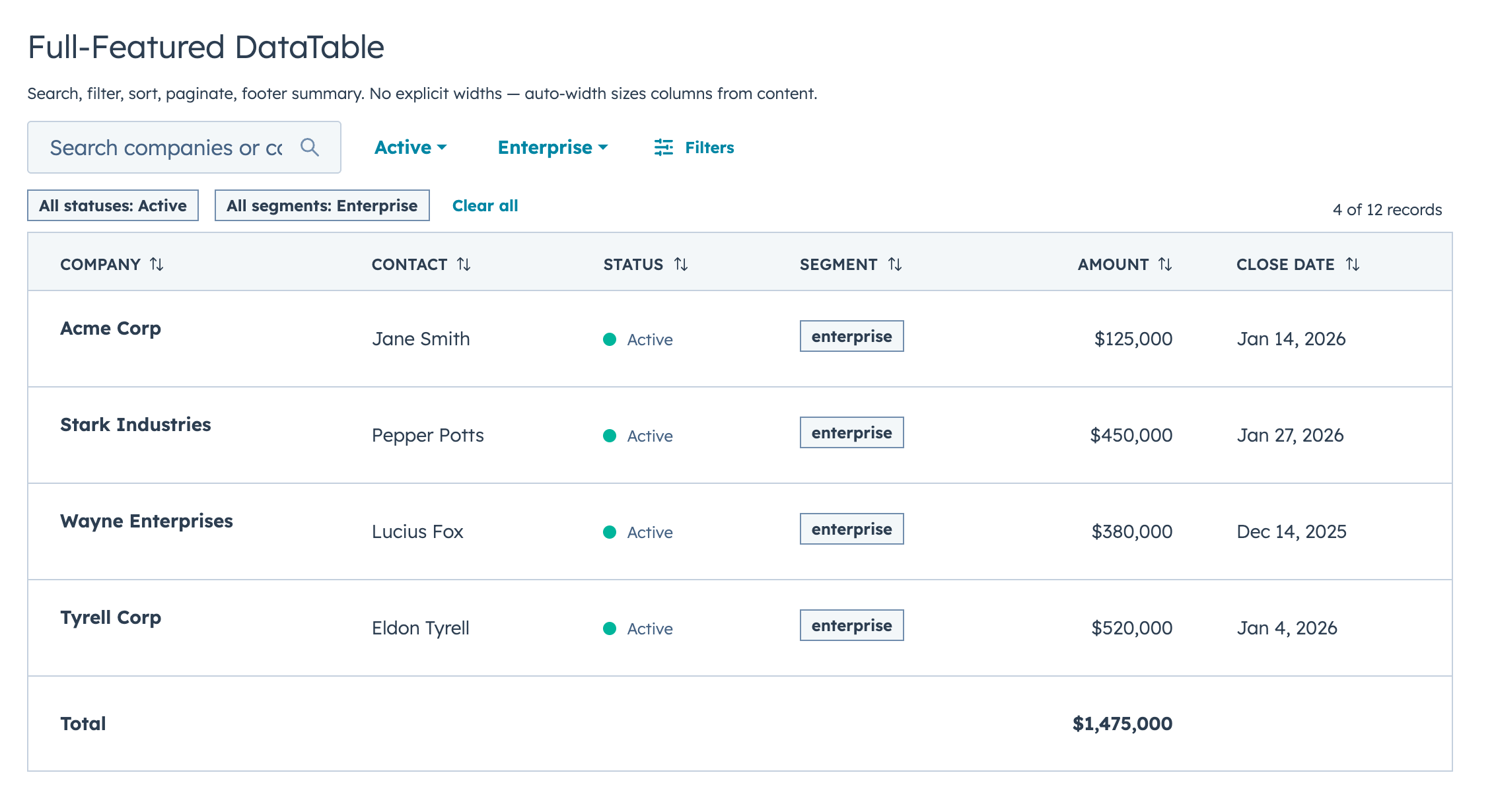
When more than 2 filters are defined, the first 2 appear inline and the rest are tucked behind a Filters button. Active filters display as removable chips with a "Clear all" option.
const FILTERS = [
  {
    name: "status",
    type: "select",
    placeholder: "All statuses",
    options: [
      { label: "Active", value: "active" },
      { label: "At Risk", value: "at-risk" },
      { label: "Churned", value: "churned" },
    ],
  },
  { name: "closeDate", type: "dateRange", placeholder: "Close date" },
];

const COLUMNS = [
  { field: "company", label: "Company", sortable: true, footer: "Total",
    renderCell: (val) => <Text format={{ fontWeight: "demibold" }}>{val}</Text> },
  { field: "amount", label: "Amount", sortable: true, align: "right",
    footer: (rows) => formatCurrency(rows.reduce((sum, r) => sum + r.amount, 0)),
    renderCell: (val) => formatCurrency(val) },
];

<DataTable
  data={DEALS}
  columns={COLUMNS}
  filters={FILTERS}
  searchFields={["company"]}
  pageSize={5}
/>
Row Selection with Bulk Actions
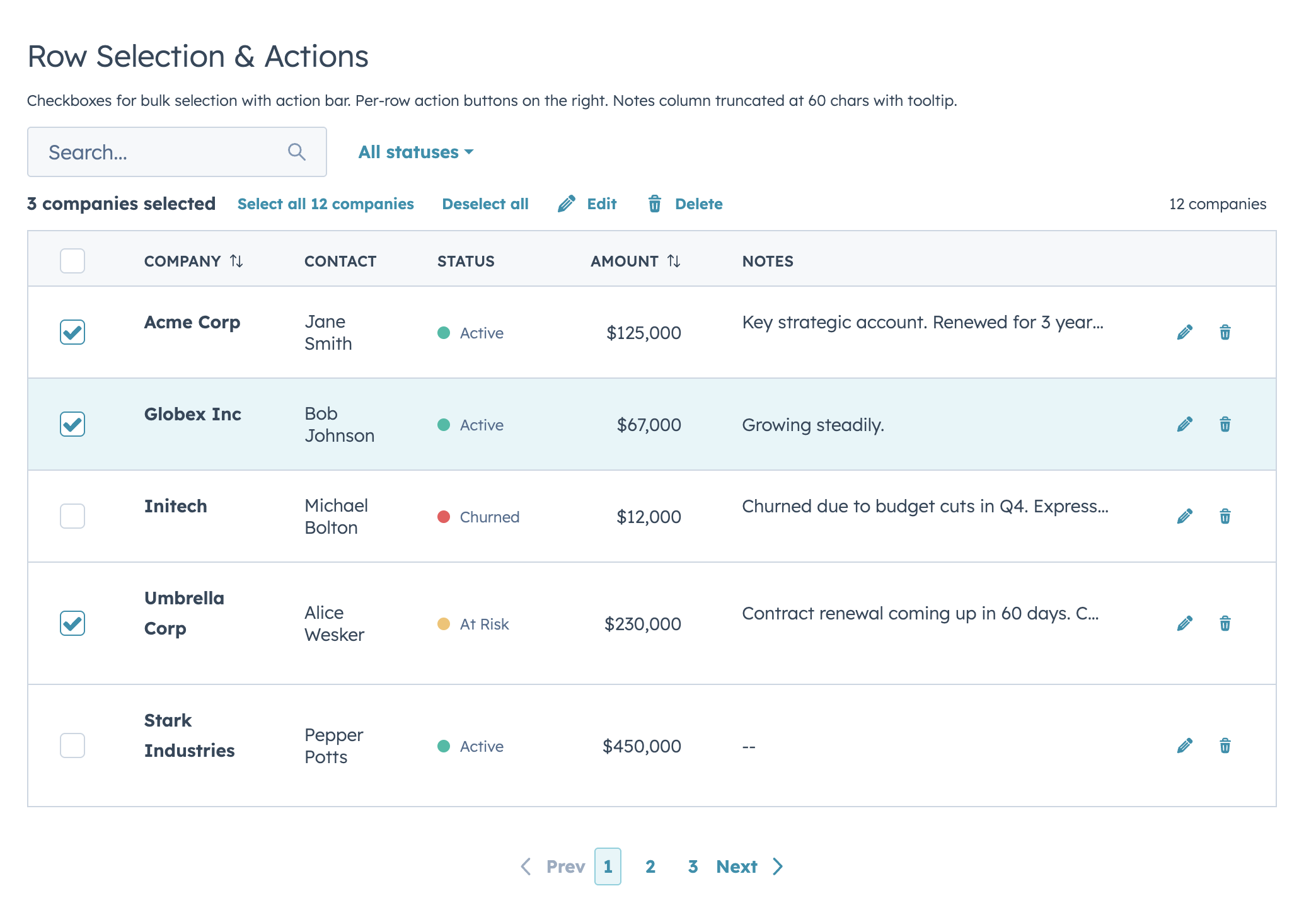
const selectionActions = [
  { label: "Edit", icon: "edit", onClick: (ids) => console.log("Edit", ids) },
  { label: "Delete", icon: "delete", onClick: (ids) => console.log("Delete", ids) },
  { label: "Export", icon: "dataExport", onClick: (ids) => console.log("Export", ids) },
];

<DataTable
  data={COMPANIES}
  columns={columns}
  selectable={true}
  rowIdField="id"
  recordLabel={{ singular: "Company", plural: "Companies" }}
  onSelectionChange={setSelected}
  selectionActions={selectionActions}
  searchFields={["name", "contact"]}
  pageSize={10}
/>
Inline Editing
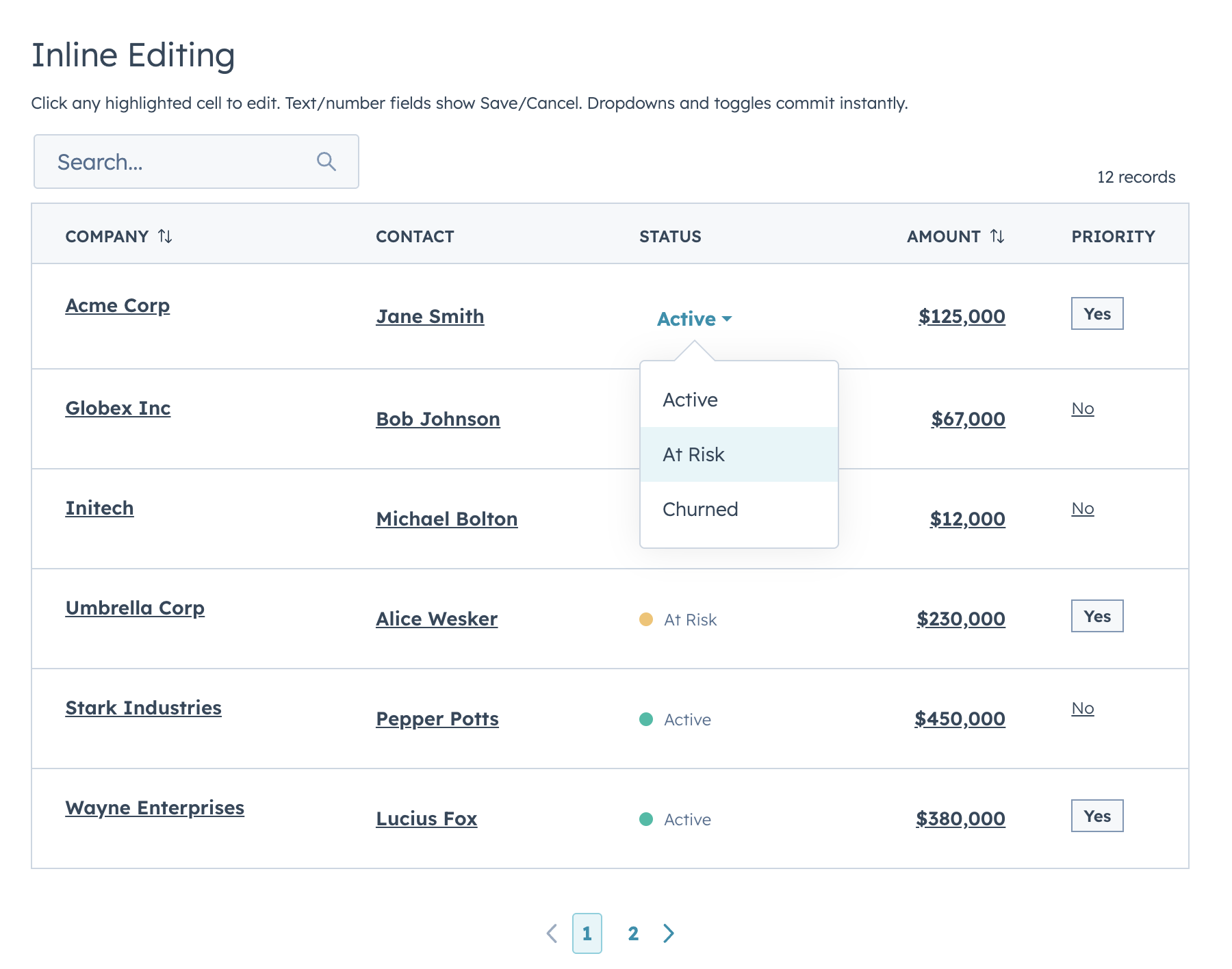
Two edit modes: discrete (click-to-edit, default) and inline (always-visible inputs).
const columns = [
  { field: "company", label: "Company", editable: true, editType: "text",
    renderCell: (val) => <Text format={{ fontWeight: "demibold" }}>{val}</Text> },
  { field: "status", label: "Status", editable: true, editType: "select",
    editOptions: [
      { label: "Active", value: "active" },
      { label: "At Risk", value: "at-risk" },
    ],
    renderCell: (val) => <StatusTag variant={STATUS_COLORS[val]}>{val}</StatusTag> },
  { field: "amount", label: "Amount", editable: true, editType: "currency",
    renderCell: (val) => formatCurrency(val) },
];

<DataTable
  data={data}
  columns={columns}
  rowIdField="id"
  onRowEdit={(row, field, newValue) => handleEdit(row, field, newValue)}
/>
Supported edit types: text, textarea, number, currency, stepper, select, multiselect, date, time, datetime, toggle, checkbox
Row Grouping
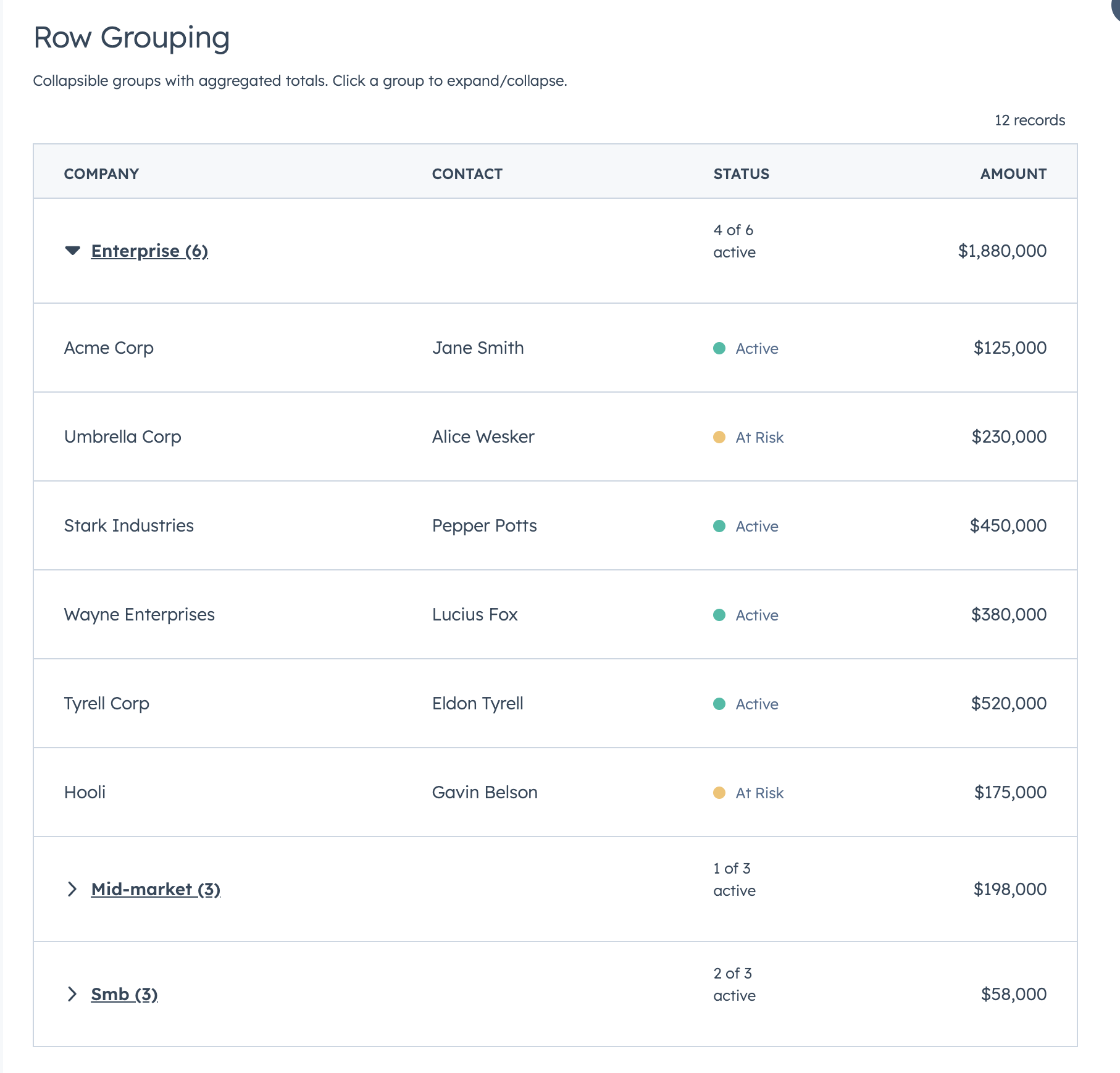
Collapsible groups with per-column aggregation functions:
<DataTable
  data={DEALS}
  columns={COLUMNS}
  groupBy={{
    field: "segment",
    label: (value, rows) => `${value} (${rows.length})`,
    sort: "asc",
    defaultExpanded: true,
    aggregations: {
      amount: (rows) => formatCurrency(rows.reduce((sum, r) => sum + r.amount, 0)),
    },
  }}
/>
Full-Row Editing
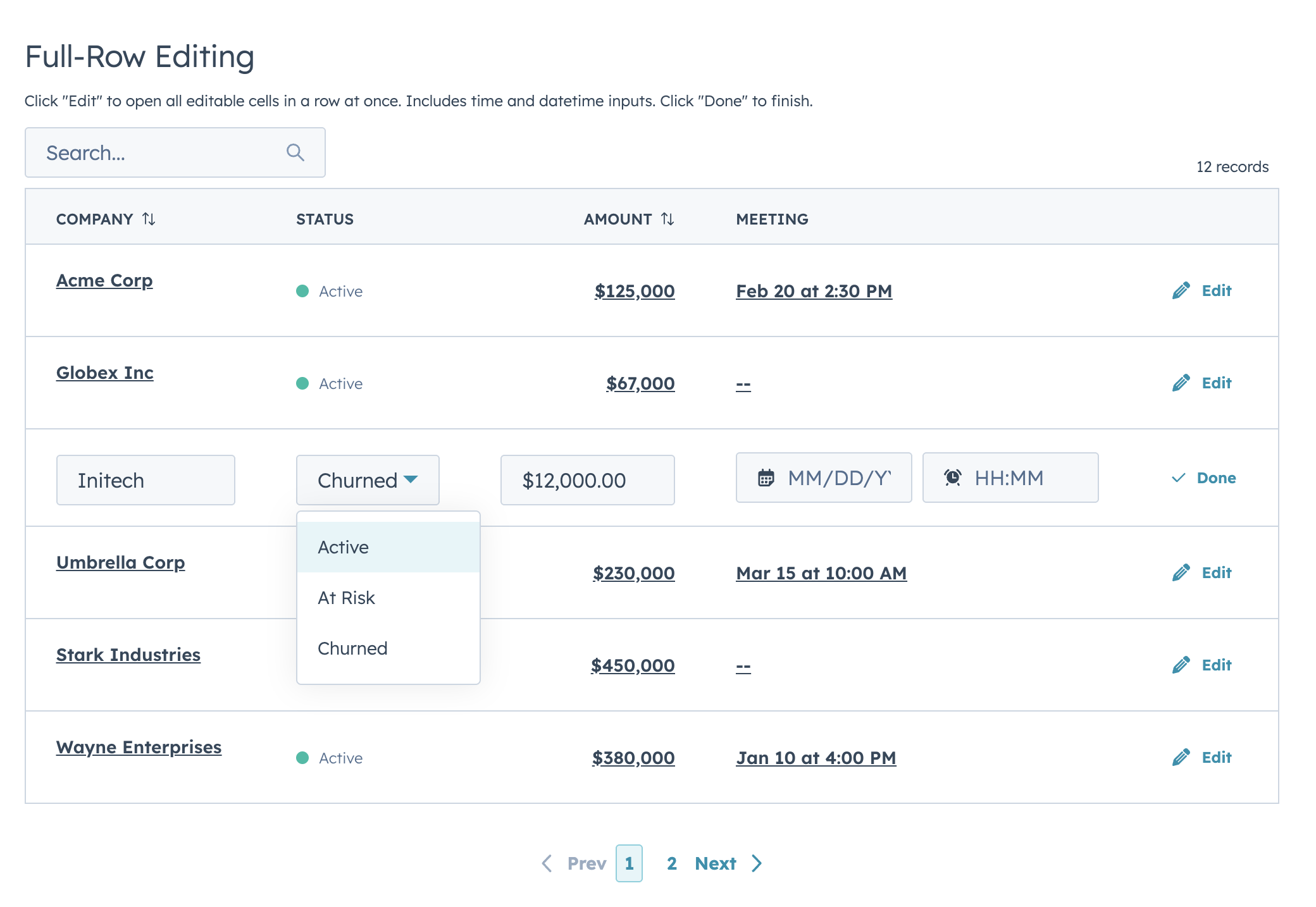
Use rowActions with editingRowId for an Edit/Done flow:
<DataTable
  data={rows}
  columns={columns}
  rowIdField="id"
  editingRowId={editingRowId}
  onRowEdit={handleCommittedEdit}
  rowActions={(row) => editingRowId === row.id
    ? [{ label: "Done", icon: "success", onClick: () => saveRow(row.id) }]
    : [{ label: "Edit", icon: "edit", onClick: () => setEditingRowId(row.id) }]}
/>
Scrollable Wide Tables
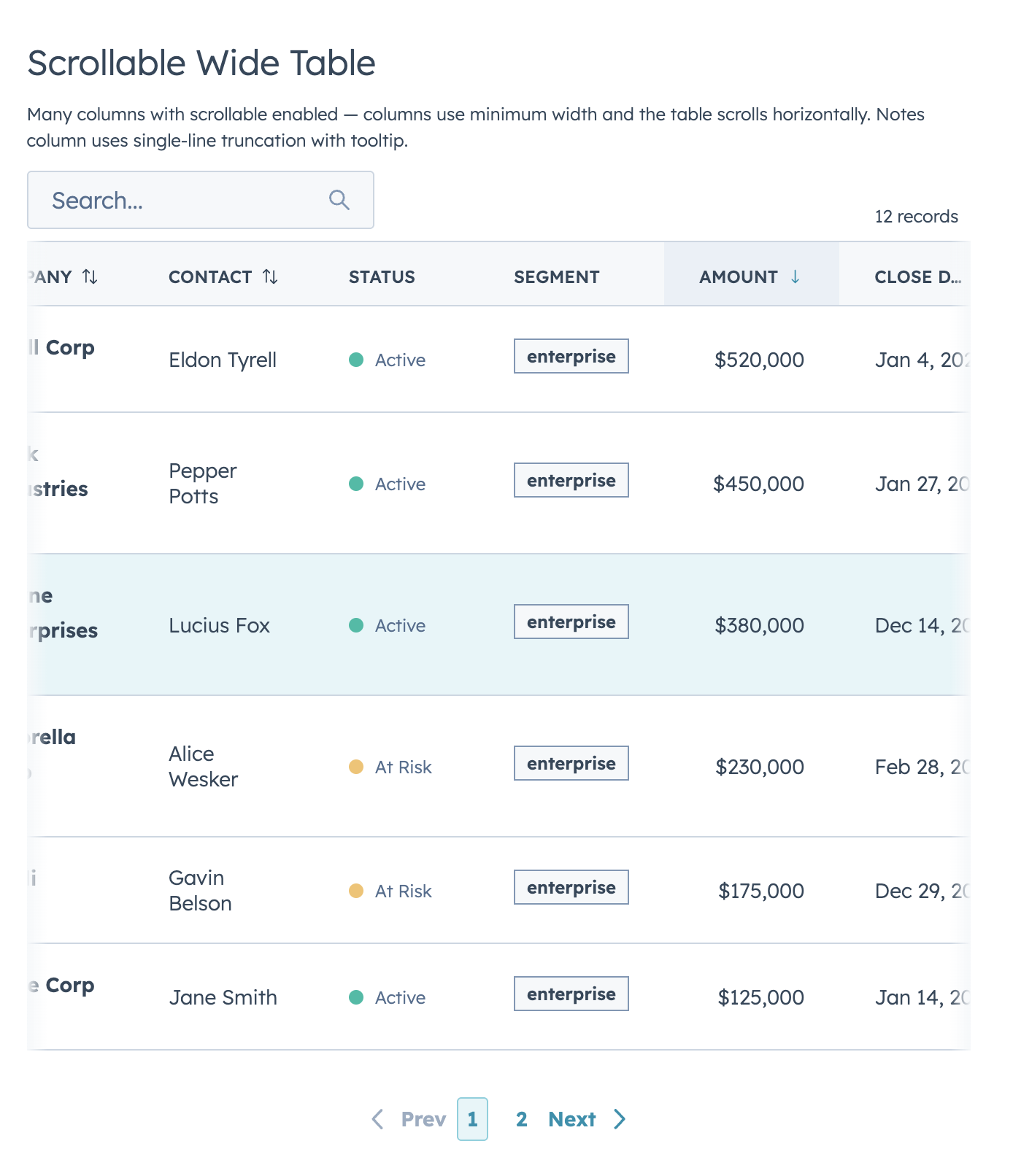
<DataTable data={data} columns={manyColumns} scrollable={true} pageSize={10} />useAssociations
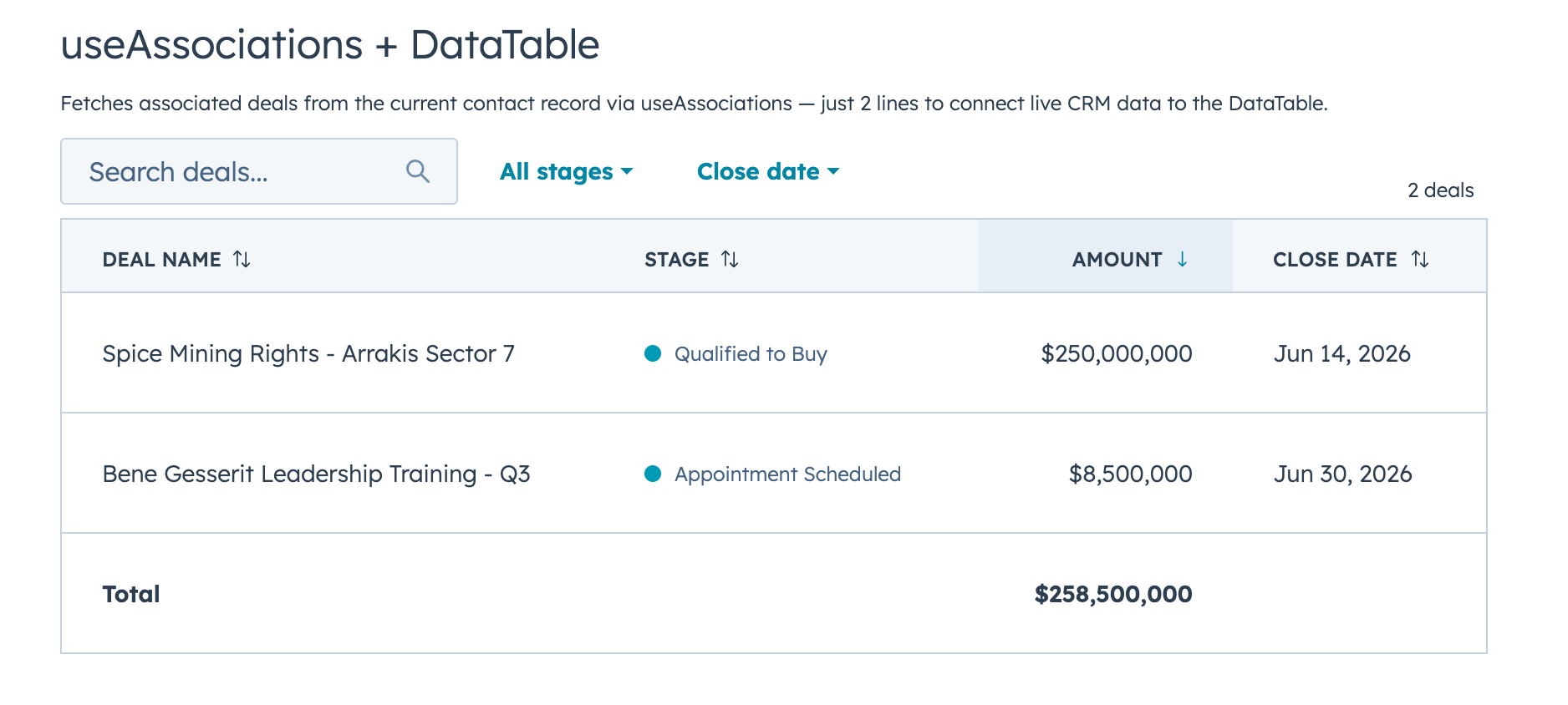
Connect live CRM data to a DataTable in two lines:
import { useAssociations } from "@hubspot/ui-extensions/crm";
import { DataTable } from "hs-uix/datatable";

const { results, isLoading } = useAssociations({
  toObjectType: "0-3",
  properties: ["dealname", "dealstage", "amount", "closedate"],
});

const deals = results.map((a) => ({
  id: a.toObjectId,
  dealname: a.properties.dealname,
  amount: Number(a.properties.amount) || 0,
}));

<DataTable data={deals} columns={columns} searchFields={["dealname"]} />
Server-Side Mode
For API-backed data or large datasets, use serverSide={true}. DataTable renders all the UI and fires callbacks — you handle the fetching.
<DataTable
  serverSide={true}
  loading={loading}
  error={error}
  data={pageRows}
  totalCount={totalCount}
  columns={COLUMNS}
  searchFields={["name", "email"]}
  filters={FILTERS}
  pageSize={25}
  page={params.page}
  searchDebounce={300}
  onParamsChange={(p) => fetchData(p)}
/>
DataTable Props
| Prop | Type | Default | Description |
|---|---|---|---|
data |
Array | required | Array of row objects |
columns |
Array | required | Column definitions |
renderRow |
(row) => ReactNode |
— | Full row renderer (alternative to renderCell) |
searchFields |
string[] | [] |
Fields to search across |
fuzzySearch |
boolean | false |
Enable fuzzy matching via Fuse.js |
searchPlaceholder |
string | "Search..." |
Placeholder text |
filters |
Array | [] |
Filter configurations |
showFilterBadges |
boolean | true |
Show active filter chips |
showClearFiltersButton |
boolean | true |
Show "Clear all" button |
pageSize |
number | 10 |
Rows per page |
maxVisiblePageButtons |
number | — | Max page buttons |
showButtonLabels |
boolean | true |
Show First/Prev/Next/Last text |
showFirstLastButtons |
boolean | auto | Show First/Last buttons |
showRowCount |
boolean | true |
Show record count text |
rowCountBold |
boolean | false |
Bold the row count |
rowCountText |
(shownOnPage, totalMatching) => string |
— | Custom row count formatter |
bordered |
boolean | true |
Show table borders |
flush |
boolean | true |
Remove bottom margin |
scrollable |
boolean | false |
Allow horizontal scrolling |
defaultSort |
object | {} |
Initial sort state |
groupBy |
object | — | Grouping config |
footer |
(filteredData) => ReactNode |
— | Footer row renderer |
emptyTitle |
string | "No results found" |
Empty state heading |
emptyMessage |
string | — | Empty state body |
recordLabel |
{ singular, plural } |
{ singular: "record", plural: "records" } |
Entity name |
selectable |
boolean | false |
Enable row selection |
rowIdField |
string | "id" |
Unique row identifier field |
selectedIds |
Array | — | Controlled selection |
onSelectionChange |
(ids[]) => void |
— | Selection change callback |
onSelectAllRequest |
(context) => void |
— | Server-side select all callback |
selectionActions |
Array | [] |
Bulk action buttons |
selectionResetKey |
any | — | Reset key for uncontrolled selection |
rowActions |
Array | Function | — | Per-row action buttons |
hideRowActionsWhenSelectionActive |
boolean | false |
Hide row actions during selection |
editMode |
"discrete" | "inline" |
"discrete" |
Edit mode |
editingRowId |
string | number | — | Full-row edit target |
onRowEdit |
(row, field, newValue) => void |
— | Edit commit callback |
onRowEditInput |
(row, field, inputValue) => void |
— | Live input callback |
autoWidth |
boolean | true |
Auto-compute column widths |
serverSide |
boolean | false |
Enable server-side mode |
loading |
boolean | false |
Show loading spinner |
error |
string | boolean | — | Show error state |
totalCount |
number | — | Total records (server-side) |
page |
number | — | Current page (controlled) |
searchValue |
string | — | Controlled search term |
filterValues |
object | — | Controlled filter values |
sort |
object | — | Controlled sort state |
searchDebounce |
number | 0 |
Debounce search callback (ms) |
onSearchChange |
(term) => void |
— | Search callback |
onFilterChange |
(filterValues) => void |
— | Filter callback |
onSortChange |
(field, direction) => void |
— | Sort callback |
onPageChange |
(page) => void |
— | Page callback |
onParamsChange |
({ search, filters, sort, page }) => void |
— | Unified change callback |
Column Definition
| Property | Type | Description |
|---|---|---|
field |
string | Key in the row object |
label |
string | Column header text |
sortable |
boolean | Enable sorting |
width |
"min" | "max" | "auto" | number |
Column width |
cellWidth |
"min" | "max" | "auto" |
Cell-only width override |
align |
"left" | "center" | "right" |
Text alignment |
renderCell |
(value, row) => ReactNode |
Cell renderer |
truncate |
true | { maxLength?: number } |
Text truncation with tooltip |
editable |
boolean | Enable inline editing |
editType |
string | Input type |
editOptions |
Array | Options for select/multiselect |
editValidate |
(value, row) => true | string |
Validation function |
editProps |
object | Pass-through props to edit input |
footer |
string | (rows) => ReactNode |
Footer cell content |
FormBuilder
Declarative, config-driven forms for HubSpot UI Extensions. Define fields as data, get a complete form with validation, layout, multi-step wizards, and full HubSpot component integration.
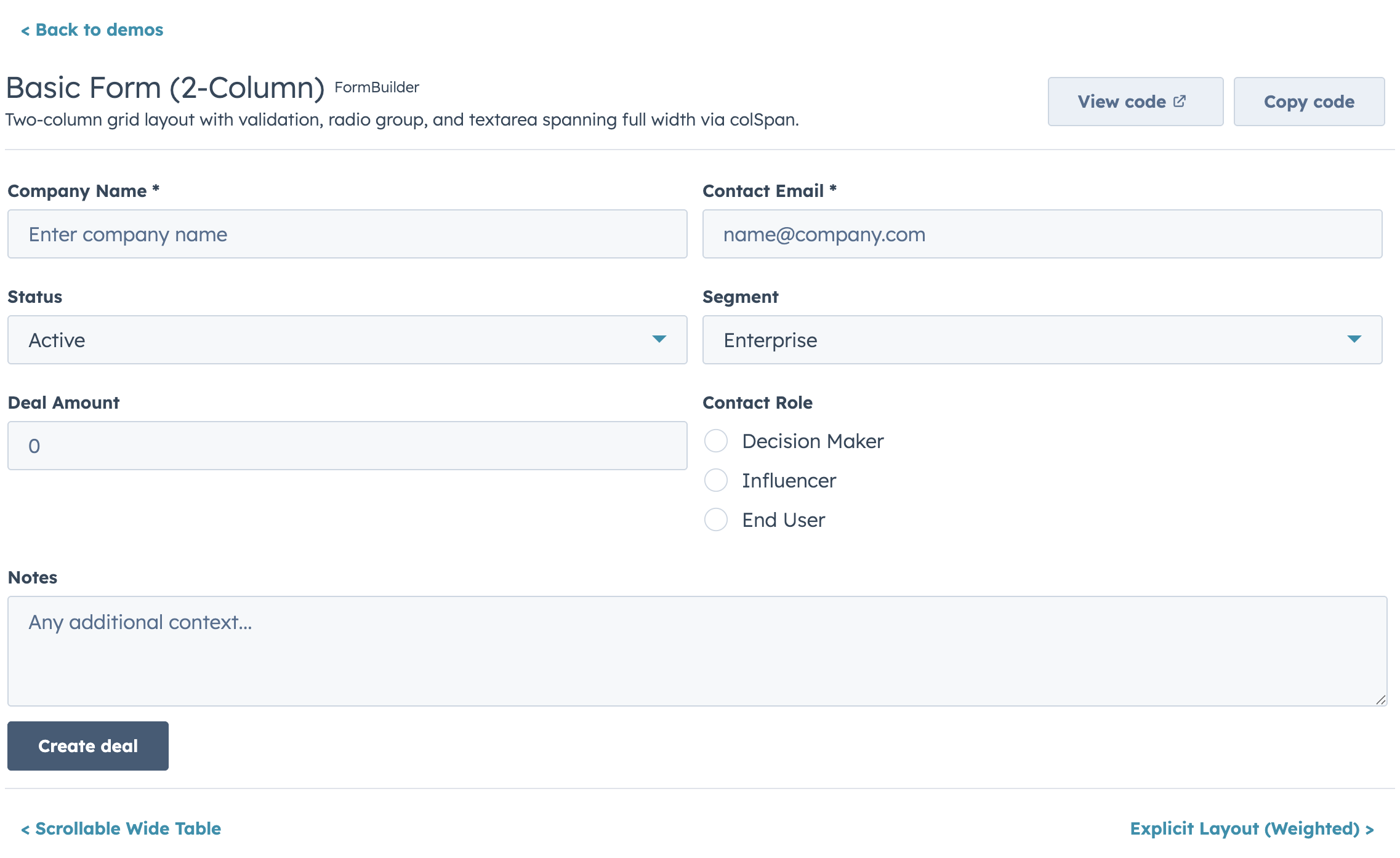
import { FormBuilder } from "hs-uix/form";

const fields = [
  { name: "firstName", type: "text", label: "First name", required: true },
  { name: "lastName", type: "text", label: "Last name", required: true },
  { name: "email", type: "text", label: "Email", pattern: /^[^\s@]+@[^\s@]+$/, patternMessage: "Enter a valid email" },
];

<FormBuilder
  columns={2}
  fields={fields}
  onSubmit={(values) => console.log(values)}
/>
Field Types
Every field maps to a native HubSpot UI Extension component with full prop support:
type |
Component | Key Props |
|---|---|---|
text |
Input |
placeholder, onInput, onBlur |
password |
Input type="password" |
Same as text |
textarea |
TextArea |
rows, cols, resize, maxLength |
number |
NumberInput |
min, max, precision, formatStyle |
stepper |
StepperInput |
min, max, stepSize, precision |
currency |
CurrencyInput |
currency (ISO 4217), min, max, precision |
date |
DateInput |
format, min, max, timezone |
time |
TimeInput |
interval, min, max, timezone |
datetime |
DateInput + TimeInput |
All date and time props |
select |
Select |
options, variant |
multiselect |
MultiSelect |
options |
toggle |
Toggle |
size, labelDisplay, textChecked, textUnchecked |
checkbox |
Checkbox |
inline, variant |
checkboxGroup |
ToggleGroup checkboxList |
options, inline, variant |
radioGroup |
ToggleGroup radioButtonList |
options, inline, variant |
display |
Custom render | Render-only, no form value |
repeater |
Sub-field rows | fields, min, max |
crmPropertyList |
CrmPropertyList |
properties, direction |
crmAssociationPropertyList |
CrmAssociationPropertyList |
objectTypeId, properties, filters, sort |
Layout
FormBuilder provides four layout modes. Use columns or columnWidth to match HubSpot's standard look.
Fixed Columns
<FormBuilder columns={2} fields={fields} />Use colSpan on individual fields to span multiple columns.
Responsive (AutoGrid)
<FormBuilder columnWidth={200} fields={fields} />Columns collapse automatically on narrow screens.
Explicit Layout
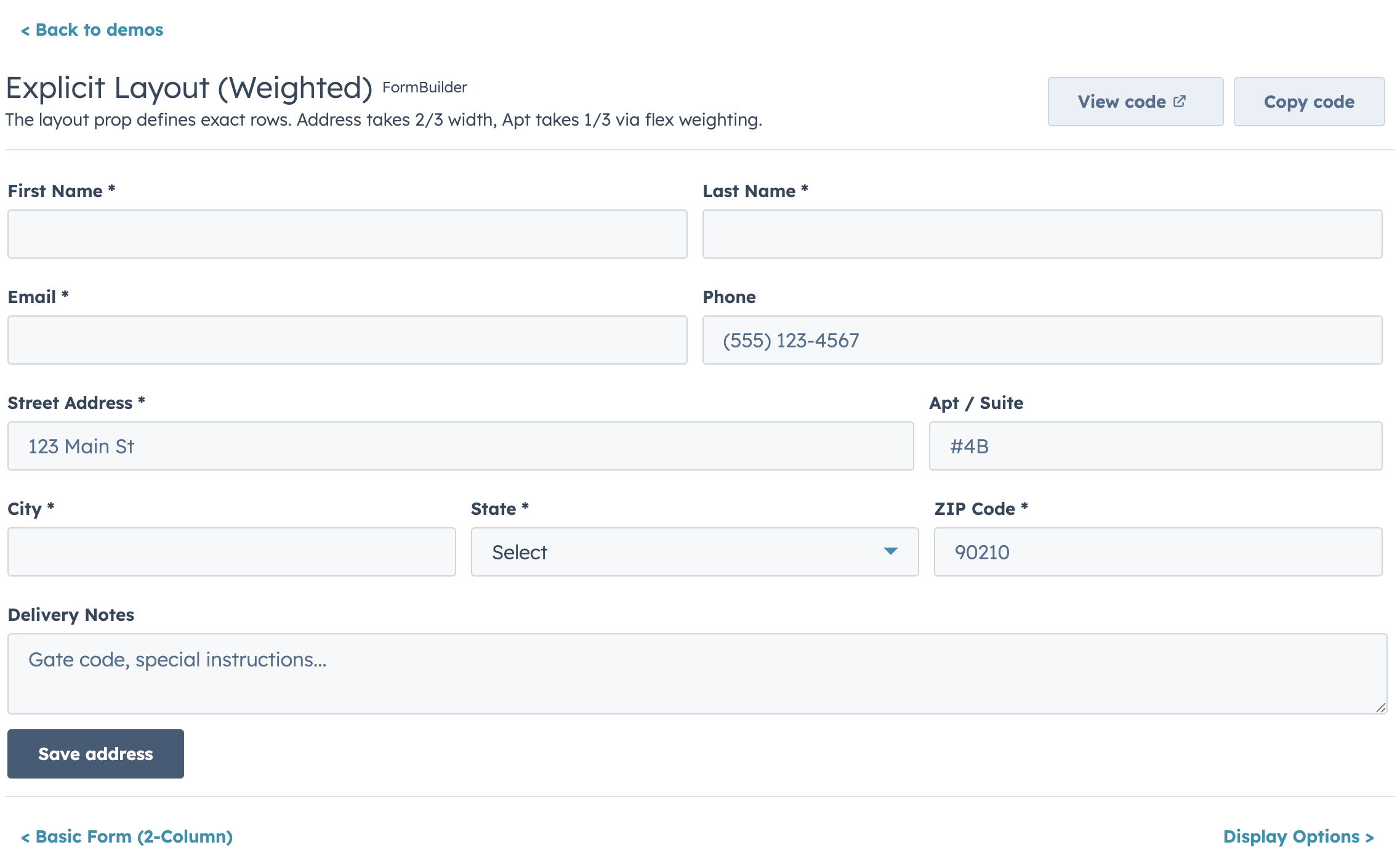
<FormBuilder
  layout={[
    ["firstName", "lastName"],           // 2 equal columns
    ["email"],                           // full width
    ["city", "state", "zip"],            // 3 columns
  ]}
  fields={fields}
/>
Weighted columns:
layout={[
  [{ field: "address", flex: 2 }, { field: "apt", flex: 1 }],  // 2:1 ratio
]}
Layout priority: layout > columnWidth > columns > legacy
Validation
Built-in validators run in order, first failure wins:
{
  name: "email",
  type: "text",
  label: "Email",
  required: true,
  pattern: /^[^\s@]+@[^\s@]+$/,
  patternMessage: "Enter a valid email",
  minLength: 5,
  maxLength: 100,
  validators: [
    (value) => value.endsWith("@example.com") ? true : "Use your company email",
  ],
  validate: async (value, allValues, { signal }) => {
    const exists = await checkEmailExists(value, { signal });
    return exists ? "Email already in use" : true;
  },
}| Timing | Default | When |
|---|---|---|
validateOnChange |
false |
Every keystroke |
validateOnBlur |
true |
Field loses focus |
validateOnSubmit |
true |
Submit attempt |
Async Validation
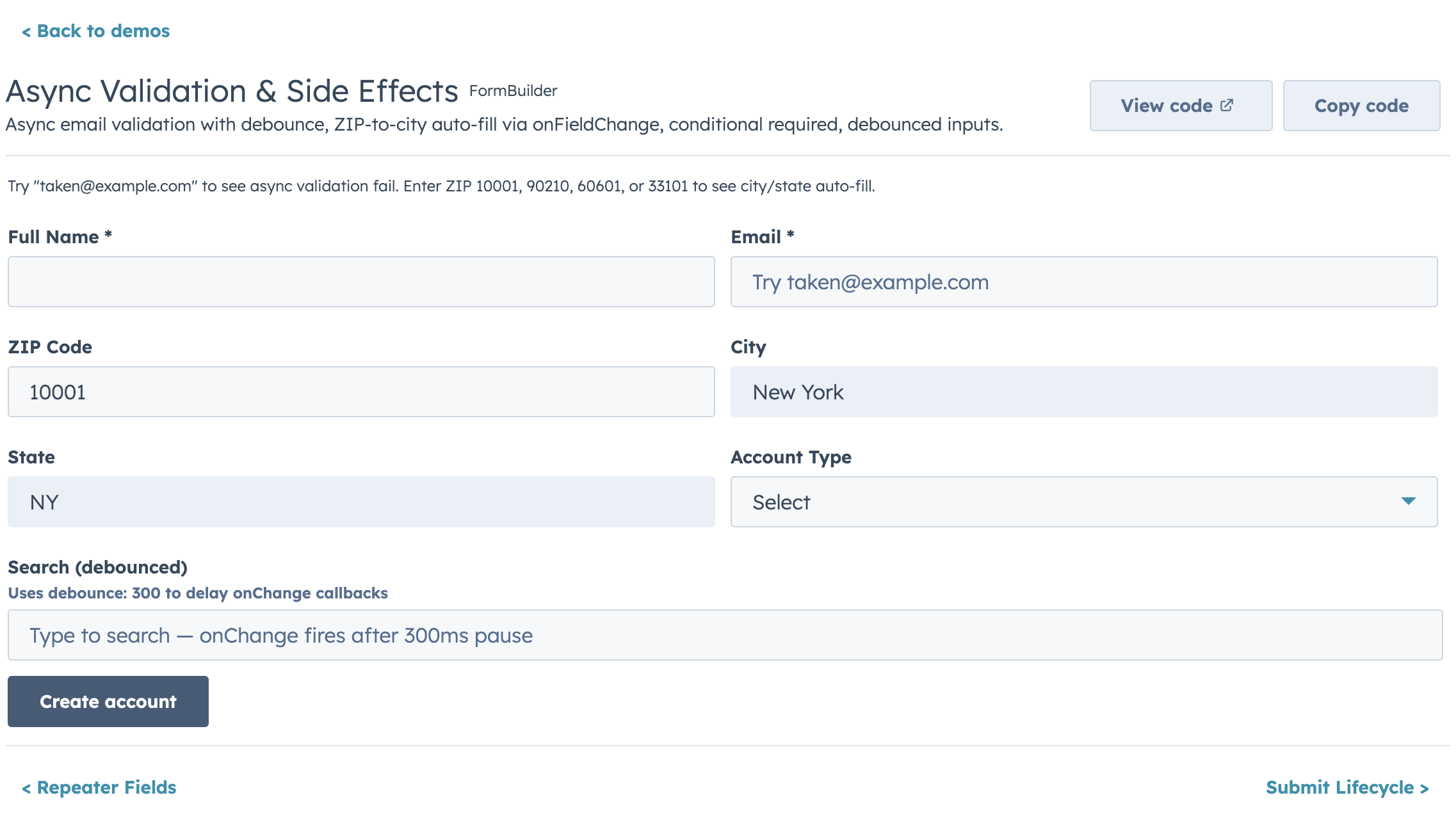
Fields show a loading indicator while async validation runs. Pending requests are versioned and prior requests are aborted when supported (signal).
{
  name: "email",
  type: "text",
  label: "Email",
  validate: async (value, allValues, { signal }) => {
    const exists = await checkEmailExists(value, { signal });
    return exists ? "Email already in use" : true;
  },
  validateDebounce: 500,
}
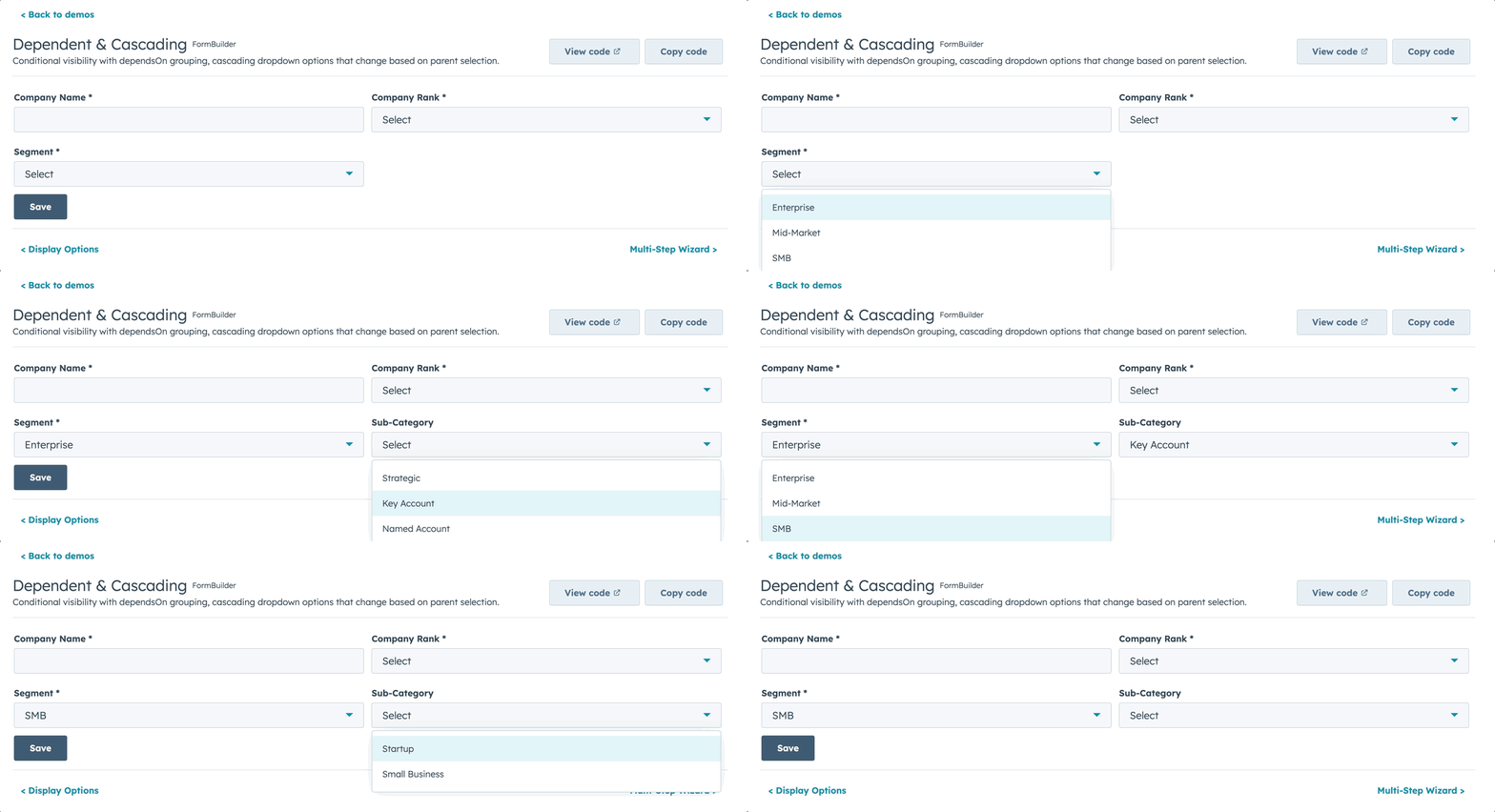
Conditional Visibility & Dependent Properties
const fields = [
  { name: "hasCompany", type: "toggle", label: "Has company?" },
  {
    name: "companyName",
    type: "text",
    label: "Company name",
    visible: (values) => values.hasCompany === true,
  },
];
Dependent fields are grouped in a HubSpot Tile container below their parent:
{
  name: "contractLength",
  type: "number",
  label: "Contract length (months)",
  dependsOnConfig: {
    field: "dealType",
    display: "grouped",
    label: "Contract details",
    message: (parentLabel) => `These properties depend on ${parentLabel}`,
  },
  visible: (values) => values.dealType === "recurring",
}
Multi-Step Wizard
<FormBuilder
  fields={allFields}
  steps={[
    { title: "Contact Info", fields: ["firstName", "lastName", "email"] },
    { title: "Company", fields: ["company", "role"] },
    { title: "Review", render: ({ values, goBack }) => (
      <ReviewPanel values={values} onEdit={goBack} />
    )},
  ]}
  showStepIndicator={true}
  validateStepOnNext={true}
  onSubmit={handleSubmit}
/>
Repeater Fields
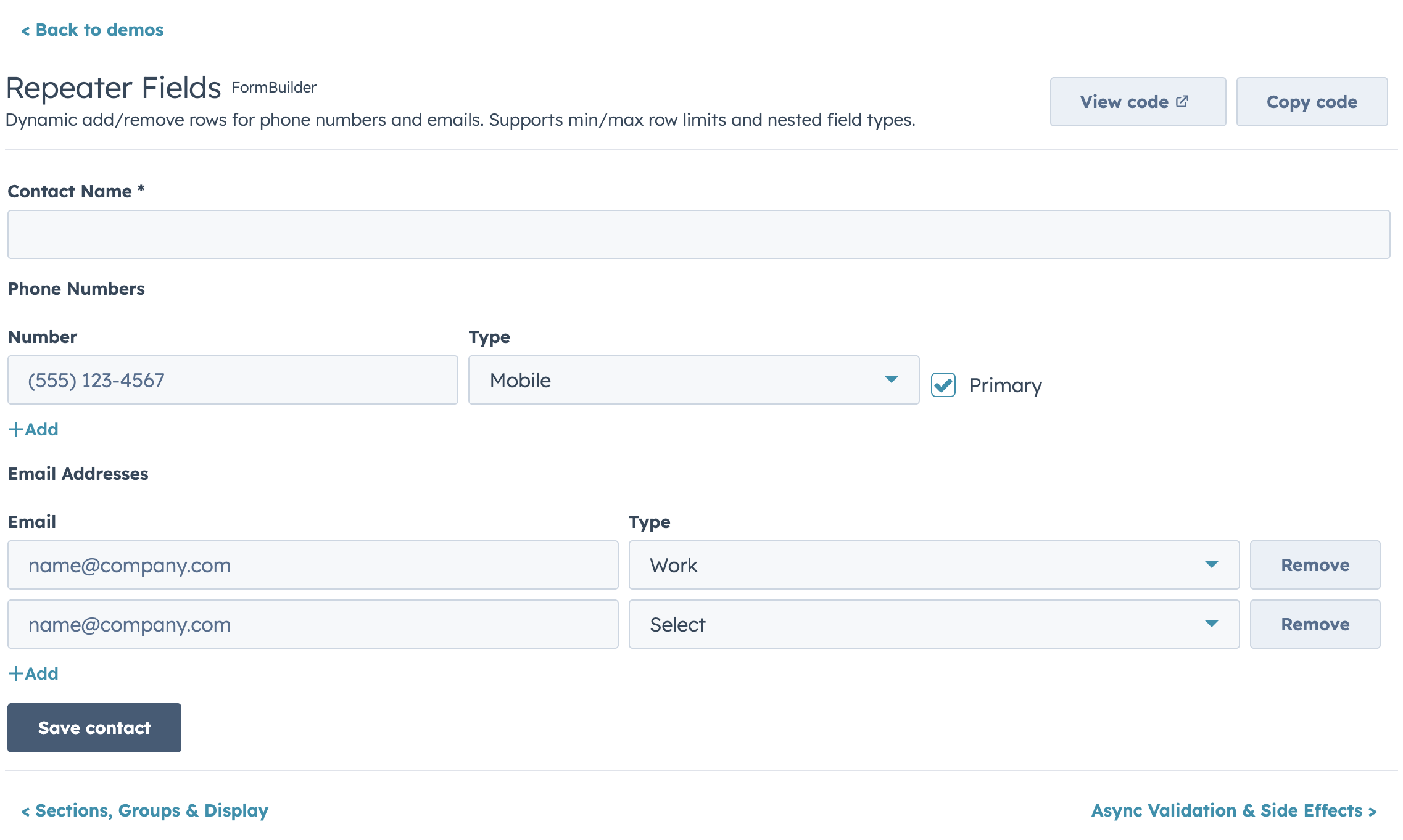
{ name: "phones", type: "repeater", label: "Phone Numbers",
  fields: [
    { name: "number", type: "text", label: "Number" },
    { name: "type", type: "select", label: "Type", options: PHONE_TYPES },
  ],
  min: 1, max: 5 }
Sections (Accordion Grouping)
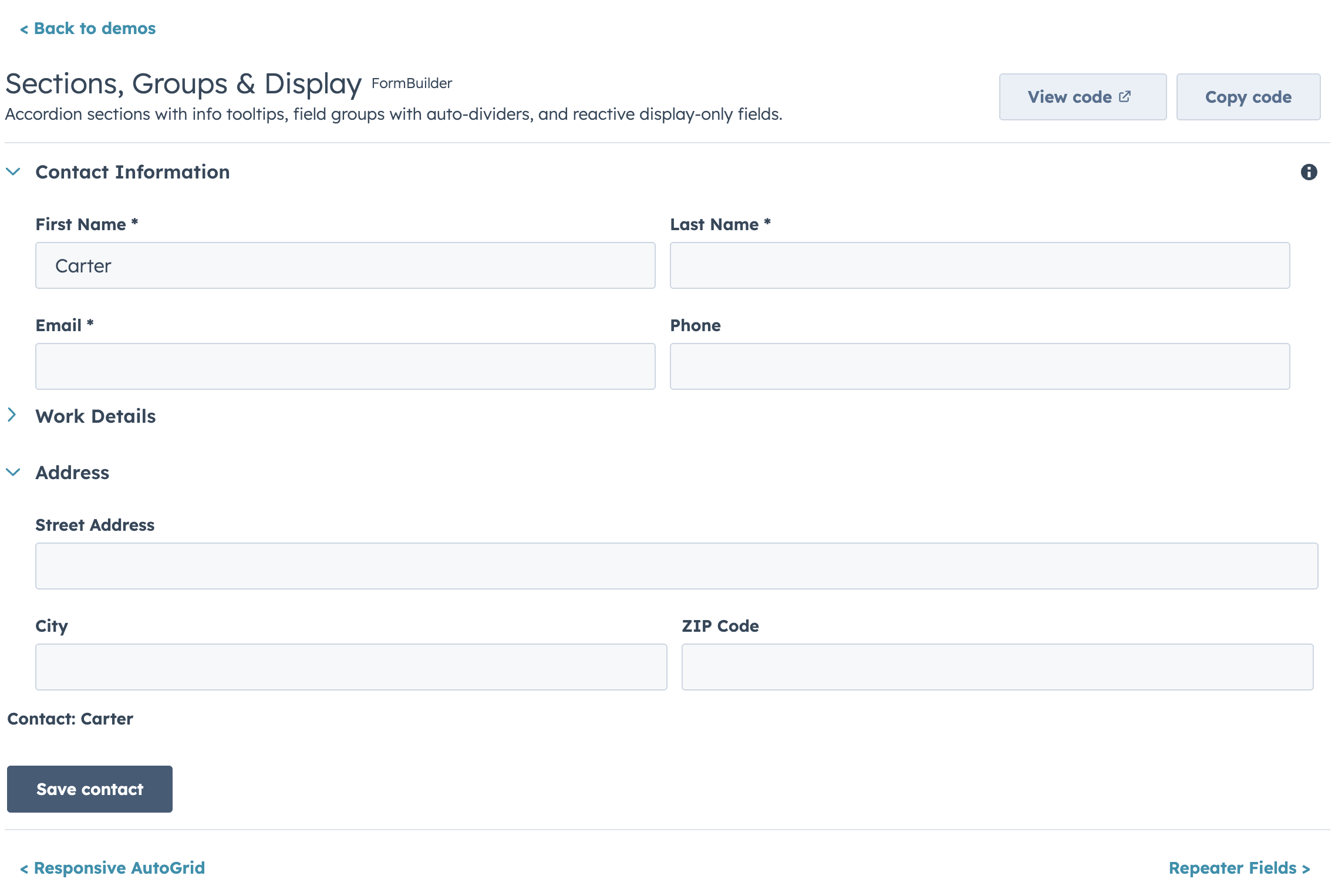
<FormBuilder
  fields={fields}
  sections={[
    { id: "basic", label: "Basic Info", fields: ["firstName", "lastName", "email"], defaultOpen: true },
    { id: "social", label: "Social Links", fields: ["facebook", "instagram"], defaultOpen: false },
  ]}
  onSubmit={handleSubmit}
/>
Custom Field Types
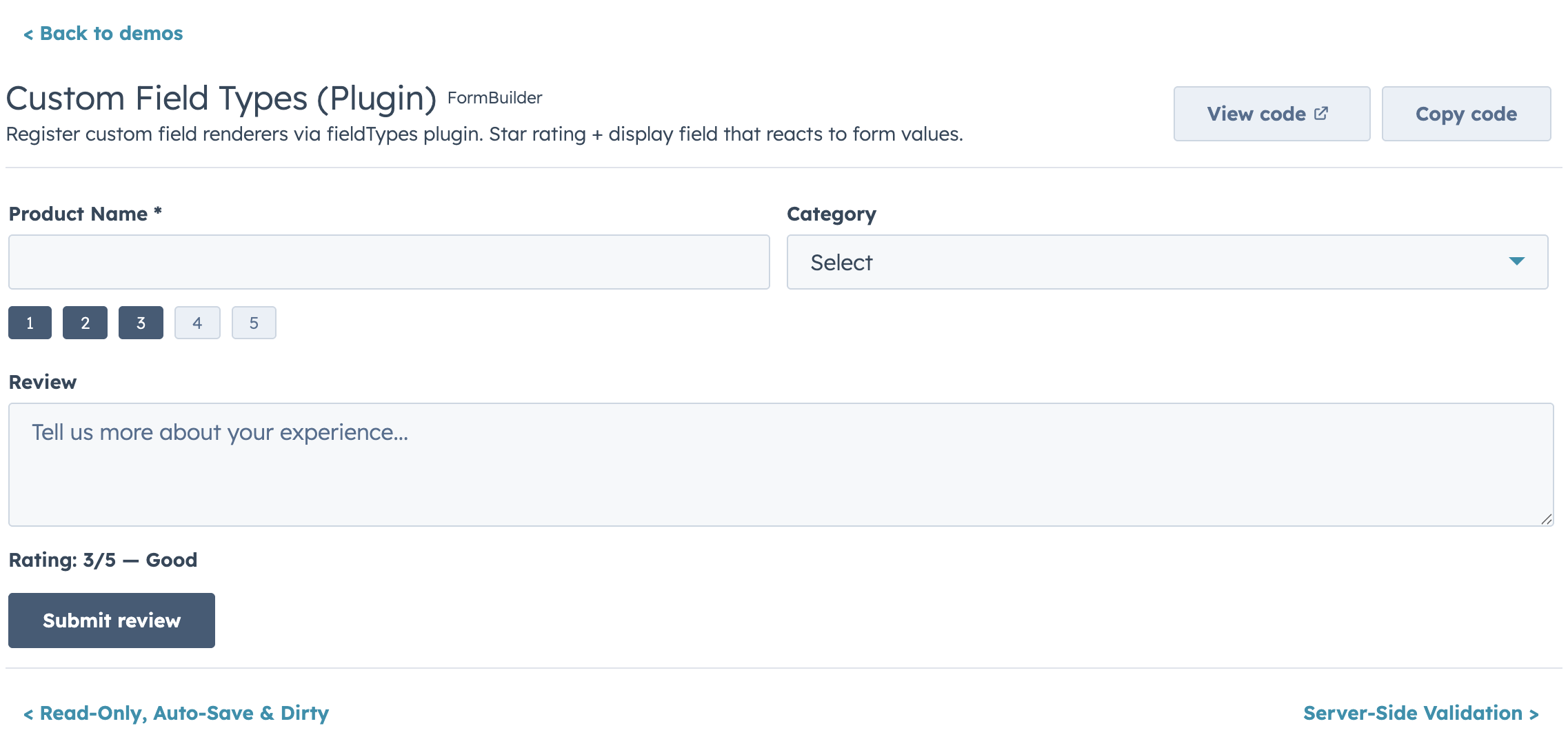
<FormBuilder
  fieldTypes={{
    imageGallery: {
      render: ({ value, onChange, error, field }) => (
        <ImageGalleryInput urls={value} onUpdate={onChange} error={error} />
      ),
      getEmptyValue: () => [],
      isEmpty: (v) => v.length === 0,
    },
  }}
  fields={[
    { name: "photos", type: "imageGallery", label: "Photos", required: true },
  ]}
/>
Display Options
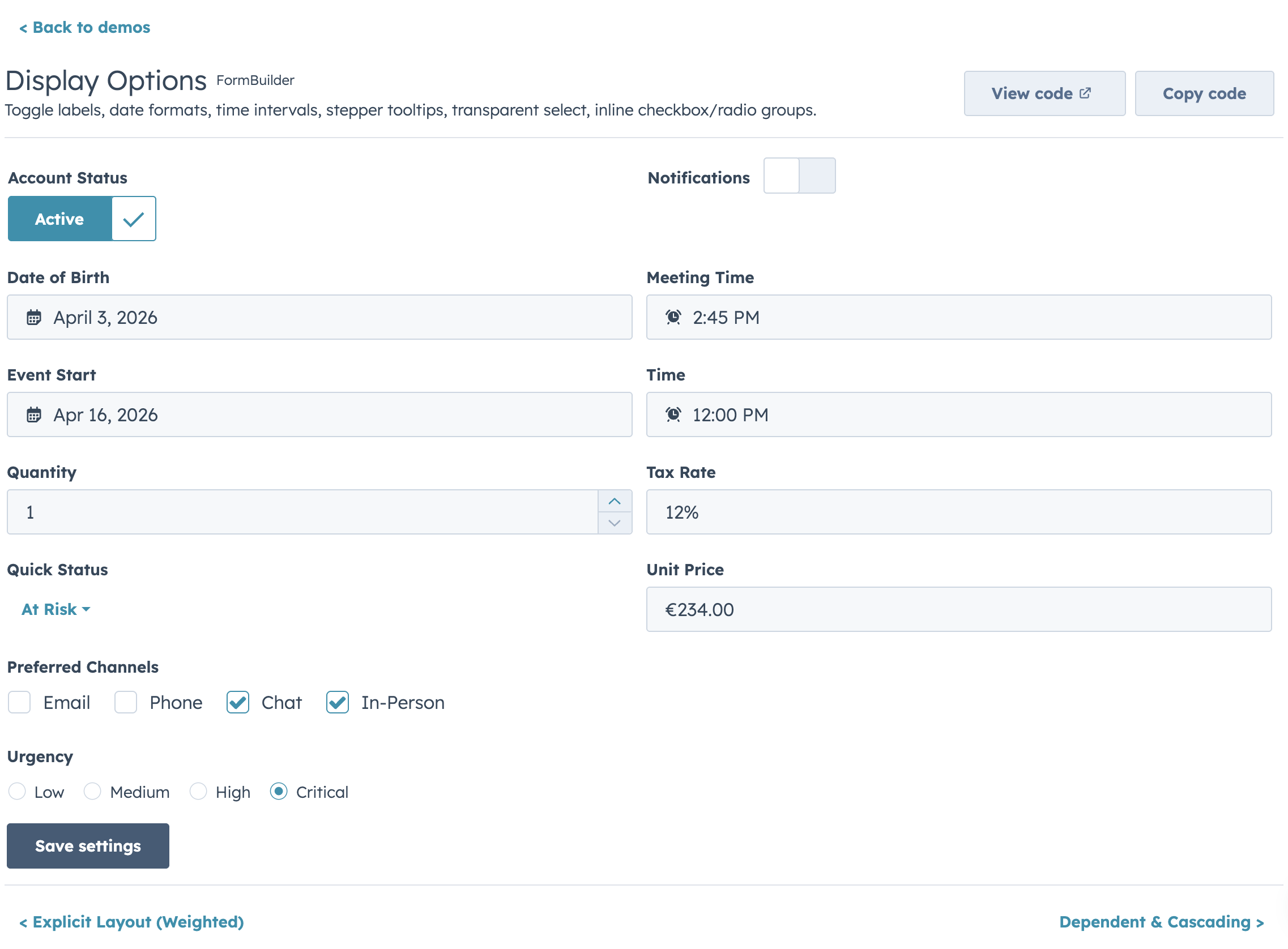
Read-Only Mode
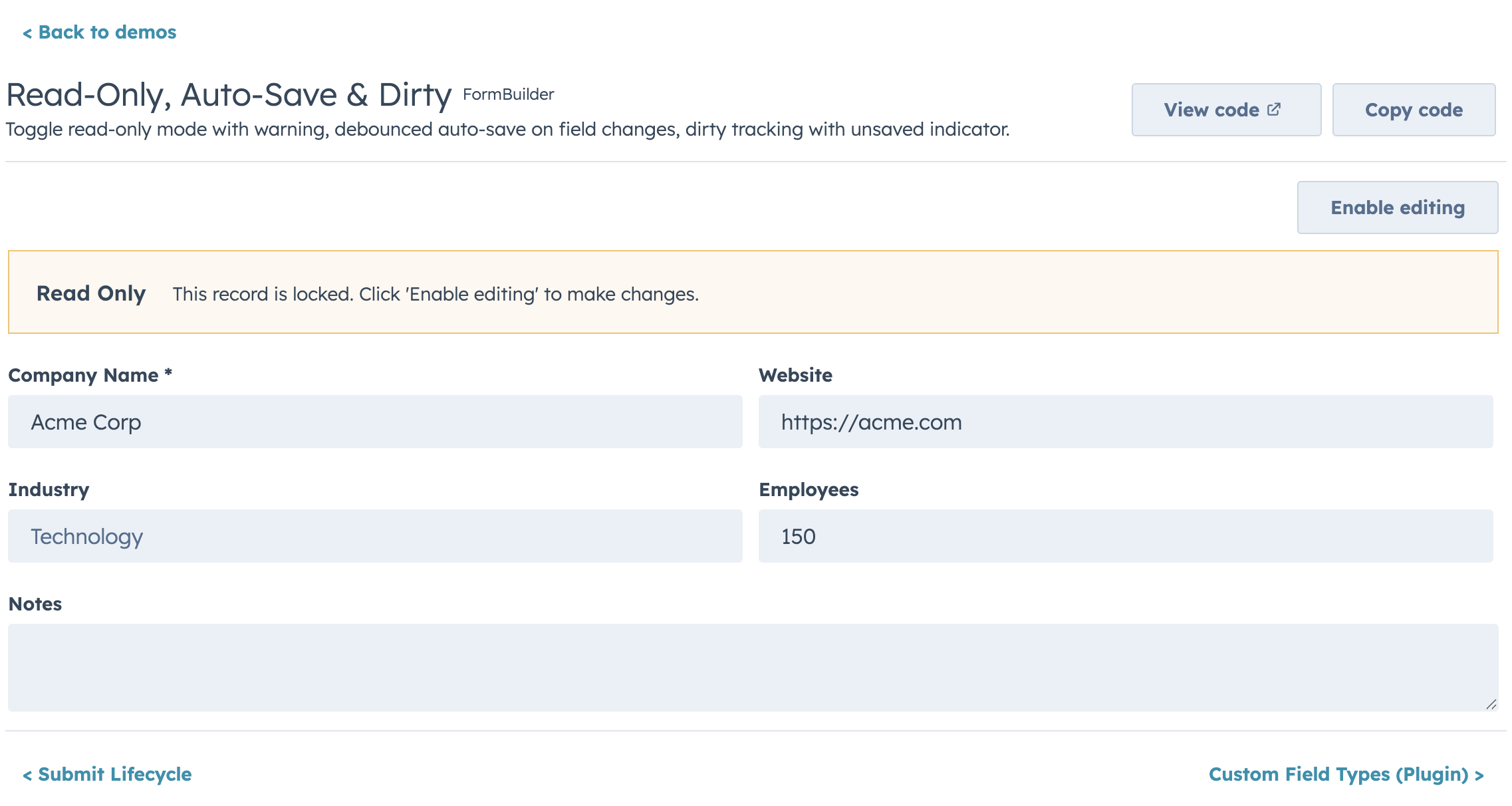
<FormBuilder
  fields={fields}
  readOnly={isPremiumAccount}
  readOnlyMessage="This is a premium account. Editing is disabled."
  onSubmit={handleSubmit}
/>
Controlled vs Uncontrolled
Uncontrolled (default):
<FormBuilder
  fields={fields}
  initialValues={{ firstName: "John" }}
  onSubmit={(values) => save(values)}
/>
Controlled:
const [values, setValues] = useState({});

<FormBuilder
  fields={fields}
  values={values}
  onChange={setValues}
  onSubmit={(values) => save(values)}
/>
Ref API
const formRef = useRef();

<FormBuilder ref={formRef} fields={fields} onSubmit={save} />

formRef.current.submit();                               // trigger validation + submit
formRef.current.validate();                              // { valid: boolean, errors: {} }
formRef.current.reset();                                 // reset to initial values
formRef.current.getValues();                             // current form values
formRef.current.isDirty();                               // true if values changed
formRef.current.setFieldValue("email", "new@test.com");  // programmatic update
formRef.current.setFieldError("email", "Taken");          // programmatic error
formRef.current.setErrors({ email: "Exists", phone: "Invalid" }); // batch set
Submit Lifecycle
<FormBuilder
  fields={fields}
  transformValues={(values) => ({
    ...values,
    fullName: `${values.firstName} ${values.lastName}`.trim(),
  })}
  onBeforeSubmit={async (values) => await showConfirmDialog()}
  onSubmit={saveRecord}
  onSubmitSuccess={(result, { reset }) => actions.addAlert({ type: "success", message: "Saved!" })}
  onSubmitError={(err) => actions.addAlert({ type: "danger", message: err.message })}
  resetOnSuccess={true}
/>
Buttons
<FormBuilder
  fields={fields}
  onSubmit={save}
  labels={{ submit: "Save record", cancel: "Discard", back: "Previous", next: "Continue" }}
  submitVariant="primary"
  showCancel={true}
  onCancel={() => actions.closeOverlay()}
  loading={isSaving}
  disabled={!canEdit}
/>
FormBuilder Props
| Prop | Type | Default | Description |
|---|---|---|---|
fields |
FormBuilderField[] |
required | Field definitions |
onSubmit |
(values, { reset }) => void | Promise |
required | Called on valid submit |
initialValues |
Record<string, unknown> |
{} |
Starting values (uncontrolled) |
values |
Record<string, unknown> |
— | Controlled values |
onChange |
(values) => void |
— | Change callback (controlled) |
errors |
Record<string, string> |
— | Controlled validation errors |
onFieldChange |
(name, value, allValues) => void |
— | Per-field change |
validateOnChange |
boolean |
false |
Validate on keystroke |
validateOnBlur |
boolean |
true |
Validate on blur |
validateOnSubmit |
boolean |
true |
Validate all before submit |
onValidationChange |
(errors) => void |
— | Validation state callback |
steps |
FormBuilderStep[] |
— | Enables multi-step mode |
step |
number |
— | Controlled step (0-based) |
onStepChange |
(step) => void |
— | Step change callback |
showStepIndicator |
boolean |
true |
Show StepIndicator |
validateStepOnNext |
boolean |
true |
Validate before Next |
submitVariant |
"primary" | "secondary" |
"primary" |
Button variant |
showCancel |
boolean |
false |
Show cancel button |
onCancel |
() => void |
— | Cancel callback |
submitPosition |
"bottom" | "none" |
"bottom" |
Button placement |
loading |
boolean |
— | Controlled loading state |
disabled |
boolean |
false |
Disable entire form |
labels |
{ submit?, cancel?, back?, next? } |
— | Button label i18n object |
renderButtons |
(context) => ReactNode |
— | Custom button-row renderer |
columns |
number |
1 |
Fixed column count |
columnWidth |
number |
— | AutoGrid responsive column width (px) |
layout |
FormBuilderLayout |
— | Explicit row layout |
gap |
string |
"sm" |
Spacing between fields |
showRequiredIndicator |
boolean |
true |
Show * on required fields |
sections |
FormBuilderSection[] |
— | Accordion field grouping |
fieldTypes |
Record<string, FieldTypePlugin> |
— | Custom field type registry |
readOnly |
boolean |
false |
Lock all fields |
readOnlyMessage |
string |
— | Warning alert in read-only mode |
alerts |
{ addAlert?, errorTitle?, successTitle? } |
— | Grouped alert config |
error |
string | boolean |
— | Form-level error alert |
success |
string |
— | Form-level success alert |
transformValues |
(values) => values |
— | Reshape values before submit |
onBeforeSubmit |
(values) => boolean | Promise |
— | Intercept submit |
onSubmitSuccess |
(result, helpers) => void |
— | Post-submit success |
onSubmitError |
(error, helpers) => void |
— | Post-submit error |
resetOnSuccess |
boolean |
false |
Auto-reset after success |
autoSave |
{ debounce?, onAutoSave } |
— | Debounced auto-save |
onDirtyChange |
(isDirty) => void |
— | Dirty state callback |
ref |
Ref<FormBuilderRef> |
— | Imperative ref |
Field Props
| Prop | Type | Description |
|---|---|---|
name |
string |
Unique field identifier |
type |
FormBuilderFieldType |
Field type |
label |
string |
Field label |
description |
string |
Helper text |
placeholder |
string |
Placeholder text |
tooltip |
string |
Tooltip next to label |
required |
boolean | (values) => boolean |
Required validation |
readOnly |
boolean |
Prevent editing |
disabled |
boolean |
Disable this field |
defaultValue |
unknown |
Default value |
colSpan |
number |
Columns to span |
visible |
(values) => boolean |
Conditional visibility |
dependsOnConfig |
{ field, display?, label?, message? } |
Grouped dependent config |
validate |
(value, allValues, context?) => true | string | Promise |
Custom validation |
validators |
Array<Function> |
Additional custom validators |
validateDebounce |
number |
Debounce async validation (ms) |
debounce |
number |
Debounce onChange (ms) |
options |
Option[] | (values) => Option[] |
Dropdown/toggle options |
render |
(props) => ReactNode |
Custom render escape hatch |
fieldProps |
Record<string, unknown> |
Pass-through to HubSpot component |
onFieldChange |
(value, allValues, helpers) => void |
Cross-field side effects |
Migrating from @hs-uix/datatable or @hs-uix/form
Both packages have been merged into hs-uix. Update your imports:
- import { DataTable } from "@hs-uix/datatable";
+ import { DataTable } from "hs-uix/datatable";

- import { FormBuilder } from "@hs-uix/form";
+ import { FormBuilder } from "hs-uix/form";
Then remove the old packages:
npm uninstall @hs-uix/datatable @hs-uix/form
npm install hs-uix
License
MIT