
Package Exports
- mind-elixir
This package does not declare an exports field, so the exports above have been automatically detected and optimized by JSPM instead. If any package subpath is missing, it is recommended to post an issue to the original package (mind-elixir) to support the "exports" field. If that is not possible, create a JSPM override to customize the exports field for this package.
Readme

Mind Elixir


English | 中文 | Español | Français | Português | Русский | 日本語 | 한국어
Mind elixir is a open source JavaScript mind map core. You can use it with any frontend framework you like.
Features
🎨 User Experience
- Fluent UX - Smooth and intuitive interactions
- Well designed - Clean and modern interface
- Mobile friendly - Touch events for mobile devices
- Efficient shortcuts - Keyboard shortcuts for power users
⚡ Performance & Architecture
- Lightweight - Minimal bundle size
- High performance - Optimized for large mind maps
- Framework agnostic - Works with any frontend framework
- Pluginable - Extensible architecture
🛠️ Core Features
- Interactive editing - Built-in drag and drop / node edit capabilities
- Bulk operations - Multi-node selection and operations
- Undo / Redo - Complete operation history
- Node connections & summarization - Custom node linking and content summarization
📤 Export & Customization
- Multiple export formats - SVG / PNG / HTML export
- Easy styling - Customize mindmap with CSS variables
- Theme support - Built-in themes and custom styling
Table of Contents
Try now
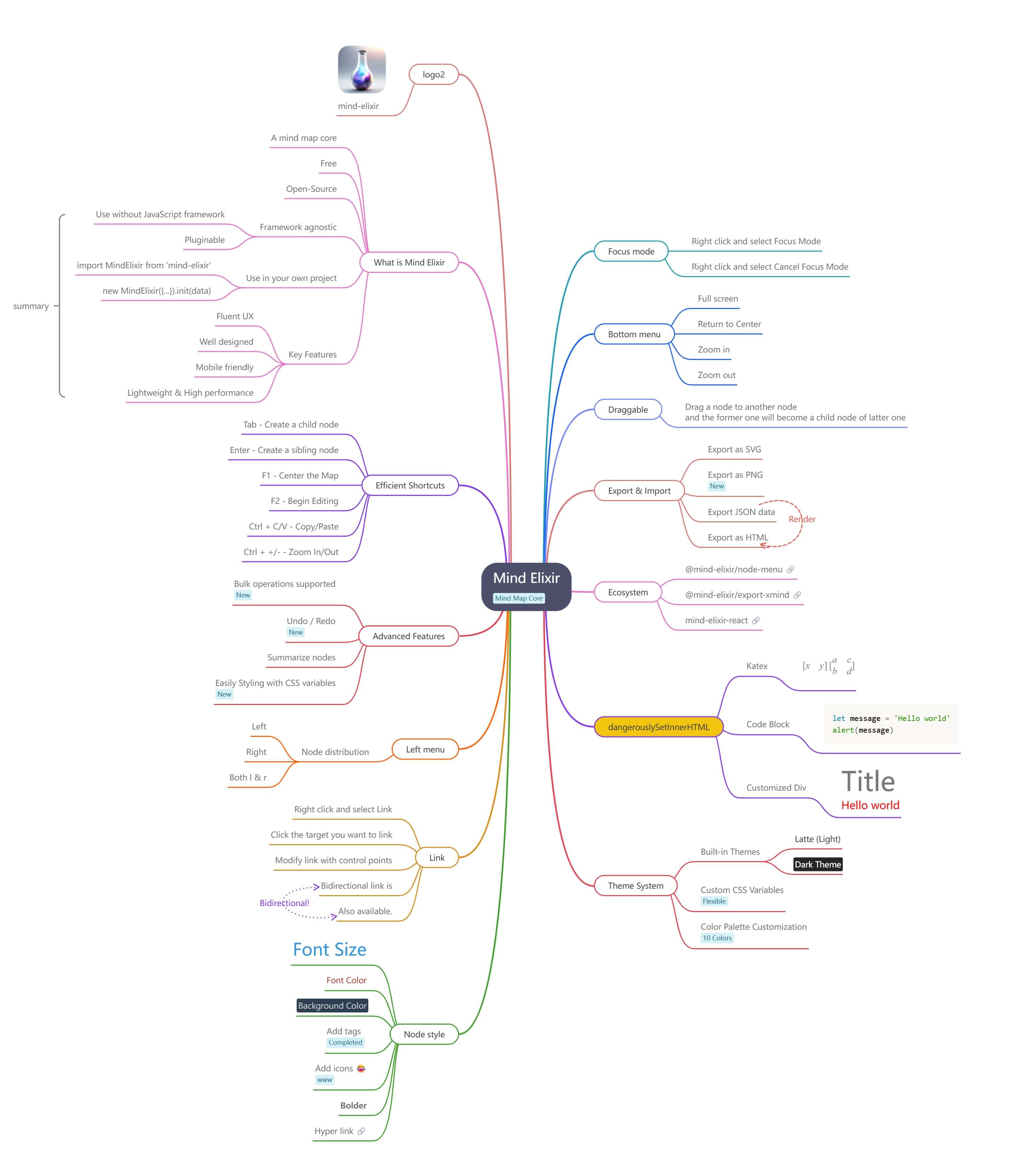
Playground
- Vanilla JS - https://codepen.io/ssshooter/pen/vEOqWjE
- React - https://codesandbox.io/p/devbox/mind-elixir-3-x-react-18-x-forked-f3mtcd
- Vue3 - https://codesandbox.io/p/sandbox/mind-elixir-3-x-vue3-lth484
Documentation
Usage
Install
NPM
npm i mind-elixir -Simport MindElixir from 'mind-elixir'
import 'mind-elixir/style.css'Script tag
<script type="module" src="https://cdn.jsdelivr.net/npm/mind-elixir/dist/MindElixir.js"></script>And in your CSS file:
@import 'https://cdn.jsdelivr.net/npm/mind-elixir/dist/style.css';Init
<div id="map"></div>
<style>
  #map {
    height: 500px;
    width: 100%;
  }
</style>
import MindElixir from 'mind-elixir'
import 'mind-elixir/style.css'
import example from 'mind-elixir/dist/example1'
let options = {
el: '#map', // or HTMLDivElement
direction: MindElixir.LEFT,
draggable: true, // default true
toolBar: true, // default true
nodeMenu: true, // default true
keypress: true, // default true
locale: 'en', // [zh_CN,zh_TW,en,ja,pt,ru,ro] waiting for PRs
overflowHidden: false, // default false
mainLinkStyle: 2, // [1,2] default 1
mouseSelectionButton: 0, // 0 for left button, 2 for right button, default 0
contextMenu: {
focus: true,
link: true,
extend: [
{
name: 'Node edit',
onclick: () => {
alert('extend menu')
},
},
],
}, // default true
before: {
insertSibling(type, obj) {
return true
},
},
// Custom markdown parser (optional)
// markdown: (text) => customMarkdownParser(text), // provide your own markdown parser function
}
let mind = new MindElixir(options)
mind.install(plugin) // install your plugin
// create new map data
const data = MindElixir.new('new topic')
// or `example`
// or the data return from `.getData()`
mind.init(data)
// get a node
MindElixir.E('node-id')Data Structure
// whole node data structure up to now
const nodeData = {
  topic: 'node topic',
  id: 'bd1c24420cd2c2f5',
  style: { fontSize: '32', color: '#3298db', background: '#ecf0f1' },
  expanded: true,
  parent: null,
  tags: ['Tag'],
  icons: ['😀'],
  hyperLink: 'https://github.com/ssshooter/mind-elixir-core',
  image: {
    url: 'https://raw.githubusercontent.com/ssshooter/mind-elixir-core/master/images/logo2.png', // required
    // you need to query the height and width of the image and calculate the appropriate value to display the image
    height: 90, // required
    width: 90, // required
  },
  children: [
    {
      topic: 'child',
      id: 'xxxx',
      // ...
    },
  ],
}
Event Handling
mind.bus.addListener('operation', operation => {
  console.log(operation)
  // return {
  //   name: action name,
  //   obj: target object
  // }

  // name: [insertSibling|addChild|removeNode|beginEdit|finishEdit]
  // obj: target

  // name: moveNode
  // obj: {from:target1,to:target2}
})

mind.bus.addListener('selectNodes', nodes => {
  console.log(nodes)
})

mind.bus.addListener('expandNode', node => {
  console.log('expandNode: ', node)
})
Data Export And Import
// data export
const data = mind.getData() // javascript object, see src/example.js
mind.getDataString() // stringify object

// data import
// initiate
let mind = new MindElixir(options)
mind.init(data)
// data update
mind.refresh(data)
Markdown Support
Mind Elixir supports custom markdown parsing:
// Disable markdown (default)
let mind = new MindElixir({
  // markdown option omitted - no markdown processing
})

// Use custom markdown parser
let mind = new MindElixir({
  markdown: (text) => {
    // Your custom markdown implementation
    return text
      .replace(/\*\*(.*?)\*\*/g, '<strong>$1</strong>')
      .replace(/\*(.*?)\*/g, '<em>$1</em>')
      .replace(/`(.*?)`/g, '<code>$1</code>')
  },
})

// Use any markdown library (e.g., marked, markdown-it, etc.)
import { marked } from 'marked'
let mind = new MindElixir({
  markdown: (text) => marked(text),
})
Operation Guards
let mind = new MindElixir({
  // ...
  before: {
    async addChild(el, obj) {
      await saveDataToDb()
      return true
    },
  },
})
Export as a Image
Install @zumer/snapdom, then:
import { snapdom } from '@zumer/snapdom'

const download = async () => {
  const result = await snapdom(mind.nodes)
  await result.download({ format: 'jpg', filename: 'my-capture' })
}
For other export formats and advanced options, see the Mind Elixir documentation.
Deprecated API
⚠️ Deprecated: The
mind.exportSvg()method is deprecated and will be removed in a future version.
// DEPRECATED - Do not use in new projects
const svgData = await mind.exportSvg()
Theme
const options = {
  // ...
  theme: {
    name: 'Dark',
    // main lines color palette
    palette: ['#848FA0', '#748BE9', '#D2F9FE', '#4145A5', '#789AFA', '#706CF4', '#EF987F', '#775DD5', '#FCEECF', '#DA7FBC'],
    // overwrite css variables
    cssVar: {
      '--main-color': '#ffffff',
      '--main-bgcolor': '#4c4f69',
      '--color': '#cccccc',
      '--bgcolor': '#252526',
      '--panel-color': '255, 255, 255',
      '--panel-bgcolor': '45, 55, 72',
    },
    // all variables see /src/index.less
  },
  // ...
}

// ...

mind.changeTheme({
  name: 'Latte',
  palette: ['#dd7878', '#ea76cb', '#8839ef', '#e64553', '#fe640b', '#df8e1d', '#40a02b', '#209fb5', '#1e66f5', '#7287fd'],
  cssVar: {
    '--main-color': '#444446',
    '--main-bgcolor': '#ffffff',
    '--color': '#777777',
    '--bgcolor': '#f6f6f6',
  },
})
Be aware that Mind Elixir will not observe the change of prefers-color-scheme. Please change the theme manually when the scheme changes.
Shortcuts
See Shortcuts Guide for detailed information.
Who's using
Ecosystem
- @mind-elixir/node-menu
- @mind-elixir/node-menu-neo
- @mind-elixir/export-xmind
- @mind-elixir/export-html
- mind-elixir-react
PRs are welcome!
Development
pnpm i
pnpm dev
Test generated files with dev.dist.ts:
pnpm build
pnpm link ./
Update docs:
# Install api-extractor
pnpm install -g @microsoft/api-extractor
# Maintain /src/docs.ts
# Generate docs
pnpm doc
pnpm doc:md
Use DeepWiki to learn more about Mind Elixir
Thanks
Contributors
Thanks for your contributions to Mind Elixir! Your support and dedication make this project better.