

Package Exports
- next-with-split
This package does not declare an exports field, so the exports above have been automatically detected and optimized by JSPM instead. If any package subpath is missing, it is recommended to post an issue to the original package (next-with-split) to support the "exports" field. If that is not possible, create a JSPM override to customize the exports field for this package.
Readme


🆎 next-with-split
This is magic!🔮
It enables branch-based split testing (AB testing) on Vercel, just like the Netify's Split Testing.
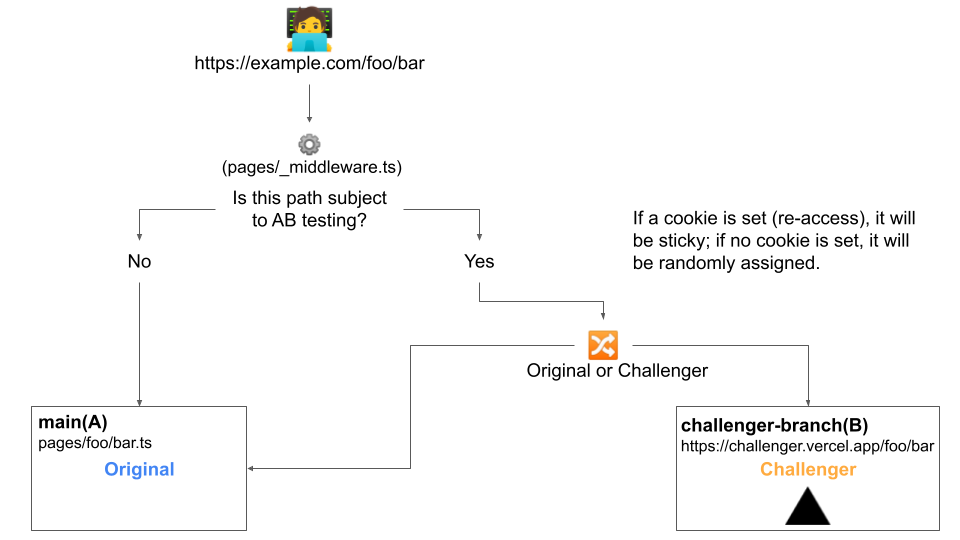
This plugin lets you divide traffic to your site between different deploys, straight from CDN network. It is not the traditional split testing on a per-component or per-page file basis.
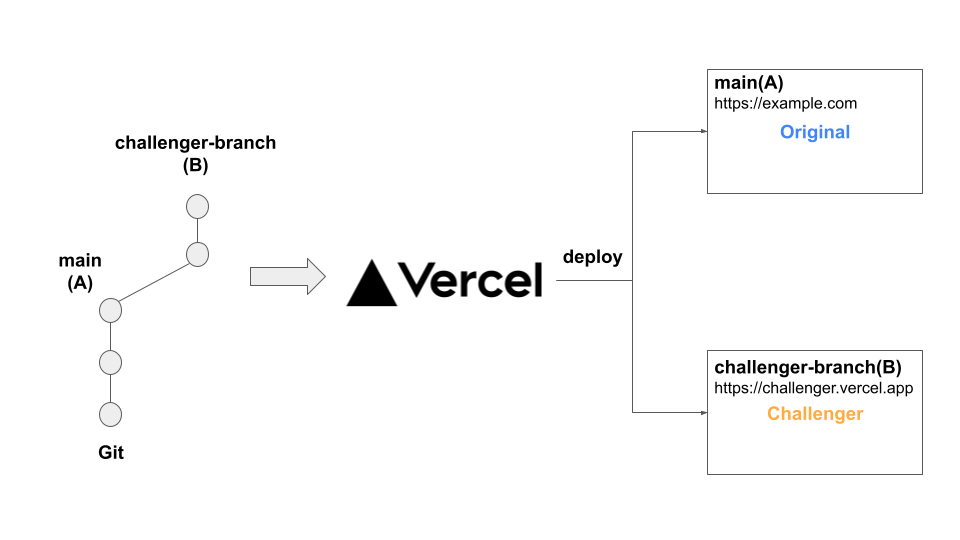
You deploy the main branch (original) and the branch derived from it (challenger) on Vercel, and use Next.js Rewrite Rules and Cookies to separate two or more environments. Since there is no need to duplicate code, it is easier to manage and prevents the bundle size from increasing.
How it works
Require
- useing Next.js >=10.1
- hosting by Vercel.
Theoretically, you could use this package with any provider other than Vercel if you can deploy a preview environment. However, at the moment, it only works with Vecel because some logic depends on Vercel's environment variables.
Contributions and requests are welcome.
Installation
npm install --save next-with-splitUsage
- Customize next.config.js. (in main branch)
// next.config.js
const { withSplit } = require('next-with-split');

module.export = withSplit({
  // write your next.js configuration values.
})- Create
pages/_split-challenge.ts(.js). (in main branch)
This file is a function to provide cookies for content separation.
// pages/_split-challenge.ts (.js)
export { getServerSideProps } from 'next-with-split'
const SplitChallenge = () => null
export default SplitChallenge
Derive a branch for Challenger and modify the content.
Deploy the Challenger branch in Vercel for preview and get the URL.
Modify next.config.js in both the main branch and the challenger branch.
// next.config.js
const { withSplit } = require('next-with-split');

module.export = withSplit({
  splits: {
    branchMappings: {
      your-challenger-branch: // challenger branch name
        'https://example-challenger-branch.vercel.app' // preview URL
    }
  }
  // write your next.js configuration values.
})
Deploy both the main branch and the challenger branch.
The network will be automatically split and the content will be served!
It is also sticky, controlled by cookies.
Function
withSplit
const withSplit = (args: WithSplitArgs) => WithSplitResult

type Options = {
  branchMappings: { [branch: string]: string }
  rootPage: string
  mainBranch: string
  active: boolean
}

type WithSplitArgs = {
  splits?: Partial<Options>
  [x: string]: unknown // next.js configuration values.
}
Options
| key | type | note |
|---|---|---|
| branchMappings | { [branch: string]: string } | undefined | Set the map data with the challenger branch name as the key and the preview URL corresponding to that branch as the value. You can specify more than one challenger as in A/B/C testing. |
| rootPage | string | undefined | default: 'top' If there is a page file corresponding to /(index), specify the file name (no extension required). Unfortunately, pages/index.tsx|jsx cannot be used, so you will need to rename it. See more |
| mainBranch | string | undefined | default: 'main' Specify the name of the branch that is registered as the production branch on Vercel. |
| active | boolean | undefined | If you want to force the function to be active in a development, set it to true.If you start a split test with the challenger branch set to active: true, you will get serious problems such as redirection loops. Be sure to keep the change of this setting value to the development environment. |
Supplement
page/index.tsx cannot be used
The root page name cannot be index. (This seems to be a restriction of the rewrite rules.)
You can continue to treat it as the root page by renaming it to something other than index and specifying the withSplit option as rootPage: 'top'.
trailingSlash will be forced to be true
It cannot be set to trailingSlash: false. (This seems to be a restriction of the rewrite rules.)
LICENSE
MIT © AijiUejima