

Package Exports
- next-with-split
- next-with-split/build/index.js
- next-with-split/esm/main.js
This package does not declare an exports field, so the exports above have been automatically detected and optimized by JSPM instead. If any package subpath is missing, it is recommended to post an issue to the original package (next-with-split) to support the "exports" field. If that is not possible, create a JSPM override to customize the exports field for this package.
Readme


🆎 next-with-split
This is magic!🔮
It enables branch-based split testing (A/B testing) on Vercel and other providers, just like the Netify's Split Testing.
This plugin lets you divide traffic to your site between different deploys, straight from CDN network. It is not the traditional split testing on a per-component or per-page file basis.
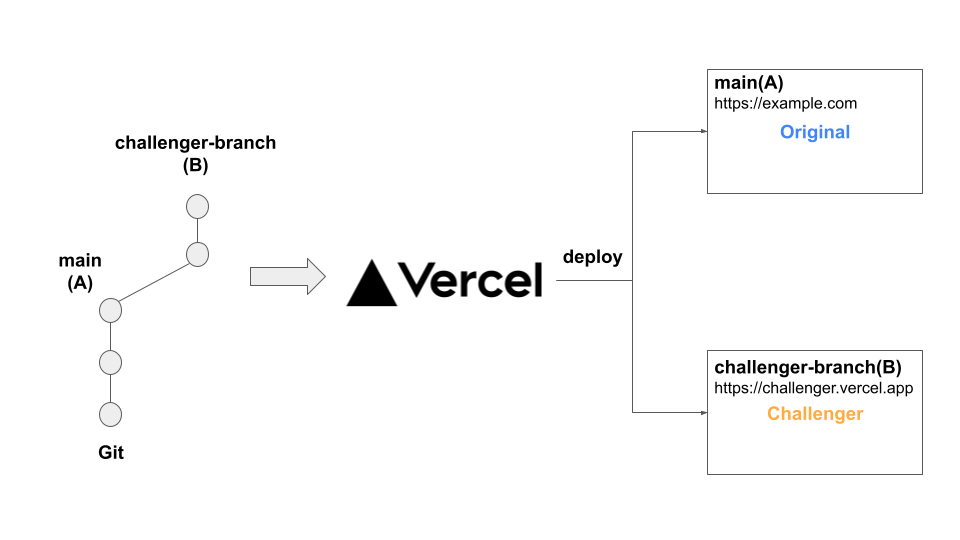
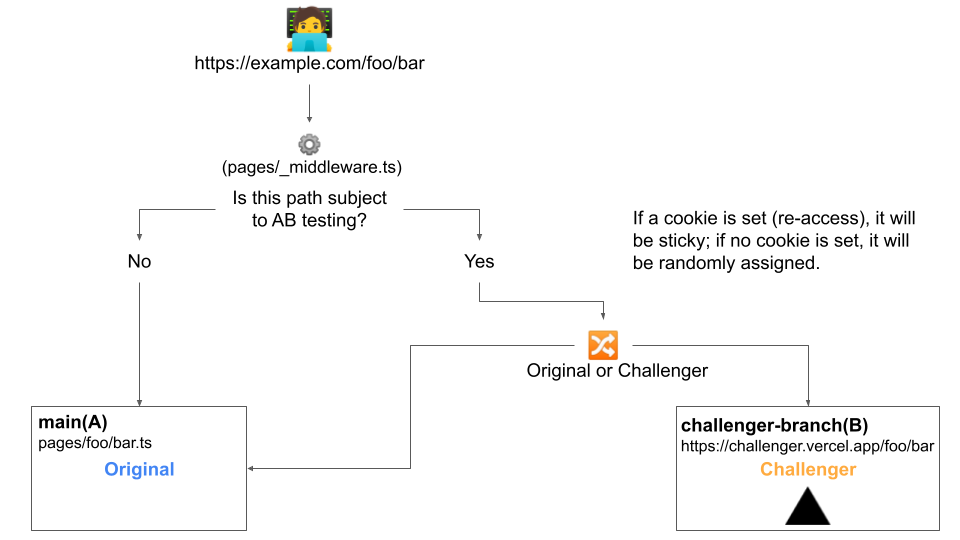
You deploy the main branch (original) and the branch derived from it (challenger) on Vercel and other providers, and use Next.js middleware and cookies to separate two or more environments. Since there is no need to duplicate code, it is easier to manage and prevents the bundle size from increasing.
Example
How it works
Require
- Using Next.js >=12
This plugin depends on the middleware of Next.js v12. If you are using Next.js v11 or earlier, please use next-with-split v3.
Installation
npm install --save next-with-splitUsage
1. Customize next.config.js and create pages/_middleware.js. (in main branch)
// next.config.js
const withSplit = require('next-with-split')({})

module.export = withSplit({
  // write your next.js configuration values.
})
// pages/_middleware.js
export { middleware } from 'next-with-split'If your A/B testing is limited, _middleware.js can be placed under the directory of the target page (Next.js middleware)
If you already have middleware code, please refer to the following.
// pages/_middleware.js
import { middleware as withSplit } from 'next-with-split'

export const middleware = (req) => {
  const res = withSplit(req)
  // write your middleware code
  return res
}
2. Derive a branch from the main branch as challenger.
- NOTE: Challenger branch also needs to have
next.config.jscustomized (No. 1).
3. Deploy the challenger branch for preview and get the hostname.
4. Modify next.config.js in the main branch.
// next.config.js
const withSplit = require('next-with-split')({
  splits: {
    example1: { // Identification of A/B tests (any)
      path: '/foo/*', // Paths to perform A/B testing. (regular expression)
      hosts: {
        // [branch name]: host name
        original: 'example.com',
        'challenger-for-example1': 'challenger-for-example1.vercel.app',
      },
      cookie: { // Optional (For Sticky's control)
        maxAge: 60 * 60 * 12 * 1000 // Number of valid milliseconds for sticky sessions. (default is 1 day)
      }
    },
    // Multiple A/B tests can be run simultaneously.
    example2: {
      path: '/bar/*',
      hosts: {
        original: 'example.com',
        'challenger-for-example2': 'challenger-for-example2.vercel.app',
        // It is possible to distribute access to two or more targets as in A/B/C testing.
        'challenger2-for-example2': 'challenger2-for-example2.vercel.app',
      }
    }
  }
})

module.export = withSplit({
  // write your next.js configuration values.
})- If you use a provider other than Vercel, please configure the following manual.
Note: This setting is also required for the Challenger deployments.
// next.config.js
const withSplit = require('next-with-split')({
  splits: {...},
  isOriginal: false, // Control it so that it is true on the original deployment (basically the main branch) and false on all other deployments.,
  hostname: 'challenger.example.com', // Set the hostname in the Challenger deployment. If this is not set, you will not be able to access the assets and images.
  currentBranch: 'chllenger1', // Optional. Set the value if you use `process.env.NEXT_PUBLIC_IS_TARGET_SPLIT_TESTING`.
})

module.export = withSplit({
  // write your next.js configuration values.
})
5. Deploy the main branch.
6. The network will be automatically split and the content will be served!
It is also sticky, controlled by cookies.
Features
If the deployment is subject to A/B testing,
process.env.NEXT_PUBLIC_IS_TARGET_SPLIT_TESTINGis set to 'true'.- CAUTION: Only if the key set in
hostsmatches the branch name.
- CAUTION: Only if the key set in
When Next.js preview mode is turned on, access will automatically be allocated to the original deployment.
- Set the
hostskey tooriginal,masterormain.
- Set the
You can control the behavior of
withSplitby forcing it by passing an environment variable at server startup.
Use it for verification in your development environment.SPLIT_ACTIVE=true yarn dev: forced active.SPLIT_DISABLE=true yarn dev: forced disable.
By default, access to deployments is allocated in equal proportions. If you want to add bias to the access sorting, set
wight.
// next.config.js
const withSplit = require('next-with-split')({
  splits: {
    example1: {
      path: '/foo/*',
      hosts: {
        // original : challenger1 : challenger2 = 3(50%) : 2(33%) : 1(16%)
        original: { host: 'example.com', weight: 3 },
        challenger1: { host: 'challenger1.vercel.app', weight: 2 },
        challenger2: 'challenger2.vercel.app', // If `weight` is not specified, the value is 1.
      }
    }
  }
})
Contributing
Please read CONTRIBUTING.md for details on our code of conduct, and the process for submitting pull requests to us.
License
This project is licensed under the MIT License - see the LICENSE file for details