Package Exports
- oas-normalize
- oas-normalize/lib/errors
- oas-normalize/lib/types
- oas-normalize/lib/utils
- oas-normalize/package.json
Readme

Tooling for converting, validating, and parsing OpenAPI, Swagger, and Postman API definitions.





Installation
npm install oas-normalizeUsage
import OASNormalize from 'oas-normalize';

const oas = new OASNormalize(
  'https://raw.githubusercontent.com/OAI/OpenAPI-Specification/master/examples/v3.0/petstore-expanded.yaml',
  // ...or a JSON object, YAML, a file path, stringified JSON, whatever you have.
);

await oas
  .validate()
  .then(() => {
    // The API definition is valid!
  })
  .catch(err => {
    console.error(err);
  });
[!WARNING] Support for Postman collections is experimental. If you've supplied a Postman collection to the library, it will always be converted to OpenAPI, using
@readme/postman-to-openapibefore doing any bundling, validating, etc.
.load()
Load and retrive the API definition that oas-normalize was initialized with. Every method of oas-normalize utilizes this internally however if you would like to retrieve the original API definition supplied (for example if all you had was a URL, a file path, or a buffer), you can use .load() to automatically resolve and return its contents.
const file = await oas.load();
console.log(file);
.bundle()
Bundle up the given API definition, resolving any external $ref pointers in the process.
const definition = await oas.bundle();
console.log(definition);
.convert()
Convert a given API definition into an OpenAPI definition JSON object.
await oas
  .convert()
  .then(definition => {
    // Definition will always be an OpenAPI JSON object, regardless if a
    // Swagger definition, Postman collection, or even YAML was supplied.
    console.log(definition);
  })
  .catch(err => {
    console.error(err);
  });
.deref()
Dereference the given API definition, resolving all $ref pointers in the process.
const definition = await oas.bundle();
console.log(definition);
.validate()
Validate a given API definition. This supports Swagger 2.0 and OpenAPI 3.x API definitions, as well as Postman 2.x collections.
try {
  await oas.validate();
  // The API definition is valid!
} catch (err) {
  console.error(err);
}
Error Handling
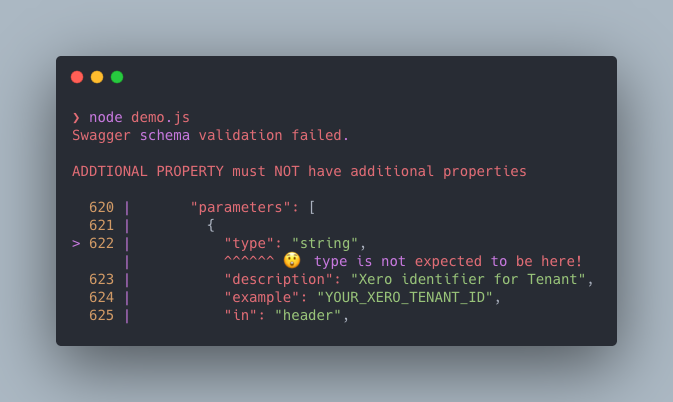
All errors will be thrown as a ValidationError exception with contextual error messages that direct the user to the line(s) where their errors are present:
OpenAPI schema validation failed.

REQUIRED must have required property 'url'

   7 |   },
   8 |   "servers": [
>  9 |     {
     |     ^ ☹️  url is missing here!
  10 |       "urll": "http://petstore.swagger.io/v2"
  11 |     }
  12 |   ],
If you also wish to treat certain errors as warnings you can do so by supplying your .validate() call with a @readme/openapi-parser ruleset:
try {
  const result = await oas.validate({
    validate: {
      rules: {
        openapi: {
          'path-parameters-not-in-path': 'warning',
        },
      },
    },
  });

  if (result.warnings.length) {
    console.warn('🚸 The API is valid but has some warnings.');
    console.warn(result.warnings);
  } else {
    console.log('🍭 The API is valid!');
  }
} catch (err) {
  console.error(err);
}
For full documentation on the available rulesets, as well as tooling to transform the the .validate() responses into a human-readable strings, check out the documentation for @readme/openapi-parser.
.version()
Load and retrieve version information about a supplied API definition.
const { specification, version } = await oas.version();

console.log(specification); // openapi
console.log(version); // 3.1.0
Options
Enable local paths
For security reasons, you need to opt into allowing fetching by a local path. To enable this supply the enablePaths option to the class instance:
const oas = new OASNormalize('./petstore.json', { enablePaths: true });Colorized errors
If you wish errors from .validate() to be styled and colorized, supply colorizeErrors: true to the class instance:
const oas = new OASNormalize('https://example.com/petstore.json', {
  colorizeErrors: true,
});
When enabled thrown validation error messages will now resemble the following: