
Package Exports
- react-native-markdown-package
This package does not declare an exports field, so the exports above have been automatically detected and optimized by JSPM instead. If any package subpath is missing, it is recommended to post an issue to the original package (react-native-markdown-package) to support the "exports" field. If that is not possible, create a JSPM override to customize the exports field for this package.
Readme
react-native-markdown-package
Node Module Package for implementing markdown syntax in React Native. I knew this is not a perfect library, so your contribution, Pull Request, or anything else from you guys will be really appreciated. :)
Getting started
To install this library, you can easily run this command from your project folder.
npm i react-native-markdown-package --save
Usage
What you need to do is import the react-native-markdown-package module and then use the
<Markdown/> tag.
How to use?
Here we are, take a look at this simple implementation:
/**
 * Sample React Native App
 * https://github.com/facebook/react-native
 * @flow
 */

import React, { Component } from 'react';
import Markdown from 'react-native-markdown-package';
import {
  AppRegistry,
  StyleSheet,
  Text,
  View
} from 'react-native';

export default class AwesomeProject extends Component {
  render() {
    return (
      <View style={styles.container}>
        <Text style={styles.welcome}>
          Welcome to React Native!
        </Text>
        <Markdown styles={styles.markdown} >
          # This is Heading 1{'\n\n'}
          ## This is Heading 2{'\n\n'}
          1. List1 {'\n'}
          2. List2 {'\n'}
          {'\t'}1. sublist1{'\n'}
          {'\t'}description sublist1.{'\n'}
          {'\t'}2. sublist2{'\t\t'}{'\n'}
          * List3{'\n'}
          * List4{'\n'}
          {'\t'}1. **bold text** {'\n'}
          {'\t'}2. this line contain * and should not be a new sublist{'\t\t'}{'\n'}
          5.  Last list{'\n\n'}
          Some *really* basic **Markdown**.{'\n\n'}


          ## this is header {'\n\n\n\n'}
          {'this is _italic_ '}
          {'this is **strong**'}

          {'\n\n'}
          | # | Name   | Age |{'\n'}
          |---|--------|-----|{'\n'}
          | 1 | John   | 19  |{'\n'}
          | 2 | Sally  | 18  |{'\n'}
          | 3 | Stream | 20  |{'\n'}
        </Markdown>
      </View>
    );
  }
}

const styles = {
  container: {
    flex: 1,
    justifyContent: 'center',
    alignItems: 'center',
    backgroundColor: '#F5FCFF',
  },
  welcome: {
    fontSize: 20,
    textAlign: 'center',
    margin: 10,
  },
  instructions: {
    textAlign: 'center',
    color: '#333333',
    marginBottom: 5,
  },
  markdown: {
    heading1: {
      color: 'red'
    },
    heading2: {
      color: 'green'
    },
    strong: {
      color: 'blue'
    },
    em: {
      color: 'cyan'
    },
    text: {
      color: 'magenta',
    }
  }
};

AppRegistry.registerComponent('AwesomeProject', () => AwesomeProject);
check this simple app for implementation example Example app
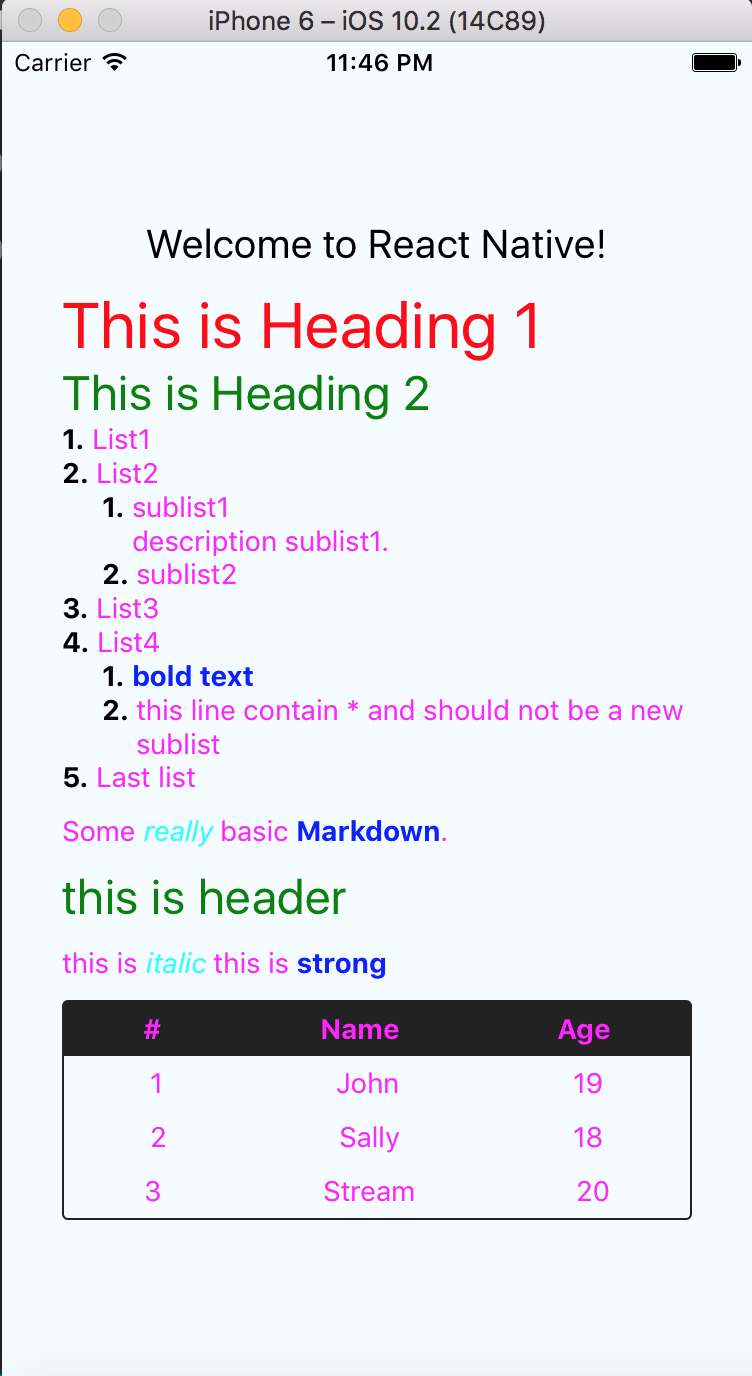
Properties
styles
Default style properties will be applied to the markdown. You will likely want to customize these styles, the following properties can be used to modify the rendered elements:
Note: The text inside the parentheses denotes the element type.
autolink(<Text>) - WIPblockQuote(<Text>) - WIPbr(<Text>)codeBlock(<View>) - WIPdel(<Text>)em(<Text>)heading(<Text>) - Alsoheading1throughheading6hr(<View>)image(<Image>) - Implemented but size is fixed to50x50until auto width is supported by React Native.inlineCode(<Text>)link(<Text>) - WIPlist(<View>) - Alsosublist(<View>),listItem(<View>),listItemBullet(<Text>) andlistItemNumber(<Text>)sublist(<View) - AlsolistItem(<View>),listItemBullet(<Text>) andlistItemNumber(<Text>)mailto(<Text>) - WIPnewline(<Text>) - WIPparagraph(<View>)plainText(<Text>) - Use for styling text without any associated stylesstrong(<Text>)table(<View>)tableHeader(<View>)tableHeaderCell(<Text>)tableRow(<View>)tableRowCell(<View>)tableRowLast(<View>, inherits fromtableRow)text(<Text>) - Inherited by all text based elementsu(<View>)url(<Text>)view(<View>) - This is the containerViewthat the Markdown is rendered in.
Thanks To
I'm very thankful to contributors who help me to make this libary better, and also this project was actually forked from lwansbrough , gijoehosaphat and imported a parser library which forked from Khan with some enhancements below :
Styling method.
Now you can easily add styling on each syntax, e.g. add different color either in
strong,header, or another md syntax. All default styles in this package is also already moved to new filestyles.js.Refactoring some codes to adopt ES6 style.
Refactor index.js using ES6. :)
Support
Sublist.In the previous library, you couldn't add sublist. It was not supported. But now, this feature already added here. Please follow the instruction above...
Latest release:
add Proptypes Support, (1.0.1)
Fix deprecated View.proptypes and update Readme (1.0.3)
Upgrade dependency, lodash, avoid vulnerabilities (1.1.0)
Fix performance issue, import only necessarry function from lodash (1.1.1)
Finalize Blockquote feature (1.2.0)
Update Docs (1.2.1)
Happy Coding... ;)