Package Exports
- react-tinacms-editor
This package does not declare an exports field, so the exports above have been automatically detected and optimized by JSPM instead. If any package subpath is missing, it is recommended to post an issue to the original package (react-tinacms-editor) to support the "exports" field. If that is not possible, create a JSPM override to customize the exports field for this package.
Readme
react-tinacms-editor
This package provides a WYSIWYM Editor for HTML and Markdown. This editor can be used as a Field Plugin or as an Inline Field in websites built with TinaCMS.
Note: The
react-tinacms-editorpackage is quite large. Whether you're using the Field Plugin or the Inline Field it is recommended that you use dynamic imports to reduce your JS bundle size.
Install
yarn add react-tinacms-editorField Plugins
This package provides two field plugins for TinaCMS: MarkdownFieldPlugin and HtmlFieldPlugin.
Registering the Plugins
This is the simplest approach to registering plugins:
import { MarkdownFieldPlugin, HtmlFieldPlugin } from 'react-tinacms-editor'

cms.plugins.add(MarkdownFieldPlugin)
cms.plugins.add(HtmlFieldplugin)
The react-tinacms-editor is a large package so it is recommended that load the plugins dynamicallyj:
import("react-tinacms-editor").then(
  ({ MarkdownFieldPlugin, HtmlFieldPlugin }) => {
    cms.plugins.add(MarkdownFieldPlugin)
    cms.plugins.add(HtmlFieldplugin)
  }
)
Field Plugin Options
interface Config {
  component: 'markdown' | 'html'
  name: string
  label?: string
  description?: string
}| Option | Description |
|---|---|
component |
The name of the plugin component. Either 'markdown' or 'html'. |
name |
The path to some value in the data being edited. |
label |
A human readable label for the field. Defaults to the name. (Optional) |
description |
Description that expands on the purpose of the field or prompts a specific action. (Optional) |
Example: Using Field Plugins in Forms
Once registered you will be able to use the plugins in your Forms:
const formConfig = {
  fields: [
    {
      name: "description",
      label: "Description",
      component: "html",
    },
    {
      name: "body",
      label: "Blog Body",
      component: "markdown",
    }
  ]
}
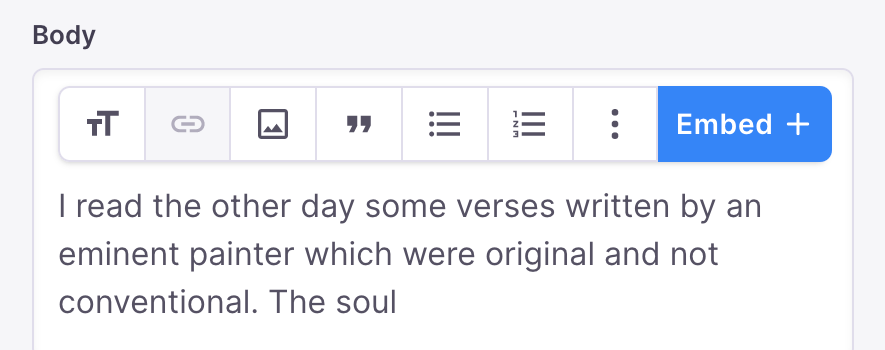
These will both show up in your sidebar looking roughly like this:
InlineWysiwyg
The InlineWysiwyg is a React inline editing component for Markdown and HTML.
InlineWysiwyg Interface
interface InlineWysiwygProps {
  name: string
  children: any
  sticky?: boolean | string
  format?: 'markdown' | 'html'
  imageProps?: ImageProps
  focusRing?: boolean | FocusRingProps
}

interface ImageProps {
  parse(media: Media): string
  uploadDir?(form: Form): string
  upload?: (files: File[]) => Promise<string[]>
  previewSrc?: (url: string) => string | Promise<string>
}

interface FocusRingProps {
  offset?: number | { x: number; y: number }
  borderRadius?: number
}| Key | Description |
|---|---|
name |
The path to some value in the data being edited. |
children |
Child components to render. |
sticky? |
A boolean determining whether the Wysiwyg Toolbar 'sticks' to the top of the page on scroll. |
format? |
This value denotes whether Markdown or HTML will be rendered. |
imageProps? |
An object that configures how images in the Wysiwyg are uploaded and rendered. Images are disabled when undefined. |
focusRing? |
Either an object to style the focus ring or a boolean to show/hide the focus ring. Defaults to true which displays the focus ring with default styles. For style options, offset (in pixels) sets the distance from the ring to the edge of the component, and borderRadius (in pixels) controls the rounded corners of the focus ring. |
Basic Usage
Below is an example of how an InlineWysiwyg field could be defined in an Inline Form.
import ReactMarkdown from 'react-markdown'
import { useForm, usePlugin } from 'tinacms'
import { InlineForm } from 'react-tinacms-inline'
import { InlineWysiwyg } from 'react-tinacms-editor'

// Example 'Page' Component
export function Page(props) {
  const [data, form] = useForm(props.data)
  usePlugin(form)
  return (
    <InlineForm form={form}>
      <InlineWysiwyg name="markdownBody" format="markdown">
        <ReactMarkdown source={data.markdownBody} />
      </InlineWysiwyg>
    </InlineForm>
  )
}
With imageProps
To upload and manage images in the Wysiwyg, you'll need to configure imageProps.
| Key | Description |
|---|---|
parse |
Defines how the actual front matter or data value gets populated on upload. The media object gets passed as an argument. Defaults to filename. |
uploadDir? |
Defines the upload directory. This function is passed the current form values. |
upload? |
An asynchronous function that handles image upload. By default, this calls the persist function on the media store. |
previewSrc? |
An asynchronous function that returns the path or url for the image src in preview or edit mode. By default, this calls the previewSrc function on the media store_. |
<InlineWysiwyg
  name="rawMarkdownBody"
  imageProps={{
    parse: (media) => `images/about/${media.filename}`
    uploadDir: () => 'public/images/about/',
  }}
>
  <div
    dangerouslySetInnerHTML={{
      __html: props.data.markdownRemark.html,
    }}
  />
</InlineWysiwyg>
Sticky Menu
When editing long content it is likely that the editor will scroll past the wysiwyg menu.
By adding the sticky property the menu will follow the user as they scroll through the page.
<InlineWysiwyg name="markdownBody" format="markdown" sticky>
  <ReactMarkdown source={data.markdownBody} />
</InlineWysiwyg>
Alternatively you can pass a string to set the exact offset of the menu.
<InlineWysiwyg name="markdownBody" format="markdown" sticky="2rem">
  <ReactMarkdown source={data.markdownBody} />
</InlineWysiwyg>
If you're using Tina's toolbar, you can pass 'var(--tina-toolbar-height)' to ensure the toolbar does not cover the WYSIWYG menu.
<InlineWysiwyg name="markdownBody" format="markdown" sticky="var(--tina-toolbar-height)">
  <ReactMarkdown source={data.markdownBody} />
</InlineWysiwyg>
Dynamic Imports
The react-tinacms-editor is a large package so it is recommended that you make sure it's only being loaded when necessary. The example below will make sure that the editor is only loaded if the CMS is actually enabled, saving the visistors to your website from the extra load time.
your-app/src/components/InlineWysiwyg.js
import React from 'react'
import { useCMS } from 'tinacms'

export function InlineWysiwyg(props) {
  const cms = useCMS()
  const [{ InlineWysiwyg }, setEditor] = React.useState({})

  React.useEffect(() => {
    if (!InlineWysiwyg && cms.enabled) {
      import('react-tinacms-editor').then(setEditor)
    }
    return () => (InlineWysiwyg ? setEditor(null) : null)
  }, [cms.enabled])

  if (InlineWysiwyg) {
    return (
      <InlineWysiwyg {...props}/>
    )
  }

  return props.children
}
Why do I have to load the editor dynamically myself?
Code splitting and dynamic imports are handled by the website's JavaScript bundlers (e.g. rollup, webpack, etc.). Since the package does not load itself into the application, it is unfortunately not possible to provide this behaviour in the package itself.
Contributing
For a deeper understanding of the Wysiwyg editor and inner-workings of the react-tinacms-editor package, checkout the contributor documentation