Package Exports
- react-tinacms-editor
This package does not declare an exports field, so the exports above have been automatically detected and optimized by JSPM instead. If any package subpath is missing, it is recommended to post an issue to the original package (react-tinacms-editor) to support the "exports" field. If that is not possible, create a JSPM override to customize the exports field for this package.
Readme
react-tinacms-editor
This package provides a WYSIWYM Editor for HTML and Markdown. This editor can be used as a Field Plugin or as an Inline Field in websites built with TinaCMS.
Note: The
react-tinacms-editorpackage is quite large. Whether you're using the Field Plugin or the Inline Field it is recommended that you use dynamic imports to reduce your JS bundle size.
Install
yarn add react-tinacms-editorField Plugins
This package provides two field plugins for TinaCMS: MarkdownFieldPlugin and HtmlFieldPlugin.
Registering the Plugins
This is the simplest approach to registering plugins:
import { MarkdownFieldPlugin, HtmlFieldPlugin } from 'react-tinacms-editor'

cms.plugins.add(MarkdownFieldPlugin)
cms.plugins.add(HtmlFieldplugin)
The react-tinacms-editor is a large package so it is recommended that load the plugins dynamicallyj:
import("react-tinacms-editor").then(
  ({ MarkdownFieldPlugin, HtmlFieldPlugin }) => {
    cms.plugins.add(MarkdownFieldPlugin)
    cms.plugins.add(HtmlFieldplugin)
  }
)
Field Plugin Options
interface Config {
  component: 'markdown' | 'html'
  name: string
  label?: string
  description?: string
}| Option | Description |
|---|---|
component |
The name of the plugin component. Either 'markdown' or 'html'. |
name |
The path to some value in the data being edited. |
label |
A human readable label for the field. Defaults to the name. (Optional) |
description |
Description that expands on the purpose of the field or prompts a specific action. (Optional) |
Example: Using Field Plugins in Forms
Once registered you will be able to use the plugins in your Forms:
const formConfig = {
  fields: [
    {
      name: "description",
      label: "Description",
      component: "html",
    },
    {
      name: "body",
      label: "Blog Body",
      component: "markdown",
    }
  ]
}
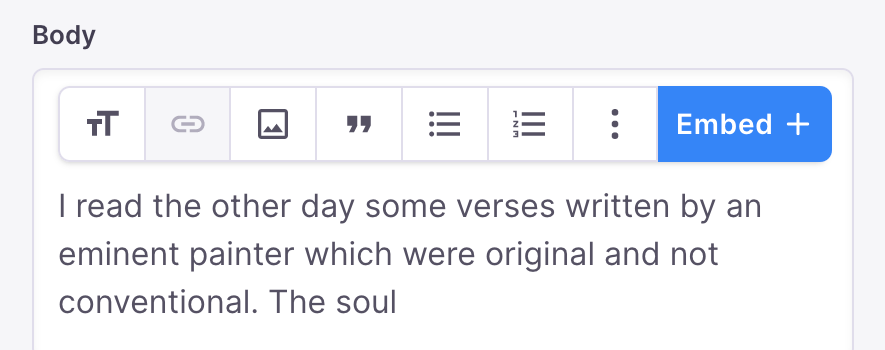
These will both show up in your sidebar looking roughly like this:
Contributing
For a deeper understanding of the Wysiwyg editor and inner-workings of the react-tinacms-editor package, checkout the contributor documentation