
Package Exports
- state-switch
Readme
STATE-SWITCH





State Switch is a Monitor/Guard for Managing Your Async Operations.
Introduction
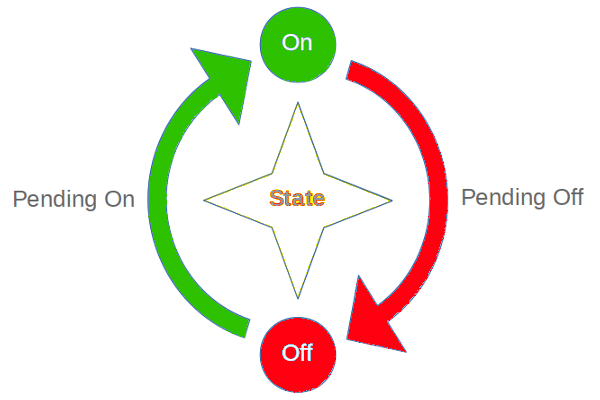
StateSwitch can manage state transition for you, by switching from the following four states:
OFF: state is offpending ON: state is switching from OFF to ONON: state is onpending OFF: state is switch from ON to OFF
You can set/get the state with the API, and you can also monite the state switch events by listening the 'on' and 'off' events.
There have another read() API return a Promise so that you can wait the on of off events by:
await state.ready('on')
await state.ready('off')
If the state is already ON when you await state.ready('on'), then it will resolved immediatelly.
EXAMPLE
Talk is cheap, show me the code!
Code
import { StateSwitch } from 'state-switch'

function doSlowConnect() {
  console.log('> doSlowConnect() started')
  return new Promise((resolve, reject) => {
    setTimeout(() => {
      console.log('> doSlowConnect() done')
      resolve()
    }, 1000)
  })
}

function doSlowDisconnect() {
  console.log('> doSlowDisconnect() started')
  return new Promise((resolve, reject) => {
    setTimeout(() => {
      console.log('> doSlowDisconnect() done')
      resolve()
    }, 1000)
  })
}

class MyConnection {
  private state = new StateSwitch('MyConnection')

  constructor() {
    /* */
  }

  public connect() {
    /**
     * This is the only 1 Right State
     */
    if (this.state.off() === true) {
      this.state.on('pending')

      doSlowConnect().then(() => {
        this.state.on(true)
        console.log(`> I'm now opened`)
      })

      console.log(`> I'm opening`)
      return
    }

    /**
     * These are the other 3 Error States
     */
    if (this.state.off() === 'pending') {
      console.error(`> I'm closing, please wait`)
    } else if (this.state.on() === true) {
      console.error(`> I'm already open. no need to connect again`)
    } else if (this.state.on() === 'pending') {
      console.error(`> I'm opening, please wait`)
    }
  }

  public disconnect() {
    /**
     * This is the only one Right State
     */
    if (this.state.on() === true) {
      this.state.off('pending')

      doSlowDisconnect().then(() => {
        this.state.off(true)
        console.log(`> I'm closed.`)
      })

      console.log(`> I'm closing`)
      return
    }

    /**
     * These are the other 3 Error States
     */
    if (this.state.on() === 'pending') {
      console.error(`> I'm opening, please wait`)
    } else if (this.state.off() === true) {
      console.error(`> I'm already close. no need to disconnect again`)
    } else if (this.state.off() === 'pending') {
      console.error(`> I'm closing, please wait`)
    }
  }
}

const conn = new MyConnection()

console.log('CALL: conn.connect(): should start to opening')
conn.connect()

console.log('CALL: conn.connect(): should not connect again while opening')
conn.connect()

console.log('CALL: conn.disconnect(): can not disconnect while opening')
conn.disconnect()

setTimeout(() => {
  console.log('... 2 seconds later, should be already open  ...')

  console.log('CALL: conn.connect(): should not connect again if we are open')
  conn.connect()

  console.log('CALL: conn.disconnect(): should start to closing')
  conn.disconnect()

  console.log('CALL: conn.disconnect(): should not disconnect again while we are closing')
  conn.disconnect()

  console.log('CALL: conn.connect(): can not do connect while we are closing')
  conn.connect()

  setTimeout(() => {
    console.log('... 2 seconds later, should be already closed ...')

    console.log('CALL: conn.disconnect(): should not disconnect again if we are close')
    conn.disconnect()
  }, 2000)

}, 2000)
Diagram
What's the meaning of the above code?
StateSwitch helps you manage the following four states easy:
Run
$ npm run demo

> state-switch@0.1.3 demo /home/zixia/git/state-switch
> ts-node example/demo

CALL: conn.connect(): should start to opening
> doSlowConnect() started
> I'm opening
CALL: conn.connect(): should not connect again while opening
> I'm opening, please wait
CALL: conn.disconnect(): can not disconnect while opening
> I'm opening, please wait
> doSlowConnect() done
> I'm now opened
... 2 seconds later, should be already open  ...
CALL: conn.connect(): should not connect again if we are open
> I'm already open. no need to connect again
CALL: conn.disconnect(): should start to closing
> doSlowDisconnect() started
> I'm closing
CALL: conn.disconnect(): should not disconnect again while we are closing
> I'm closing, please wait
CALL: conn.connect(): can not do connect while we are closing
> I'm closing, please wait
> doSlowDisconnect() done
> I'm closed.
... 2 seconds later, should be already closed ...
CALL: conn.disconnect(): should not disconnect again if we are close
> I'm already close. no need to disconnect again
That's the idea: we should always be able to know the state of our async operation.
API REFERENCE
Class StateSwitch
constructor(clientName?: string)
Create a new StateSwitch instance.
private state = new StateSwitch('MyConn')on(): boolean | 'pending'
Get the state for ON: true for ON(stable), pending for ON(in-process). false for not ON.
on(state: true | 'pending'): void
Set the state for ON: true for ON(stable), pending for ON(in-process).
off(): boolean | 'pending'
Get the state for OFF: true for OFF(stable), pending for OFF(in-process). false for not OFF.
off(state: true | 'pending'): void
Set the state for OFF: true for OFF(stable), pending for OFF(in-process).
pending(): boolean
Check if the state is pending.
true means there's some async operations we need to wait.
false means no async on fly.
ready(expectedState='on', noCross=false): Promise<void>
expectedState:'on' | 'off', default isonnoCross:boolean, default isfalse
Wait the expected state to be ready.
If set noCross to true, then ready() will throw if you are wait a state from it's opposite site, for example: you can expect an Exception when you call ready('on', true) when the on() === 'off'.
name(): string
Get the name from the constructor.
setLog(log: Brolog | Npmlog)
Enable log by set log to a Npmlog compatible instance.
Personaly I use Brolog, which is writen by my self, the same API with Npmlog but can also run inside Browser with Angular supported.
const log = Brolog.instance()
StateSwitch.setLog(log)
BusyIndicator
Set a busy state.
const indicator = new BusyIndicator()1. busy()
- set busy or not
- get busy status
indicator.busy(true)
indicator.busy(false)
const busy = indicator.busy()
2. available()
Return a Promise that will resolved after the busy state to be available. (not busy)
If the current state is not busy, it will return a
Promisethat will resolved immediately.
await indicator.available()
assert (indicator.busy() === false, 'busy() should be false after await available()')
CHANGELOG
master v1.0 (Oct 23, 2021)
- Oct 23: Add
BusyIndicatorclass- Add
BusyIndicatorInterfaceandStateSwitchInterface
- Add
- v0.15 (Sep 2021): Publish as ESM package.
v0.14
- Add RxJS typing unit tests for making sure that the
fromEventtyping inference is right.
v0.9 master (Mar 2020)
Support for using RxJS:
const notPending = (state: true | 'pending') => state === true

const stateOn$ = fromEvent(stateSwitch, 'on').pipe(
  filter(notPending)
)- Support emit
onandoffevents with the args of thestateof two values:trueandpending. - Add events unit tests
v0.6 (Jun 2018)
- DevOps for publishing to NPM@next for odd minor versions.
- Add State Diagram for easy understanding what state-switch do
v0.4 (Apr 2018)
BREAKING CHANGE: Change the ready() parameter to the opposite side.
- Before:
ready(state, crossWait=false) - AFTER:
ready(state, noCross=false)
v0.3 (Apr 2018)
- add new method
ready()to let user wait until the expected state is on(true).
v0.2 (Oct 2017)
BREAKING CHANGES: redesigned all APIs.
- delete all old APIs.
- add 4 new APIs: on() / off() / pending() / name()
v0.1.0 (May 2017)
Rename to StateSwitch because the name StateMonitor on npmjs.com is taken.
- Make it a solo NPM Module. (#466)
v0.0.0 (Oct 2016)
Orignal name is StateMonitor
- Part of the Wechaty project
AUTHOR
Huan LI zixia@zixia.net (http://linkedin.com/in/zixia)

COPYRIGHT & LICENSE
- Code & Docs 2016-2017© zixia
- Code released under the Apache-2.0 license
- Docs released under Creative Commons