

Package Exports
- stringd-colors
This package does not declare an exports field, so the exports above have been automatically detected and optimized by JSPM instead. If any package subpath is missing, it is recommended to post an issue to the original package (stringd-colors) to support the "exports" field. If that is not possible, create a JSPM override to customize the exports field for this package.
Readme
stringd-colors
Extends a stringd object with ansi styles
Features

Installing
Via NPM:
npm install stringd-colorsUsage
// Node CommonJS
const cStringd = require('stringd-colors');
// Or ES6
import cStringd from 'stringd-colors';
<!-- Or in the Browser -->
<script src="index.js"></script>Example
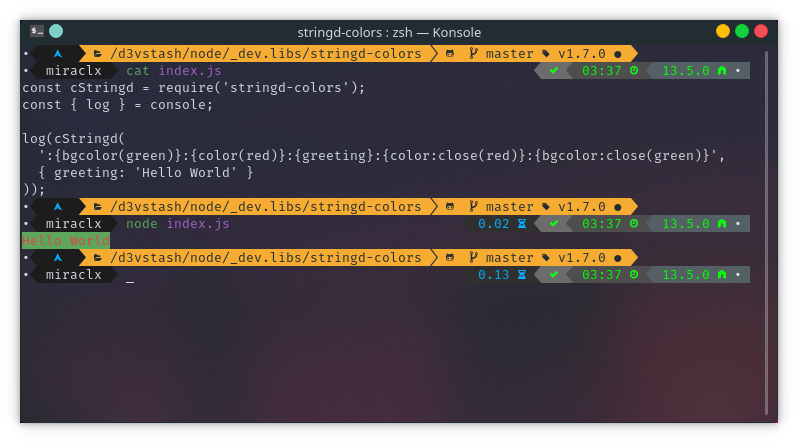
// CommonJS
const { log } = console;

log(cStringd(
  ':{bgcolor(green)}:{color(red)}:{greeting}:{color:close(red)}:{bgcolor:close(green)}',
  { greeting: 'Hello World' }
));
Result
API
cStringd(template[, objects])
Parse the template with the colors in cStringd.raw and variables in objects if provided
cStringd(':{color(green)}Hi There:{color:close(green)}');
// '\u001b[32mHi There\u001b[39m'
cStringd.extend([objects])
Return an extension of object with cStringd.raw, hence appending the ansi colors to the object, the absence of object would return cStringd.raw
const stringd = require('stringd');
const cStringd = require('stringd-colors');
stringd(':{color(green)}:{name}:{color:close(green)}', cStringd.extend({name: 'Jon Bellion'}));
// '\u001b[32mJon Bellion\u001b[39m'
cStringd.raw
An object for stringd parsing of ansi styles defined here
Handles
color
This handle, without a specific style specification, selects a random foreground color or modifier.
":{color}" // Random color
":{color(red)}" // Specifically the color red
":{color(underline)}" // Underline
color:close
This handle, without a specific style specification, defaults to closing all foreground colors
":{color:close}" // Close foreground colors
":{color:close(yellow)}" // Close the active yellow style
":{color:close(hidden)}" // Close the hidden modifier
bgcolor
This handle, without a specific style specification, selects a random background color or modifier.
":{bgcolor}" // Random background color
":{bgcolor(cyan)}" // Specifically the color cyan
":{bgcolor(bold)}" // bold
bgcolor:close
This handle, without a specific style specification, defaults to closing all background colors
":{bgcolor:close}" // Close foreground colors
":{bgcolor:close(magenta)}" // Close the active magenta style
":{bgcolor:close(strikethrough)}" // Close the strikethrough modifier
color:reset
This special handle, closes all ANSI manipulations.
Styles
ANSI style documentation here
Modifiers
color(bold)color(dim)color(italic)color(underline)color(inverse)color(hidden)color(strikethrough)color(visible)
Colors
color(black)color(red)color(green)color(yellow)color(blue)color(magenta)color(cyan)color(white)color(gray)color(redBright)color(greenBright)color(yellowBright)color(blueBright)color(magentaBright)color(cyanBright)color(whiteBright)
Background colors
bgcolor(black)bgcolor(red)bgcolor(green)bgcolor(yellow)bgcolor(blue)bgcolor(magenta)bgcolor(cyan)bgcolor(white)bgcolor(blackBright)bgcolor(redBright)bgcolor(greenBright)bgcolor(yellowBright)bgcolor(blueBright)bgcolor(magentaBright)bgcolor(cyanBright)bgcolor(whiteBright)
Development
Building
Feel free to clone, use in adherance to the license and perhaps send pull requests
git clone https://github.com/miraclx/stringd-colors.git
cd stringd-colors
npm install
# hack on code
npm run build
npm test
Testing
Tests are executed with Jest. To use it, simple run npm install, it will install
Jest and its dependencies in your project's node_modules directory followed by npm test.
To run the tests:
npm install
npm test
License
Apache 2.0 © Miraculous Owonubi (@miraclx) <omiraculous@gmail.com>