

Package Exports
- backport
- backport/dist/entrypoint.module.js
This package does not declare an exports field, so the exports above have been automatically detected and optimized by JSPM instead. If any package subpath is missing, it is recommended to post an issue to the original package (backport) to support the "exports" field. If that is not possible, create a JSPM override to customize the exports field for this package.
Readme

A CLI tool that automates the process of backporting commits.
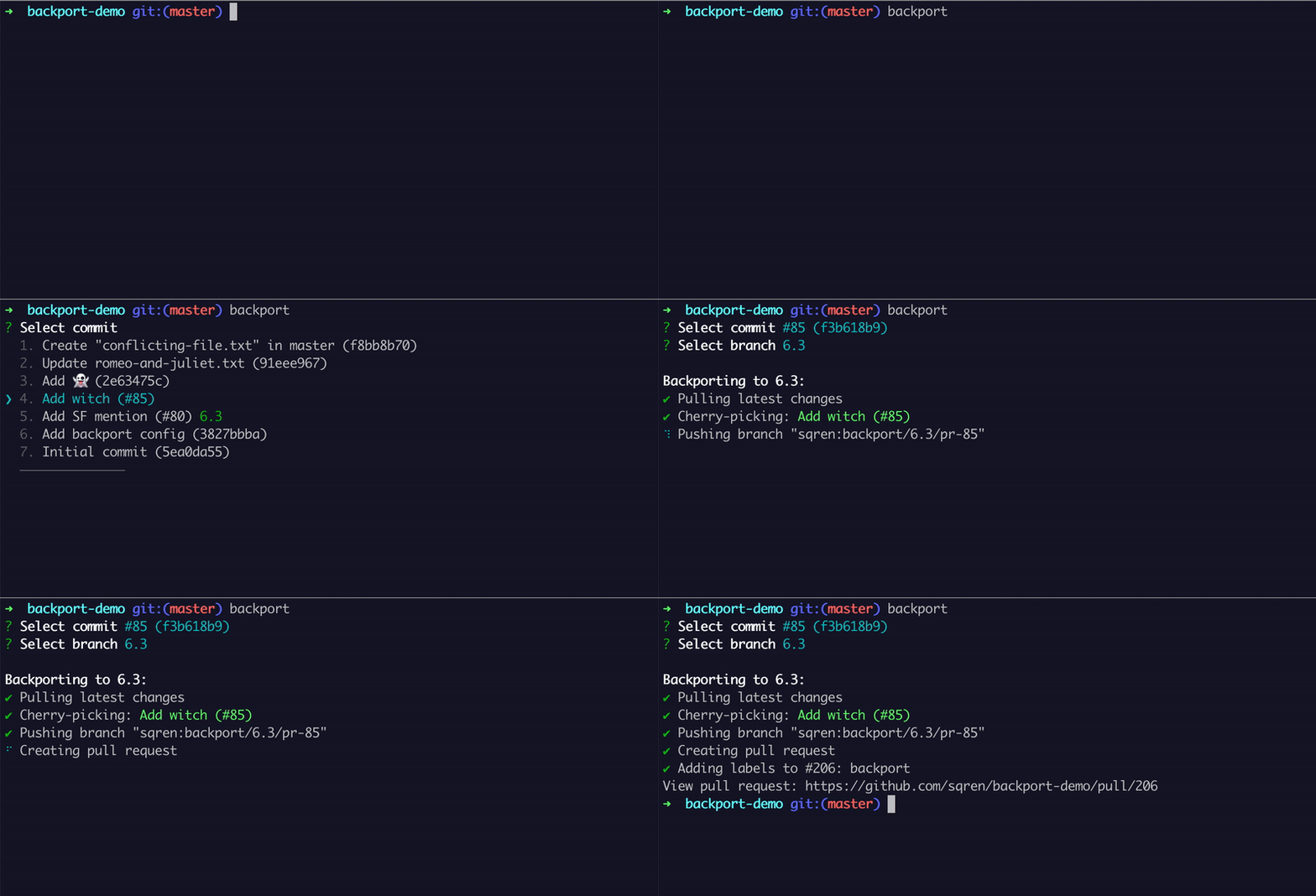
How it works
- Select a commit to backport
- Select a branch to backport to
- The commit will be cherrypicked, pushed and a pull request created.
Requirements
- Node 16 or higher
- git
Install
npm install -g backportAfter installation you should add an access token to the global config in ~/.backport/config.json. See the documentation for how the access token is generated.
Quick start
Add a project config to the root of your repository:
// .backportrc.json
{
  "repoOwner": "elastic",
  "repoName": "kibana",

  // the branches available to backport to
  "targetBranchChoices": ["main", "6.3", "6.2", "6.1", "6.0"],

  // Optional: Automatically detect which branches a pull request should be backported to based on the pull request labels.
  "branchLabelMapping": {
    "^backport-to-(.+)$": "$1"
  }
}
Install locally:
npm install backportRun:
npx backportThis will start an interactive prompt. You can use your keyboards arrow keys to choose options, <space> to select checkboxes and <enter> to proceed.
Config options
See configuration.md
CLI options
| Option | Shorthand notation | Description | Default |
|---|---|---|---|
| --access-token | Github access token | ||
| --all | -a | Show commits from any author | false |
| --assignee | --assign | Assign users to the target PR | |
| --author | Filter commits by Github username. Opposite of --all |
Current user | |
| --auto-assign | Assign current user to the target PR | false | |
| --branch | -b | Target branch to backport to | |
| --ci | Disable interactive prompts | false | |
| --config-file | Custom path to project config file (.backportrc.json) | ||
| --dir | Clone repository into custom directory | ~/.backport/repositories/ | |
| --dry-run | Perform backport without pushing to Github | false | |
| --editor | Editor (eg. code) to open and resolve conflicts |
nano | |
| --fork | Create backports in fork repo | true | |
| --git-hostname | Hostname for Git | github.com | |
| --mainline | Parent id of merge commit | 1 | |
| --max-number | --number, -n | Number of commits to choose from | 10 |
| --multiple | Multi-select for commits and branches | false | |
| --multiple-branches | Multi-select for branches | true | |
| --multiple-commits | Multi-select for commits | false | |
| --no-cherrypick-ref | Do not append "(cherry picked from commit...)". Git Docs | false | |
| --no-status-comment | Do not publish a status comment to Github with the results of the backport | false | |
| --no-verify | Bypass the pre-commit and commit-msg hooks | false | |
| --path | -p | Filter commits by path | |
| --pr-description | --description | Description for pull request | |
| --pr-filter | Find PRs using Github's search syntax | ||
| --pr-title | --title | Title of pull request | |
| --pull-number | --pr | Backport pull request by number | |
| --repo-name | Name of repository | ||
| --repo-owner | Owner of repository | ||
| --reset-author | Set yourself as commit author | ||
| --reviewer | Add reviewer to the target PR | ||
| --sha | Sha of commit to backport | ||
| --source-branch | Specify a non-default branch to backport from | ||
| --source-pr-label | Labels added to the source PR | ||
| --target-branch | -b | Target branch(es) to backport to | |
| --target-pr-label | --label, -l | Labels added to the target PR | |
| --help | Show help | ||
| -v, --version | Show version number |
The CLI options will override the configuration options.
Backport Module API
backport can be imported as a Node module and interacted with programatically. This can be useful when creating automation around the Backport tool. See for example the Backport Github Action
backportRun
Backport a commit programatically. Commits can be selected via pullNumber or sha.
Arguments:
All of the options listed on configuration.md are valid. The most common options are:
accessToken string (Required)
Github access token to authenticate the request
repoName string (Required)
Name of repository
repoOwner string (Required)
Owner of repository (organisation or username)
pullNumber number
Filter commits by pull request number
sha string
Filter commits by commit sha
ci boolean
Enabling this will disable the interactive prompts
Example
import { backportRun } from 'backport';

const result = await backportRun({
  accessToken: 'abc',
  repoName: 'kibana',
  repoOwner: 'elastic',
  pullNumber: 121633,
  ci: true,
  targetPRLabels: ['backport'],
  autoMerge: true,
  autoMergeMethod: 'squash',
});

console.log(result);
getCommits
Retrieve information about commits and whether they are backported
Arguments:
accessToken string (Required)
Github access token to authenticate the request
repoName string (Required)
Name of repository
repoOwner string (Required)
Owner of repository (organisation or username)
author string
Filter commits by Github user
pullNumber number
Filter commits by pull request number
sha string
Filter commits by commit sha
sourceBranch string
The branch to display commits from. Defaults to the default branch (normally "main" or "master")
Example
import { getCommits } from 'backport';

const commits = await getCommits({
  accessToken: 'abc',
  repoName: 'kibana',
  repoOwner: 'elastic',
  pullNumber: 121633,
});

console.log(commits);

/*
[{
  soureCommit: {
    committedDate: '2021-12-20T14:20:16Z',
    sha: 'd421ddcf6157150596581c7885afa3690cec6339',
    message: '[APM] Add note about synthtrace to APM docs (#121633)',
  },
  sourcePullRequest: {
    number: 121633,
    url: 'https://github.com/elastic/kibana/pull/121633'
    mergeCommit: {
      sha: 'd421ddcf6157150596581c7885afa3690cec6339',
      message: '[APM] Add note about synthtrace to APM docs (#121633)',
    }
  },
  sourceBranch: 'main',
  expectedTargetPullRequests: [
    {
      url: 'https://github.com/elastic/kibana/pull/121643',
      number: 121643,
      branch: '8.0',
      state: 'MERGED'
    }
  ]
}]
*/
The Backport Tool as a Github Action
A Github Action around The Backport Tool for automatically creating backports when pull requests are merged.
What is backporting?
Backporting is the action of taking parts from a newer version of a software system [..] and porting them to an older version of the same software. It forms part of the maintenance step in a software development process, and it is commonly used for fixing security issues in older versions of the software and also for providing new features to older versions.
Source: https://en.wikipedia.org/wiki/Backporting
Who is this tool for?
This tools is for anybody who is working on a codebase where they have to maintain multiple versions. If you manually cherry-pick commits from master and apply them to one or more branches, this tool might save you a lot of time.
backport is a CLI tool that will let you backport commit(s) interactively and then cherry-pick and create pull requests automatically. backport will perform all git operations in a temporary folder (~/.backport/repositories/) separate from your working directory, thereby never interfering with any unstages changes your might have.
Features:
- interactively backport one or more commits to one or more branches with an intuitive UI
- ability to see which commits have been backported and to which branches
- ability to customize the title, description and labels of the created backport PRs
- all git operations are handled in a separate directory to not interfere with unstaged files
- Conflicts are handled gracefully, and hints are provided to help the user understand the source of the conflict
- backport a commit by specifying a PR:
backport --pr 1337 - list and backport commits by a particular user:
backport --author john - list and backport commits by a particular path:
backport --path src/plugins/chatbot - list PRs filtered by a query:
backport --pr-filter label:backport-v2(will list commits from PRs with the label "backport-v2") - forward port commits:
backport --source-branch 7.x --branch master(will forwardport from 7.x to master) - backport merge commits:
backport --mainline
Contributing
See CONTRIBUTING.md


